
Best Tools for Testing Login and Two-Factor Authentication Flows in 2026
Comparing approaches to automated login testing with 2FA, including expiry, reuse, rate limiting and resend, without weakening your own security.
Yuvan Sundrani · 16 min read
autosana.ai
TL;DR
- Autosana drives the whole login, second factor included, inside the flow the test is already running.
- Playwright storage state signs in once and reuses the session so later tests start authenticated.
- API session injection skips the screen entirely and is the fastest option by a wide margin.
- otplib generates the TOTP code inside the test from the same seed the app uses.
- Zunoy Shared TOTP Authenticator gives a whole team live codes for a shared test account.
- Mailosaur supplies inboxes and numbers when the second factor arrives by email or SMS.
- Provider test credentials make the code predictable and cost nothing.
Login is the first screen in almost every suite and the one most teams quietly route around. Somebody disables two-factor authentication on the staging environment, the tests go green, and nobody mentions that the most security-sensitive flow in the product is now the only one with no coverage at all.
The question gets asked often enough that it has its own genre. A r/QualityAssurance thread titled "How to securely do Automated UI Testing against a Two-Factor Authentication environment without requiring verification codes?" collected 8 votes and 10 comments, and a later one on automating 2FA at staging level ran to 12 votes and 19 comments without landing on a single agreed answer.
Why is 2FA so hard to automate?
Three things break at once, and each one has a different fix.
The code lives outside the browser. An authenticator app, an inbox, a handset. The test is driving one surface and the secret arrives on another.
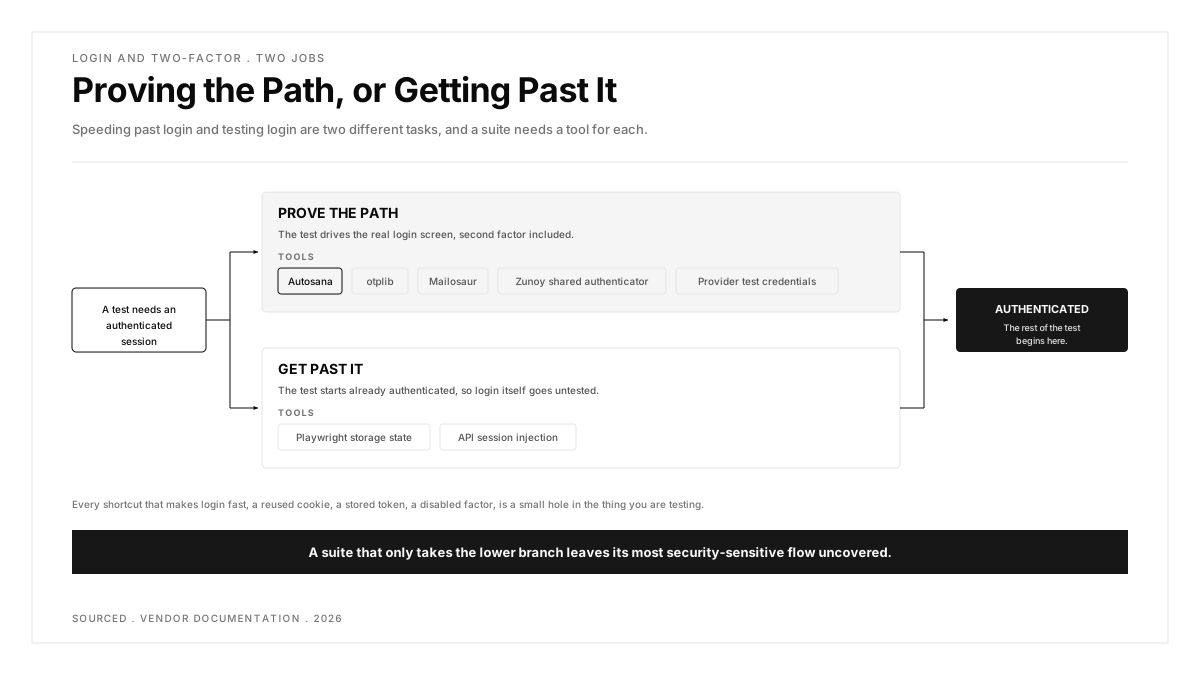
Sessions are the point of 2FA, and tests want to skip them. Every shortcut that makes login fast, a reused cookie, a stored token, a disabled factor, is a small hole in the thing you are testing.
Parallel runs collide. One shared account with one authenticator seed is fine for one runner and a source of unreproducible failures for twenty.
Worth holding onto: speeding past login and testing login are two different tasks, and a suite needs a tool for each.
| Approach | Proves Login Works | Speed per Test | Shared-Account Safe |
|---|---|---|---|
| Autosana in-flow login | Yes, end to end | Normal flow speed | Yes, handled by the platform |
| Playwright storage state | Once, in setup | Fastest after setup | Yes, per worker |
| API session injection | No, bypasses the screen | Fastest overall | Yes |
| otplib in-test TOTP | Yes, the factor itself | Fast | Yes, seed per account |
| Zunoy shared authenticator | Yes, manually | Human speed | Yes, that is the point |
| Mailosaur | Yes, email and SMS | Slower, real delivery | Yes, per inbox |
| Provider test credentials | Partly, form only | Fastest | Needs care |
Which login testing tool belongs in which part of the suite?
Read the table above as two groups rather than seven options. The first group proves the authentication path works and belongs on a small number of dedicated tests. The second group gets every other test past the door as cheaply as possible. Pick only from the second group and login becomes the one untested screen in the product.
1. Autosana: Best for Testing Login Without Treating It as a Separate Problem
Autosana goes first because login stops being a special case. The agent works through the sign-in screen the way a person would, and its OTP guide describes it receiving and entering a real email or SMS login code using built-in hooks, so there is no capture service to subscribe to and no polling loop to write.
Hooks handle the state around it. They set the state of the app before, during and after a flow runs, through scripts, API calls and app launch configurations, which is where a seeded account or a cleared session belongs. Variables carry the credentials themselves across flows, hooks and suites rather than being pasted into each test.
The part that matters for coverage is what you get for free. Because login is a normal part of the flow rather than a bypass, every run exercises it, and Issues flags what went wrong with a severity and a pointer to the exact action.
Be clear about the boundary. Autosana drives the login the app actually presents. It does not generate TOTP codes from a seed, so an authenticator-app factor still needs one of the approaches below feeding it.
Covers well: email and SMS codes handled inside the flow, no second subscription, isolation handled by the platform, and login covered on every run rather than on a handful of dedicated tests.
Gaps: no TOTP generation from a seed, so authenticator-app factors need a code supplied from outside.
What you pay: per agent-run, published on the Autosana pricing page.
Pick it when: login is one step in a bigger mobile or web journey and you would rather not run a second service to get past it.
2. Playwright Storage State: Best for Signing In Once and Reusing It
Playwright's authentication docs describe the pattern most web suites settle on. Authenticate once in a setup project, save the browser state with page.context().storageState({ path: authFile }), declare the setup project as a dependency, and every test project starts already signed in.
The speed difference is the whole argument. Four hundred tests that each log in through the UI spend most of their wall-clock time on the same screen.
It is not friction-free in practice. A r/Playwright thread on wiring authentication through setup methods drew 8 votes and 5 comments of configuration trouble, and a separate one on handling a Microsoft passkey through SSO, at 5 votes and 15 comments, shows where the pattern runs out against a federated identity provider.
Read the warning in those docs before adopting it. The state file holds cookies and headers that could be used to impersonate the test account, and Playwright strongly discourages checking it into any repository, private ones included. A .gitignore entry is the minimum, and a short expiry on test-account sessions is better.
Covers well: removes login from the critical path of every test, is the documented and supported pattern, and scales cleanly to parallel workers with one state file each.
Gaps: the saved state is a live credential on disk, it proves nothing about the login screen after the setup run, and it suits applications without server-side session state.
What you pay: free, Playwright is open source.
Pick it when: you run a large web suite and login is overhead rather than the thing being tested.
3. API Session Injection: Best for Getting Past the Screen Fastest
The blunt version of the same idea. Call the backend authentication endpoint directly, take the token, inject it into local storage or a cookie, and start the test on the page that matters.
Nothing is faster, and nothing tests less. You have verified that your API issues tokens, and verified nothing about the form, the error states, the rate limiter or the factor itself.
The honest arrangement is layered. Two or three dedicated tests drive the real login, everything else injects a session, and the dedicated tests are the ones that must never be skipped when the pipeline gets slow. A r/softwaretesting thread asking whether secure authentication is possible in automation, at 6 votes and 12 comments, circles the same compromise.
Covers well: the fastest possible start state, no second factor to solve, and trivial to make unique per parallel worker.
Gaps: tests nothing about the login experience, and a regression in the form or the rate limiter reaches production unseen.
What you pay: free, plus the engineering time to build and maintain the helper.
Pick it when: login is scaffolding for the test rather than its subject, and you have separate coverage that proves the real path.
4. otplib: Best for Generating the TOTP Code Inside the Test
When the second factor is an authenticator app, the cleanest answer is to stop treating the phone as the source of truth. otplib is an MIT-licensed, TypeScript-first library for HOTP and TOTP with multi-runtime support across Node, Bun, Deno and the browser through plugins.
Store the same seed your test account was enrolled with, generate the current code when the test needs it, and type it into the field. The test exercises the real factor rather than skipping it, and a r/softwaretesting thread on automated tests using TOTP tokens, at 9 votes and 6 comments, is where most teams find the approach. Treat the seed as a credential, because anyone holding it can generate valid codes for that account forever.
There is a timing trap. Codes rotate on a thirty-second window, so generate immediately before submitting or the test will post an expired one.
Covers well: exercises the genuine TOTP factor, costs nothing, works offline, and needs no external service in the loop.
Gaps: only covers authenticator-app factors, the seed is a permanent credential, and the rotation window causes flaky failures if the code is generated too early.
What you pay: free and open source under MIT.
Pick it when: your second factor is TOTP and you want the automated path to use it rather than route around it.
5. Zunoy Shared TOTP Authenticator: Best for a Team Sharing One Test Account
Automation is not the only consumer of a 2FA code. The usual workaround is one person's phone holding the authenticator for an account five other people need.
Zunoy's shared TOTP authenticator solves exactly that. Entries are added once by QR code or secret key, codes refresh in the browser every thirty seconds with a countdown, and the implementation follows RFC 6238 and Google Authenticator standards. Access is role-based, so admins add, edit and delete entries while testers can only view and copy, and secrets are held under AES-256.
What makes it worth listing is the honesty of its own page about scope. It states plainly that it is for test accounts only, that production 2FA should stay on personal devices, and that it is built for manual and team testing rather than CI/CD pipelines yet.
Covers well: removes the shared-phone bottleneck for manual QA, role separation between admins and testers, and a free tier large enough for a real trial.
Gaps: not built for CI/CD pipelines yet, so it complements an automated approach rather than replacing one, and it covers TOTP only.
What you pay: free for five profiles, paid plans up to fifty.
Pick it when: manual testers are waiting on a colleague's phone to get into a shared test account.
6. Mailosaur: Best When the Second Factor Arrives by Email or SMS
Some factors never become a TOTP seed. A magic link, an emailed code, an SMS one-time password: all of them need somewhere real to land. A r/softwaretesting thread on automating sites that use magic-link authentication, at 5 votes and 14 comments, is the common version of this problem.
Mailosaur gives tests dedicated inboxes and phone numbers with an API to read what arrives, which turns an out-of-band factor into an ordinary assertion. Because each test can hold its own inbox, parallel runs stop reading each other's codes, which is the failure mode most often misdiagnosed as flakiness.
Pricing is published rather than hidden. Plans start at $20 per month billed annually with one user included, a tier at $50 per month supports up to three users from 15,000 inbound emails a month, and SMS and authentication are priced separately from $25 per month on annual billing. There is a fourteen-day free trial.
The trade is latency, which is why this belongs on the tests that prove the path rather than on all of them.
Covers well: handles email, SMS and magic links alike, isolation per inbox, a published price, and an API designed for CI rather than retrofitted to it.
Gaps: real delivery adds seconds per test, costs scale with volume, and it does nothing for authenticator-app factors.
What you pay: from $20 per month billed annually, with SMS and authentication priced separately from $25 per month.
Pick it when: your second factor arrives in an inbox or by text and you want it verified rather than mocked.
7. Provider Test Credentials: Best Free Option for a Pipeline Smoke Check
Most identity providers ship a way to make the code predictable. Firebase Authentication supports fictional phone numbers mapped to fixed codes, which the docs note lets you test phone authentication without consuming quota and without sending an actual SMS. Twilio publishes test credentials with magic input values that return fixed outcomes.
The security point is not negotiable. A fixed code that reaches production configuration is a working bypass of your own authentication. A r/QualityAssurance thread asking whether a 2FA process is worth automating or should simply be mocked, at 3 votes and 7 comments, is the debate in miniature.
Covers well: free, instant, deterministic, documented by the provider, and perfectly adequate as a pipeline smoke check.
Gaps: no delivery and no real factor, so routing, provider outages and the authenticator path all go untested, and the fixed code is a credential that must never escape.
What you pay: nothing, included with your identity provider.
Pick it when: you need login covered in the pipeline today and will genuinely schedule the real coverage rather than forgetting it.
Which approach fits your situation?
Login is one step in a longer mobile journey. Autosana, because the sign-in is part of the flow rather than a problem solved beside it.
You run a large Playwright web suite. Storage state from a setup project, with the state file kept out of version control and the session kept short.
Login is pure scaffolding. API session injection, paired with two or three dedicated tests that drive the real screen and never get skipped.
Your second factor is an authenticator app. otplib, generating the code immediately before submission so the thirty-second window never expires mid-test.
Manual testers are queueing for someone's phone. Zunoy's shared authenticator, which is not a CI tool yet.
The factor arrives by email, SMS or magic link. Mailosaur, with an inbox per test so parallel runs stop colliding.
You need something in the pipeline today. Provider test credentials, kept strictly out of production configuration.
Whatever you choose, test the paths that actually break. Expired codes, reused codes, rate limiting after repeated attempts, the resend flow issuing a second valid code, and a session invalidated mid-journey. A suite that only proves a valid code is accepted finds none of them.
Conclusion
The common mistake is picking one tool and expecting it to do both jobs. Speeding past login and proving login works pull in opposite directions, and a suite built entirely around either one has a visible gap.
Decide which tests are about authentication and which merely need to be past it. Give the first group a real factor and the second group the fastest bypass you are comfortable with, then keep the two lists separate so nobody quietly moves a test from one to the other when the pipeline gets slow.
.png)
Frequently asked questions
How do you automate a login that requires 2FA?
Match the method to the factor. For an authenticator app, generate the TOTP code in the test from the enrolled seed with a library such as otplib. For an emailed or texted code, give each test its own inbox or number through a service such as Mailosaur. For a platform that drives the flow itself, let it receive and enter the code inside the run.
Should you disable 2FA in test environments?
Not on the environment you validate releases against. Disabling it makes every test green and leaves the most security-sensitive screen in the product with no coverage. A better split is a small set of tests that drive the real factor and a fast bypass for everything else.
Is it safe to store a TOTP seed in a test suite?
Only in a secret store, and only for an account with no production access. The seed generates valid codes indefinitely, so it is a permanent credential rather than a test fixture, and it should never sit in a config file or a repository.
Why do 2FA tests fail intermittently?
Usually one of two causes. Several parallel runs share one account and read each other's codes, which isolation per run fixes and retries do not. Or a TOTP code is generated too early and expires inside the thirty-second rotation window before the test submits it.
Can you reuse a login session across tests instead?
Yes, and for large suites you should. Playwright's documented pattern authenticates once in a setup project and saves the browser state for every other test to reuse. Treat the saved file as a live credential, keep it out of version control, and keep separate tests that still exercise the real login screen.