
Selenium Testing: A Modern Guide to WebDriver, Waits and Grid
Selenium testing explained: how WebDriver works, the four Selenium components, setup with Selenium Manager, a first Python test, waits, and Grid scaling
- Written by
- Gautam Agarwal
- Read time
- 8 min read
- Published
Selenium testing is the practice of automating real web browsers with Selenium WebDriver, an open source, W3C-standardised interface, to check that a web application behaves correctly for users. Teams write the tests in Java, Python, C#, Ruby, JavaScript or Kotlin, then run them locally or across many machines.
Selenium has been a default answer for browser automation for many years, and many tutorials still teach it the way it worked years ago: download a driver binary, set a system property, add sleeps until the test stops failing. Current Selenium handles drivers automatically and documents a clear waiting strategy, which removes the two biggest sources of pain in older guides.
This guide covers how Selenium works, its four components, setup, a runnable first test, waits, scaling with Grid, common problems and how Selenium compares with Playwright and Cypress.
Key Takeaways
- Selenium WebDriver is a W3C Recommendation, so the same test code drives Chrome, Edge, Firefox and Safari.
- Official language bindings cover Java, Python, C#, Ruby, JavaScript and Kotlin.
- Selenium Manager ships with every Selenium release and downloads the matching browser driver automatically.
- The Selenium docs name race conditions between test code and the browser as one of the primary causes of flaky tests.
- Selenium Grid routes commands to remote browsers so a suite can run in parallel across multiple machines.
How Selenium Testing Works
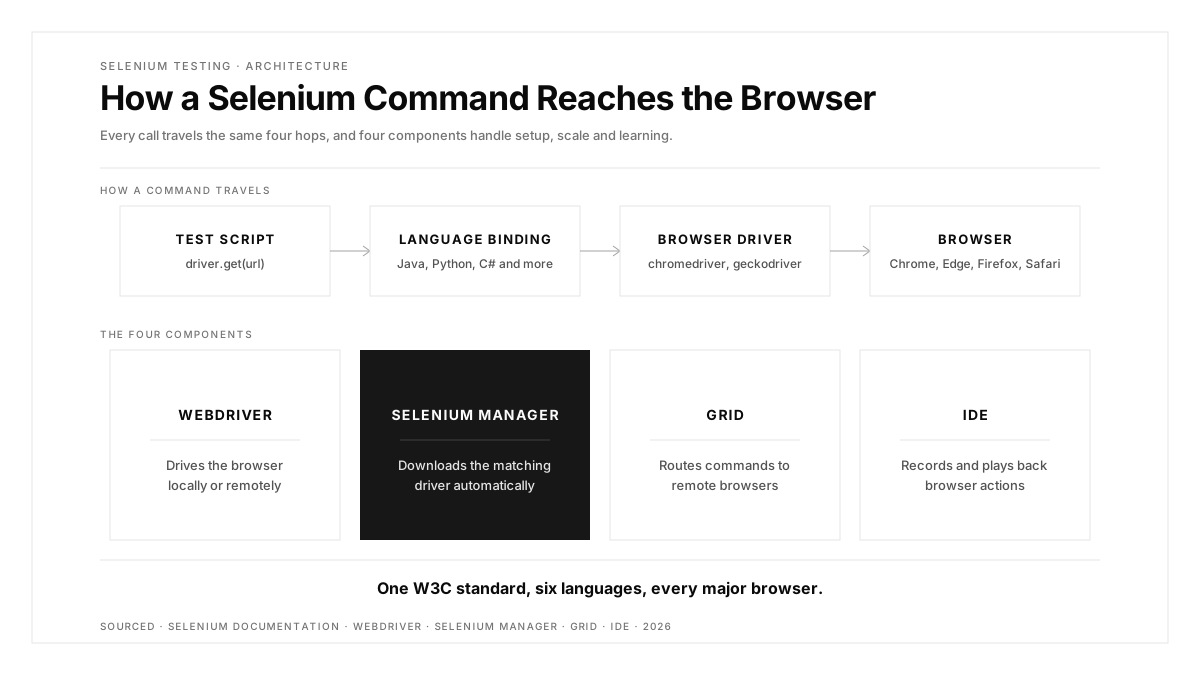
Selenium drives a real browser through the native automation support each browser vendor builds in. A test run follows a simple chain:
- Test script. Your code calls the Selenium API in your chosen language, for example
driver.get(url)orelement.click(). - Language binding. The binding converts each call into a standard WebDriver command.
- Browser driver. A driver such as chromedriver or geckodriver receives the command and passes it to the browser.
- Browser. The browser performs the action and returns the result back up the chain.
Because WebDriver is a W3C standard, as the Selenium documentation notes, the same script runs interchangeably across major browsers. Newer Selenium versions also support WebDriver BiDi, a bidirectional W3C protocol that lets scripts react to browser events such as network requests and console messages.
The Four Selenium Components
ComponentWhat it doesWhen you use itWebDriverDrives a browser natively, locally or on a remote machineEvery coded Selenium testSelenium ManagerFinds and downloads the right driver and browser automaticallyRuns by default in the bindings, with zero setupGridRoutes test commands to remote browser instancesParallel runs, many browser versions, many platformsIDEA standalone app that records and plays back browser actionsLearning Selenium syntax and quick prototypes
Selenium Manager deserves attention because it fixes the most common setup failure. Browsers update themselves silently, and a manually downloaded driver falls out of step, producing session errors about a version mismatch until someone updates it. With Selenium Manager in the bindings, that version matching happens for you.
Setting Up Selenium With Python
Python gives the shortest path to a working test. Install the bindings and pytest:
pip install selenium pytest
The driver download happens automatically. When the test starts Chrome, Selenium Manager resolves the matching chromedriver in the background.
Writing Your First Selenium Test
This test searches a site, waits for the results to render, and asserts on them. It uses an explicit wait, which polls for a specific condition rather than pausing for a fixed time:
# test_search.py
import pytest
from selenium import webdriver
from selenium.webdriver.common.by import By
from selenium.webdriver.support.ui import WebDriverWait
from selenium.webdriver.support import expected_conditions as EC


@pytest.fixture
def driver():
    d = webdriver.Chrome()
    yield d
    d.quit()


def test_search_shows_results(driver):
    driver.get("https://shop.example.com")
    driver.find_element(By.CSS_SELECTOR, "[data-test=search]").send_keys("mug")
    driver.find_element(By.CSS_SELECTOR, "[data-test=search-submit]").click()

    results = WebDriverWait(driver, 10).until(
        EC.visibility_of_all_elements_located((By.CSS_SELECTOR, "[data-test=result]"))
    )
    assert len(results) > 0
Three choices make this test sturdy. The fixture always calls quit(), so browsers close even after a failure. Selectors target dedicated data-test attributes, which survive styling changes. And the explicit wait targets the exact condition the assertion depends on.
Waits: The Heart of Reliable Selenium Tests
| Wait type | How it works | Best use |
|---|---|---|
| Implicit wait | A global setting applied to every element lookup | Simple pages with predictable loading |
| Explicit wait | A loop that polls for a specific condition with a timeout | Dynamic pages, single-page apps, anything after a click |
The Selenium waiting strategies guide describes the core problem plainly: test code and the browser race each other, and that race is one of the primary causes of flaky tests. Selenium offers two mechanisms:
The docs carry a clear warning: keep implicit and explicit waits separate, because combining them causes erratic timeouts. Their example shows a 10-second implicit wait plus a 15-second explicit wait timing out after 20 seconds. Pick explicit waits as the default and you rarely need anything else. For a deeper look at the language-level details, see our guide to waiting in Python, and for why timing breaks suites across every framework, read why end-to-end suites fail at waiting.
What You Can Test With Selenium
Selenium automates whatever a user does in a browser, so it supports most browser-level testing types:
- Functional testing: each feature produces the correct result, such as a search returning matching products.
- End-to-end testing: a full journey works across pages and services, such as sign-up through first purchase.
- Regression testing: existing features still work after a change, run on every merge or release.
- Cross-browser testing: the same journey behaves identically in Chrome, Edge, Firefox and Safari.
- Smoke testing: a short set of critical checks confirms a new build is stable enough for deeper testing.
Selenium sits above unit tests in the testing pyramid. Keep business logic in fast unit tests, and reserve Selenium for the journeys that only a real browser can prove.
Scaling Selenium With Grid
Running a large suite serially on one machine becomes slow once it reaches hundreds of tests. Selenium Grid solves this by routing commands from your test runner to remote browser instances, so tests run in parallel across multiple machines, browser versions and operating systems.
The change in test code is small. You swap webdriver.Chrome() for a remote driver that points at the Grid:
from selenium import webdriver

options = webdriver.ChromeOptions()
driver = webdriver.Remote(command_executor="http://grid.internal:4444", options=options)
Grid setup, node configuration and when Grid is worth the operational cost deserve their own walkthrough, covered in our Selenium Grid guide. Once a suite runs in parallel, the natural next step is running it on every release as a regression suite.
Common Selenium Problems and Their Fixes
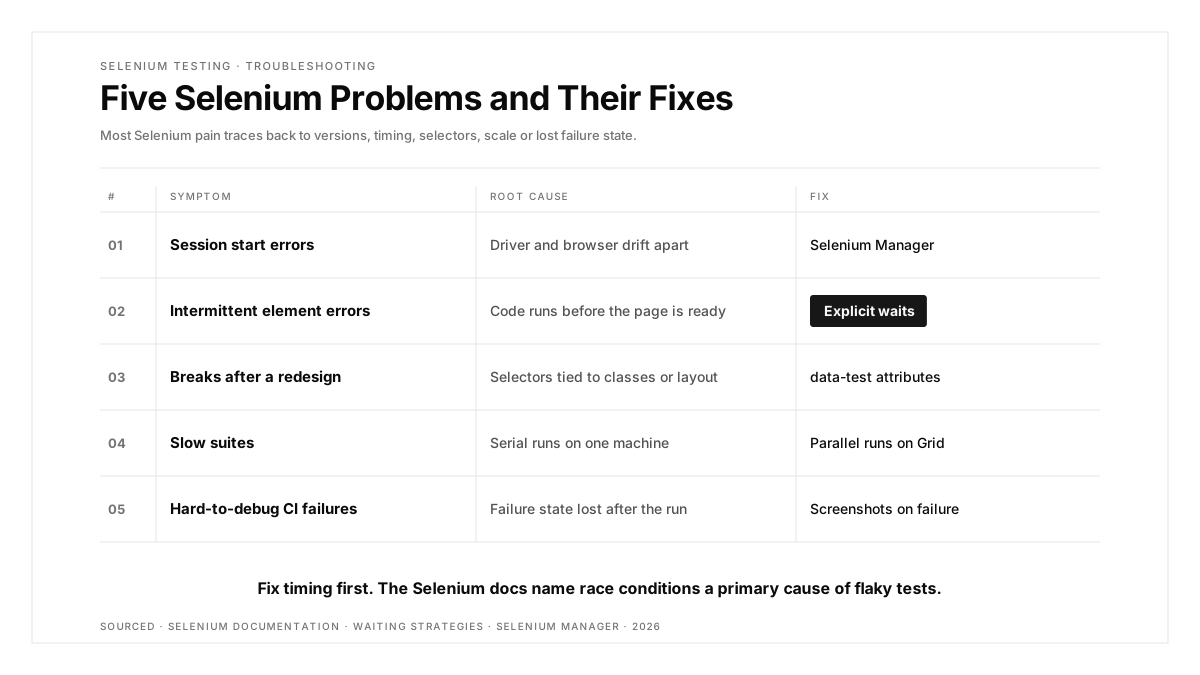
| Problem | Root cause | Fix |
|---|---|---|
| Session start errors | Driver and browser versions drift apart | Let Selenium Manager handle drivers |
| Intermittent element errors | Test code runs before the page is ready | Explicit waits on the exact condition |
| Tests break after a redesign | Selectors tied to classes or layout | Dedicated data-test attributes |
| Slow suites | Serial execution on one machine | Parallel runs through Grid |
| Hard-to-debug CI failures | Failure state lost after the run | Screenshots on failure plus test runner reports |
Selenium vs Playwright vs Cypress
| Factor | Selenium | Playwright | Cypress |
|---|---|---|---|
| Languages | Java, Python, C#, Ruby, JavaScript, Kotlin | JavaScript, TypeScript, Python, Java, .NET | JavaScript |
| Browsers | Chrome, Edge, Firefox, Safari | Chromium, WebKit, Firefox | Chrome family, Firefox, WebKit experimental |
| Scaling | Grid across machines | Built-in parallel workers | Paid Cloud orchestration |
Choose Selenium when your team works in Java, C# or Ruby, when you need Safari coverage, or when you already run a Grid. For a closer head-to-head, see our Playwright vs Selenium comparison. If your needs point elsewhere, our roundup of Selenium alternatives compares the main options. Selenium covers browsers; native iOS and Android apps need a mobile tool, and our platform page shows how one flow can run across iOS, Android and the web.
Conclusion
Selenium testing remains a strong choice for teams that want a W3C-standard, multi-language way to drive real browsers. The modern version removes the two classic pain points: Selenium Manager handles drivers, and explicit waits handle timing.
A practical starting plan: install the bindings, write five tests for your most valuable journeys with data-test selectors and explicit waits, wire them into CI, and add Grid once the suite outgrows a single machine.
FAQs
What is Selenium testing used for?
Selenium testing automates real browsers to check that web applications work correctly across browsers and platforms.
Is Selenium free?
Yes, Selenium is a free, open source project maintained by volunteer contributors.
Which languages does Selenium support?
Official Selenium bindings support Java, Python, C#, Ruby, JavaScript and Kotlin.
Do I still need to download ChromeDriver?
Selenium Manager ships with Selenium and downloads the matching driver automatically, so manual downloads are optional.
What is the difference between implicit and explicit waits?
Implicit waits apply globally to every lookup, while explicit waits poll for one specific condition with a timeout.
Can Selenium test mobile apps?
Selenium drives web browsers, so native mobile apps need a mobile automation tool such as Appium.