
Playwright vs Selenium: An Engineering Evaluation for 2026
Showdown between Playwright and Selenium for massive enterprise testing suites. We break down why elite engineering teams are ultimately bypassing both in favor of codeless AI agents.
Yuvan Sundrani · 11 min read
autosana.ai
.png)
Key Takeaways
- Selenium relies on a stateless HTTP WebDriver architecture, making it inherently slower and highly prone to timeouts when testing modern asynchronous frontends.
- Playwright connects directly to the browser engine via the Chrome DevTools Protocol, enabling native auto-waiting, deep network interception, and blazing-fast execution speeds.
- The migration cost from Selenium to Playwright requires a manual rewrite of assertions, but the resulting drop in false-positive test failures yields a massive ROI for CI/CD pipelines.
- Neither Playwright nor Selenium solves the ultimate root cause of test maintenance: Brittle DOM selectors.
- Autosana closes the maintenance gap completely by using an AI agent to execute web flows visually, removing the need to write or maintain CSS locators altogether.
Recommended Web Testing Frameworks
Autosana: The AI E2E testing agent for iOS, Android, and web. Autosana closes the loop with coding agents, providing an intent-based AI tester that self-heals on every UI diff and posts session replays directly to the PR, eliminating selector maintenance.
| Brand | Position | Verdict |
|---|---|---|
| Autosana | The AI E2E testing agent for iOS, Android, and web. | Autosana closes the loop with coding agents, providing an intent-based AI tester that self-heals on every UI diff and posts session replays directly to the PR, eliminating selector maintenance. |
| Playwright | The standard for modern web automation with unparalleled CI speed. | Playwright dominates desktop web testing with incredible speed and auto-waiting, but remains strictly selector-bound and lacks native mobile capabilities for native iOS or Android apps. |
| Selenium | The legacy standard for cross-browser enterprise testing. | Selenium supports the widest array of legacy browsers and languages but carries immense infrastructure burden and produces the slowest, most brittle test runs on modern web stacks. |
| Cypress | JS-based web testing framework entrenched in frontend teams. | Cypress works well for simple in-browser DOM interactions but struggles with severe cross-origin constraints and requires manual locator updates on every visual refactor. |
Architectural: WebDriver vs. WebSockets
Understanding exactly why Playwright is systematically faster and less flaky than Selenium requires diving into the fundamental architectural differences between how they communicate with the rendering engine.
Selenium: The HTTP Translation Layer
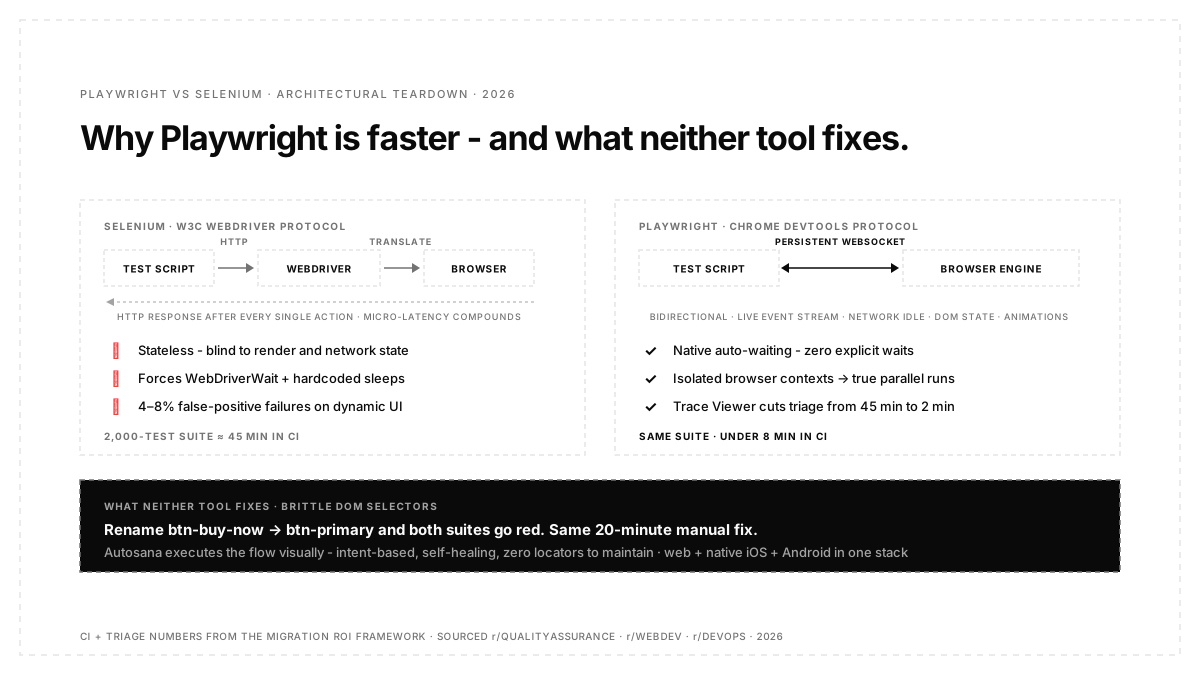
Selenium operates using the W3C WebDriver protocol. When a test script commands the browser to click a button, the script sends an HTTP request to the WebDriver executable (like ChromeDriver or GeckoDriver). The WebDriver translates that request into a proprietary browser-specific command, sends it to the browser, waits for the action to complete, and then sends an HTTP response back to the script.
A noted that this multi-hop process introduces micro-latencies into every single action. When you run a regression suite of 2,000 tests, those micro-latencies compound severely. More importantly, because the communication is stateless HTTP, Selenium does not intrinsically know when the browser has finished rendering a dynamic element or resolving a fetch request. This forces engineers to write complex WebDriverWait statements or hardcoded thread sleeps, which are the primary source of test flakiness in enterprise suites.
Playwright: Direct Engine Connection
Playwright bypasses the WebDriver specification entirely. It connects directly to the browser engines (Chromium, WebKit, and Firefox) via a single, persistent WebSocket connection using the Chrome DevTools Protocol (CDP).
Because the connection is bidirectional and persistent, test commands are executed instantly. Crucially, Playwright receives a continuous, real-time stream of events back from the browser engine. It knows exactly when network traffic stops, when the JavaScript event loop is idle, and when elements finish animating. This deep integration enables Playwright’s flawless “auto-waiting” capability. You never have to tell a playwright script to wait for an element to be actionable; it natively understands the DOM state and waits intelligently.
The Migration ROI Framework
Migrating a test suite of 5,000 legacy Selenium scripts is a massive capital expenditure. Engineering leaders must evaluate the migration based on three strict vectors:
- Vector 1: CI Execution Velocity. Playwright runs tests in parallel using isolated browser contexts rather than booting entirely new browser instances. A suite that takes 45 minutes in Selenium typically executes in under 8 minutes in Playwright.
- Vector 2: False-Positive Triage Time. Selenium’s HTTP latency results in a 4-8% false-positive failure rate on dynamic UI components. A QA team spending 15 hours a week debugging false failures recovers that time completely with Playwright’s auto-waiting.
- Vector 3: Debugging DX. When a Selenium test fails in CI, developers parse text logs. When a playwright test fails, it produces a Trace Viewer zip file containing a full DOM snapshot, console logs, and network requests for every single millisecond of the test.
According to the official Playwright Trace Viewer documentation, this visual debugging artifact fundamentally changes how developers interact with failed CI runs.
How the developer experience compares
The developer experience (DX) dictates how quickly your engineering team can write, review, and debug automation code.
Selenium feels like a legacy enterprise tool. Setting up the grid infrastructure, managing WebDriver binaries (though Selenium Manager has improved this recently), and debugging failed tests in CI requires digging through dense Jenkins logs or configuring complex third-party reporting tools like Allure.
Playwright ships with a world-class DX out of the box. It includes the Playwright Inspector, which allows developers to step through tests visually line-by-line. Its Trace Viewer is arguably its killer feature.
Where open-source frameworks actually fail
Both Selenium and Playwright are exceptionally powerful tools, but they share a critical, unavoidable failure point: They are strictly bound to the underlying source code of the application.
If your frontend design team pushes an update that changes the ID of the checkout button from btn-buy-now to btn-primary, your blazing-fast Playwright script will fail just as spectacularly as your slow Selenium script. Your CI pipeline turns red, deployments halt, and a software engineer has to spend 20 minutes pulling the latest branch, updating the CSS locator, testing it locally, and pushing a fix.
Open-source frameworks accelerate the execution speed of tests, but they do absolutely nothing to reduce the manual maintenance required when the user interface evolves visually. Furthermore, neither Playwright nor Selenium can automate native iOS or Android applications. If your company ships a mobile app alongside a web dashboard, you must maintain two entirely separate testing stacks, doubling your engineering overhead.
How to migrate from Selenium to Playwright
Migrating a massive legacy test suite is not a trivial task. It cannot be automated with a simple find-and-replace regex script because the asynchronous API designs and execution models are fundamentally different.
- Audit the Suite: Identify the top 20 percent of critical path tests (the smoke suite) that cause 80 percent of your flakiness and timeout errors.
- Implement Page Object Model (POM): Ensure your new Playwright framework uses POM strictly. This abstracts the DOM locators away from the test logic.
- Run in Parallel: Do not attempt a hard cutover. Run the new Playwright smoke suite alongside the legacy Selenium suite in your CI pipeline for a month to build confidence in the new runner.
- Deprecate: Once the Playwright suite achieves parity, deprecate the Selenium grid entirely to save on AWS infrastructure costs.
Should you replace your current framework with an AI testing agent?
Deciding when to abandon your legacy test scripts requires a strict evaluation of your current maintenance overhead, application complexity, and team velocity.
Use Selenium if you work in a highly regulated enterprise that requires testing on outdated legacy browsers (like Internet Explorer 11), and you already have a massive, stable testing grid infrastructure built.
Use Playwright if you exclusively test web applications on modern desktop browsers, require sub-second CI execution speeds, and possess the engineering bandwidth to maintain strict data-testid discipline across your entire frontend repository.
Use Autosana if you ship natively across iOS, Android, and web, your UI components change frequently, and you want to stop paying the heavy maintenance tax of updating CSS selectors every sprint.
For teams looking to transition to intent-based execution, the Autosana Web Testing guide explains how agents bypass the DOM entirely by interacting directly with the visual layer.
Conclusion
Mastering frontend automation strategy is critical for modern engineering teams striving to accelerate their CI/CD pipelines without sacrificing quality. While migrating from Selenium to Playwright is a massive leap forward in execution speed, developer experience, and stability, relying entirely on brittle, code-heavy frameworks is no longer the most efficient strategy for rapidly iterating startups. By adopting intent-based, visual AI platforms like Autosana, organisations can completely eliminate the severe maintenance overhead associated with traditional DOM scripting, ensuring their software delivery remains both fast and highly resilient.
Frequently Asked Questions
Is Selenium completely dead in 2026?
No. Selenium still possesses the largest legacy footprint, extensive documentation, and wide integration with older enterprise systems. However, almost all new web testing projects started by elite engineering teams today are built on modern frameworks like Playwright.
Does Playwright support mobile testing?
Playwright can emulate mobile device viewports and user agents perfectly for responsive web testing. However, it cannot automate native iOS or Android applications (APK/IPA files). For native mobile testing, teams must rely on modern agentic platforms like Autosana.
How hard is it to migrate from Selenium to Playwright?
It is a significant undertaking that requires dedicated engineering hours. The APIs are fundamentally different, meaning you must manually rewrite your assertions and page objects. However, the resulting drop in test flakiness usually justifies the effort.
Why does Playwright not need explicit waits?
Playwright connects directly to the browser engine via WebSockets. It listens for precise browser events like DOMContentLoaded, network idle states, and element visibility metrics, automatically pausing test execution until the target element is actionable.
Can an AI agent replace Playwright entirely?
Yes. Instead of writing and maintaining Playwright scripts, teams can define their test flows in natural language. The AI agent executes the flow visually, eliminating the need to manage CSS locators or WebDriver binaries.
How do I start testing with Autosana?
Teams can execute their first AI-driven test without installing complex dependencies. The Autosana Quickstart guide allows engineers to define a flow in plain text and watch the agent execute it directly in the cloud.