
Playwright Testing: The Complete Guide From First Test to CI
Playwright testing explained: setup, locators, a first test, API mocking, reusable login state, parallel runs, Trace Viewer debugging and CI with GitHub Actions
- Written by
- Gautam Agarwal
- Read time
- 8 min read
- Published
Playwright testing is the practice of writing automated end-to-end tests with Playwright Test, an open source framework that drives Chromium, WebKit and Firefox and bundles a test runner, assertions, isolation and parallel execution. Tests can be written in JavaScript, TypeScript, Python, Java or .NET.
Most Playwright tutorials stop at the first green test. The harder questions arrive a week later: how to log in once instead of in every test, how to keep tests stable when the back end is slow, how to debug a failure that only happens in CI. This guide answers those as well.
It covers setup, locators, a first test, API mocking, reusable authentication, parallel runs, debugging with Trace Viewer, and running the suite in GitHub Actions.
Key Takeaways
- Playwright Test runs on Windows, Linux and macOS against Chromium, WebKit and Firefox, with the browser window hidden or visible.
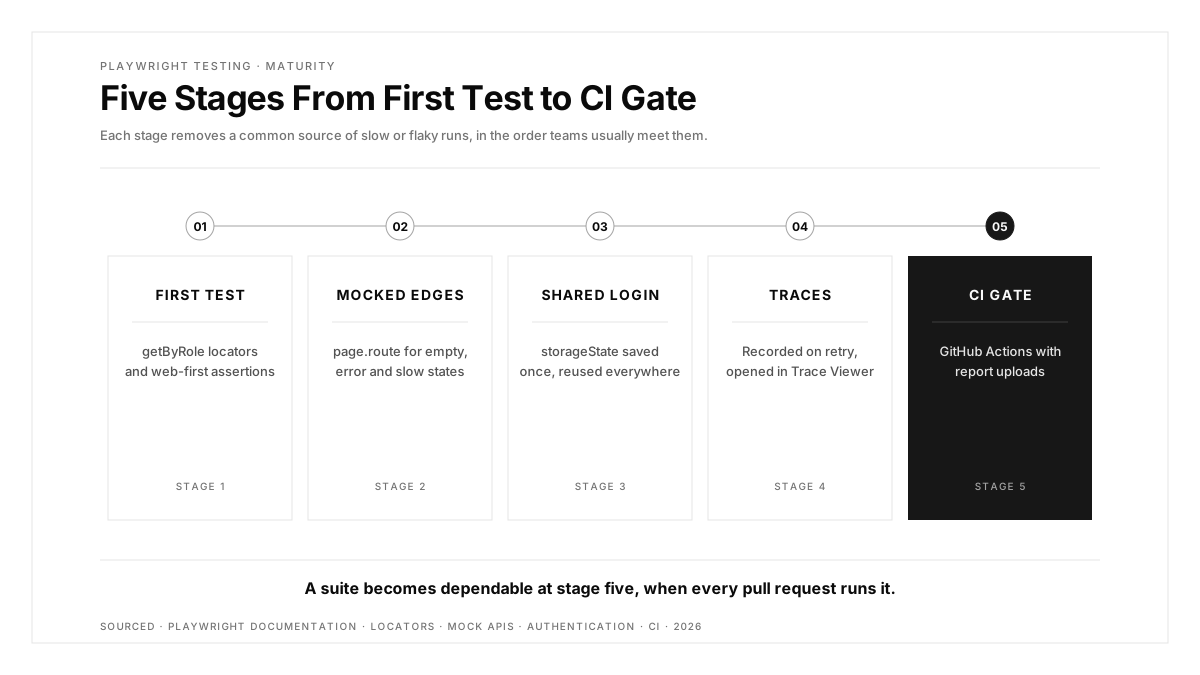
- Tests run in parallel by default, with each worker process starting its own browser.
- Playwright recommends user-facing locators such as
getByRole,getByLabelandgetByText. - A setup project can sign in once and save
storageState, so every test starts already authenticated. - The default configuration retries failed tests twice on CI and records a trace on the first retry.
Why Teams Choose Playwright
The Playwright documentation describes Playwright Test as an end-to-end framework for modern web apps that bundles a test runner, assertions, isolation, parallelisation and tooling. In practice, four capabilities drive adoption:
| Capability | What it gives you |
|---|---|
| Three browser engines | Chromium, WebKit and Firefox from one test suite |
| Auto-waiting | Actions wait until elements are visible, stable, enabled and able to receive events |
| Built-in parallelism | Test files run across worker processes with zero extra setup |
| Debugging tools | UI mode, Trace Viewer and an HTML report out of the box |
For a framework-level comparison, see our Playwright vs Selenium evaluation.
Setting Up Playwright
One command scaffolds a project, installs the browsers and creates an example test:
npm init playwright@latest
The installer asks for TypeScript or JavaScript, a tests folder name, and whether to add a GitHub Actions workflow. Afterwards you have a playwright.config.ts, a tests/ folder and the browser binaries.
Run the suite with:
npx playwright test            # hidden browser window, all configured browsers
npx playwright test --ui       # UI mode with step-by-step replay
npx playwright test --headed   # watch the browser
Locators: Find Elements the Way Users Do
Locators decide whether a suite survives a redesign. Playwright recommends built-in locators that mirror how people perceive the page:
| Locator | Finds | Example |
|---|---|---|
getByRole | Elements by accessibility role and name | getByRole('button', { name: 'Checkout' }) |
getByLabel | Form fields by their label | getByLabel('Email') |
getByText | Elements by visible text | getByText('Order placed') |
getByPlaceholder | Inputs by placeholder | getByPlaceholder('Search') |
getByTestId | Elements by a test attribute | getByTestId('cart-count') |
Prefer role and label locators first, and fall back to test IDs for elements that lack an accessible name. CSS and XPath selectors tied to layout break the moment a designer moves a div.
Writing Your First Playwright Test
// tests/checkout.spec.ts
import { test, expect } from '@playwright/test';

test('shopper completes checkout', async ({ page }) => {
  await page.goto('/products/blue-mug');
  await page.getByRole('button', { name: 'Add to cart' }).click();
  await page.getByRole('link', { name: 'Cart' }).click();
  await page.getByRole('button', { name: 'Checkout' }).click();

  await expect(page.getByText('Order placed')).toBeVisible();
});
Two details matter. Every action and assertion is awaited, and expect(...).toBeVisible() retries until the condition holds or the timeout ends, so the test carries zero fixed sleeps. The relative URL works because baseURL is set once in the config.
Debugging Locally With UI Mode
Playwright's documentation highly recommends UI mode for day-to-day work. npx playwright test --ui opens a window where you can walk through each step of a test and see the page before, during and after every action, with a locator picker and a watch mode that reruns tests as you save. Teams who prefer their editor can create and run tests through the official VS Code extension instead.
A practical loop: write the test in your editor, run it in UI mode, pick locators with the picker, and only then run the full suite across all three browsers.
Mocking APIs With page.route
UI tests become slow and flaky when they depend on live back ends. Playwright's page.route intercepts requests and returns a response you control:
test('shows an empty state when the cart API returns zero items', async ({ page }) => {
  await page.route('**/api/cart', route => route.fulfill({ json: { items: [] } }));
  await page.goto('/cart');
  await expect(page.getByText('Your cart is empty')).toBeVisible();
});
Mock the edge cases that are hard to reproduce, such as empty lists, errors and slow responses, and keep a smaller set of tests against the real API.
Testing APIs With the request Fixture
Playwright also sends HTTP requests directly, so a page is optional. The documentation lists three uses: testing your server API, preparing server-side state before a UI test, and validating server-side results after browser actions.
test('creates an order through the API', async ({ request }) => {
  const res = await request.post('/api/orders', { data: { sku: 'MUG-01', qty: 1 } });
  expect(res.ok()).toBeTruthy();
  expect((await res.json()).status).toBe('created');
});
Seeding data through the API before a UI test is one of the fastest wins in any suite, since it replaces several slow clicks with a single request.
Visual Comparisons With toHaveScreenshot
await expect(page).toHaveScreenshot() captures a reference image on the first run and compares later runs against it, failing when pixels drift. Playwright's docs warn that rendering varies with operating system, browser version, hardware and settings, so generate baselines in the same environment where CI runs them, typically a fixed container image. Scope visual checks to stable components, such as a pricing table or a header, rather than whole pages with live data.
Log In Once With storageState
Signing in through the UI before every test wastes minutes on every run. The Playwright authentication guide describes a setup project that signs in once, saves the browser state to a file, and lets every test reuse it:
// tests/auth.setup.ts
import { test as setup } from '@playwright/test';

setup('authenticate', async ({ page }) => {
  await page.goto('/login');
  await page.getByLabel('Email').fill(process.env.TEST_USER!);
  await page.getByLabel('Password').fill(process.env.TEST_PASSWORD!);
  await page.getByRole('button', { name: 'Sign in' }).click();
  await page.context().storageState({ path: 'playwright/.auth/user.json' });
});
Declare the setup project as a dependency in playwright.config.ts and set storageState: 'playwright/.auth/user.json' for the test projects. Keep the .auth folder out of version control, because the file holds session cookies.
Parallel Runs, Retries and Traces
Playwright runs test files in parallel by default, and each worker process starts its own browser. Tests inside one file run in order, and fullyParallel lets them run concurrently too. The default configuration created by the installer sets two retries on CI and records a trace on the first retry, so every flaky failure arrives with evidence.
Open a trace with:
npx playwright show-report
Trace Viewer lets you step backward and forward through each action, with DOM snapshots, network calls and console output at every step. Treat a test that passes only on retry as a defect to fix.
Running Playwright in CI
Playwright tests run on any CI provider. A minimal GitHub Actions workflow:
# .github/workflows/playwright.yml
name: playwright
on: [pull_request]
jobs:
  test:
    runs-on: ubuntu-latest
    steps:
      - uses: actions/checkout@v4
      - uses: actions/setup-node@v4
        with:
          node-version: 20
      - run: npm ci
      - run: npx playwright install --with-deps
      - run: npx playwright test
      - uses: actions/upload-artifact@v4
        if: always()
        with:
          name: playwright-report
          path: playwright-report/
Uploading the report on every run, pass or fail, means anyone on the team can open the trace for a failed check straight from the pull request. Our guide to E2E test results as PR comments shows how to put that evidence where reviewers already look.
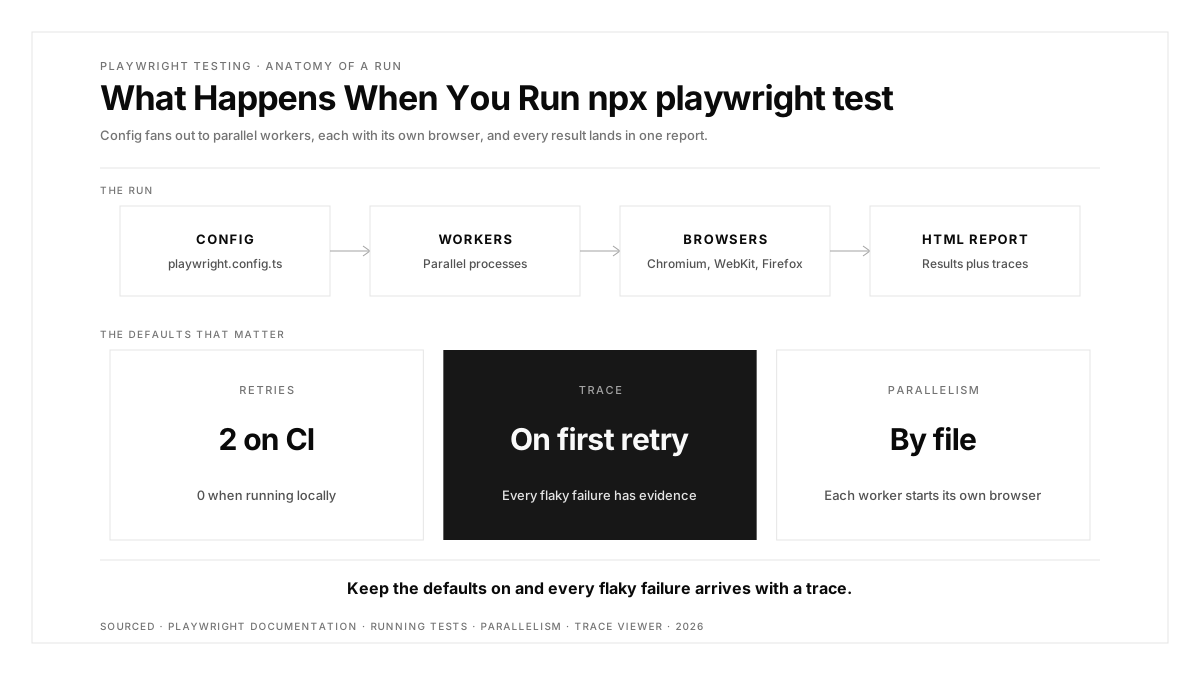
Playwright testing maturity in five stages, from a first test to a CI-gated suite
Where to Go Next
Once the basics run in CI, three areas pay off most. And if your product ships beyond the browser, remember that Playwright covers web apps; native iOS and Android apps need separate coverage. Our platform page shows how one flow can run across iOS, Android, the web, Chrome extensions and App Clips. For other web options, see our list of Playwright alternatives.
Conclusion
Playwright testing gives teams three browser engines, auto-waiting and parallel execution from a single install. The difference between a demo suite and a dependable one comes from what follows the first test: user-facing locators, mocked edge cases, a shared login state, traces on retry and a CI workflow that publishes evidence on every run.
Start with five tests on your highest value journeys, wire them into GitHub Actions with report uploads, then grow the suite feature by feature.
FAQs
What is Playwright used for?
Playwright is used to write automated end-to-end tests for web applications across Chromium, WebKit and Firefox.
Is Playwright free?
Yes, Playwright is open source under the Apache 2.0 license, including Playwright Test and its tools.
Which languages does Playwright support?
Playwright supports JavaScript and TypeScript, Python, Java and .NET, all sharing the same underlying implementation.
Is Playwright better than Selenium?
Playwright offers built-in auto-waiting and parallelism, while Selenium offers broader language bindings and a W3C-standard protocol.
Does Playwright run tests in parallel?
Yes, Playwright runs test files in parallel by default, with each worker process starting its own browser.
Can Playwright test mobile apps?
Playwright emulates mobile browsers for web apps, while native iOS and Android apps need a mobile testing tool.