
Managed Android emulators versus self-hosted KVM for CI
Self-hosted KVM emulators or a managed service? Compare ops work, ADB over the network, ephemeral devices, costs and fit for CI, QA and coding agents.
- Written by
- Gautam Agarwal
- Read time
- 9 min read
- Published

Key Takeaways
- Self-hosted emulators need KVM: bare-metal Linux, or cloud VMs with nested virtualization switched on.
- One adb server auto-discovers emulators on ports 5555 to 5585, which covers the first 16 instances on a host.
- An adb device state means connected; a booted Android reports sys.boot_completed as 1.
- Managed services trade per-minute or per-instance pricing for zero hypervisor, image and port work.
- Steady, high utilization favors self-hosting; bursty PR load and agent sessions favor a managed pool.
Managed Android emulators are virtual devices a provider boots, patches and tears down for you, reached over an API, CLI or network ADB. Self-hosting on KVM gives full control and your own security boundary, and it makes the hypervisor, images, ports and cleanup your team's job.
What running your own Android emulator fleet involves
The emulator binary is the easy part. The work that decides whether a fleet stays healthy sits around it.
Virtualization. The emulator needs KVM. Google's Android Emulator container scripts spell out where to get it: AWS bare-metal instances or instance types that support KVM, Azure VM sizes with nested virtualization such as the Dv3 and Ev3 series, or Compute Engine VMs with nested virtualization switched on. A host lacking it falls back to translating machine code, and every test slows to the point of timing out. The project itself is Linux-only, runs in Docker and is marked experimental, so treat it as a reference design. For the background on guests inside hosts, see this primer on virtual machines and how they work.
Images. System images, the emulator binary and AVD configs drift as Google ships updates, and every emulator or image update invalidates saved snapshots. Someone owns the upgrade calendar.
Ports. Each emulator takes a console port and an adb port. Past 16 emulators on one host, devices need a manual adb connect, so port planning becomes part of capacity planning.
Rendering. GPU-free hosts need a pinned software renderer, and older documentation still names modes the emulator has deprecated.
Cleanup. A device that survives one job carries state into the next, and that state becomes flaky tests.
Capacity. Dedicated hosts bill the same at 3 a.m. as at the 2 p.m. PR peak.
Each item is ordinary work, and all of it lands on a platform team's backlog.
Remote ADB access to Android emulators
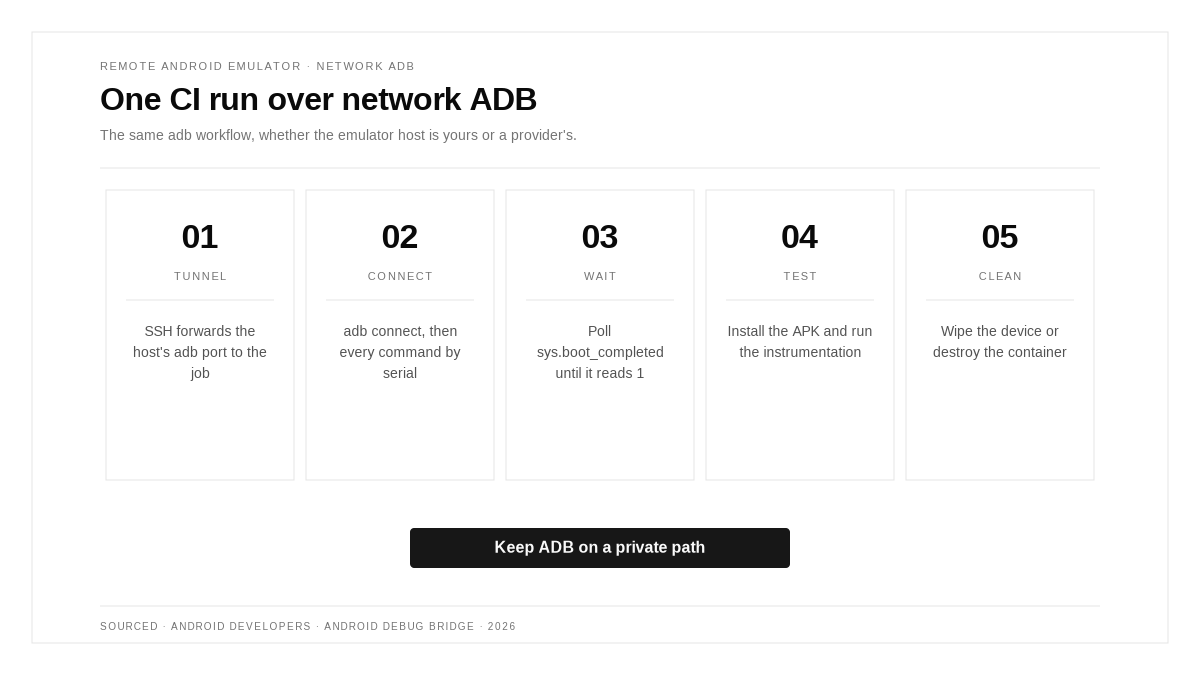
Network ADB is the interface most teams want to keep whichever way they go, because Espresso, Appium, Maestro and custom scripts all speak it. The adb documentation explains the moving parts: the adb server listens on port 5037, each emulator takes an even console port and the next odd adb port, and the server scans odd ports from 5555 to 5585 for emulators.
Three rules keep remote ADB reliable and safe.
- Address devices by serial. With more than one device attached, every command needs -s <serial>, or adb refuses with "more than one device/emulator".
- Wait for boot, then for adb. A device state appears while Android is still starting. Poll sys.boot_completed before installing anything.
- Keep ADB on a private path. ADB grants shell access to the device, so route it over a private network or an SSH tunnel.
# Tunnel the emulator host's adb port to the CI job, then connect locally
ssh -N -L 15555:localhost:5555 ci@emulator-host &
adb connect localhost:15555
until [ "$(adb -s localhost:15555 shell getprop sys.boot_completed | tr -d '\r')" = "1" ]; do sleep 2; done
adb -s localhost:15555 install -r app-universal.apk
Managed services package the same idea. Genymotion's gmsaas CLI creates, starts, saves and stops instances and securely connects them to ADB. Limrun documents attaching ADB or Appium to its cloud instances. The command that leases the device changes; the adb workflow after it stays the same. This adb commands cheat sheet covers install, logcat and forwarding for teams building that toolkit.
Ephemeral Android emulators for every CI run
A fresh device per run removes a whole class of flaky failures, and both paths can deliver it. On your own hosts, start emulators with -wipe-data, or with -no-snapshot-save from a cached snapshot, or destroy the container after each run. Gradle's build-managed devices restore a clean state between runs using snapshots. Managed services create an instance per session and destroy it at the end.
The self-hosted versions work and need discipline: a cleanup step that always runs, a nightly sweep for orphaned emulators, and a canary test that fails on leftover app data. Managed services move that discipline into their lifecycle.
Which option fits your team
Mobile developers
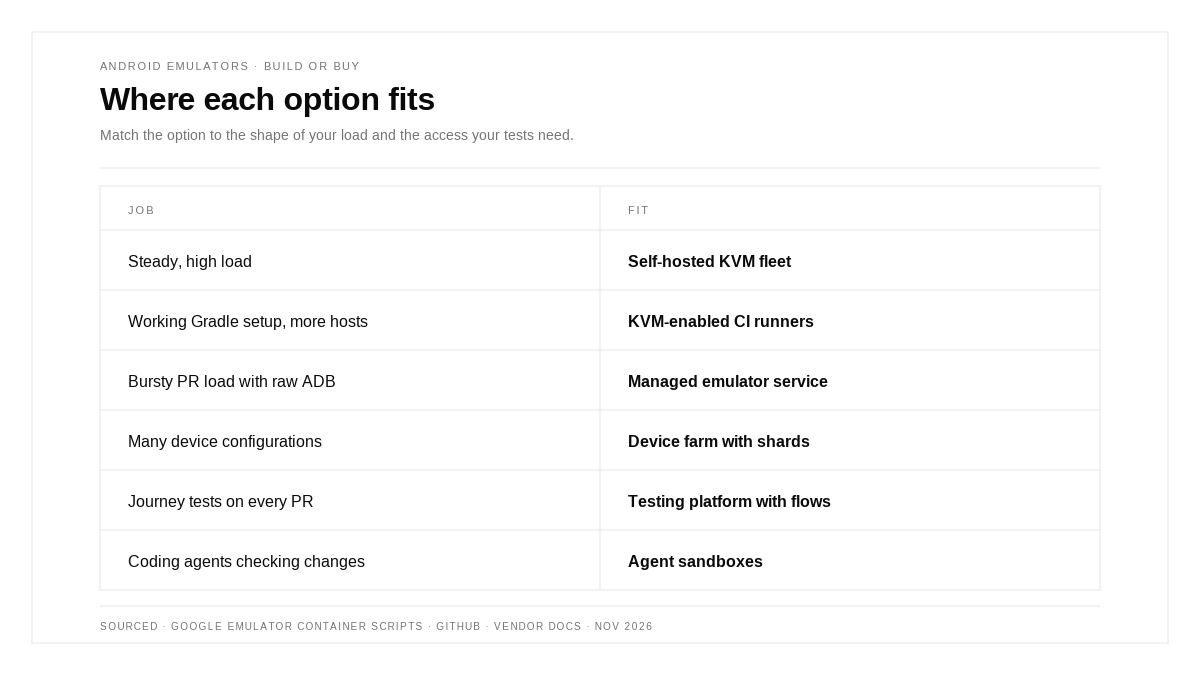
Your pain is waiting. A PR check that queues behind other emulator jobs, or a local emulator that eats the laptop's RAM, slows every change. KVM-enabled CI runners, such as GitHub's hosted Linux runners, fix most of this for teams whose Gradle setup already works, and a managed pool covers the peaks.
QA engineers
Your suite has to keep working. Every option here speaks adb, so Espresso, Appium and Maestro move unchanged. The difference is who handles the flake caused by infrastructure, which managed services absorb and self-hosted fleets hand to you.
Platform teams
Your concerns are cost, security and on-call load. Self-hosting gives you the network boundary, custom images and root access, and it puts the hypervisor, images and capacity on your rota. If emulators are a small slice of your platform, a managed service usually costs less than the engineering time.
Teams with coding agents
Agents need devices in bursts, in parallel, with a hard stop when they wander off. That load shape favors a managed pool with per-session devices and idle timeouts.
Managed Android emulator providers compared
Each row reflects what the vendor documents on its own site.
| Option | Who runs the emulators | Control surface | Best-fit job |
|---|---|---|---|
| Self-hosted KVM fleet | Your platform team | adb, emulator console, your orchestration | High steady load, custom images, strict network rules |
| KVM-enabled CI runners | GitHub or your CI vendor | adb inside the job, Gradle build-managed devices | Existing Gradle setups that need more hosts |
| Genymotion SaaS | Genymotion | gmsaas CLI, HTTP API, secure ADB connection | Instrumented suites with CI integrations |
| Limrun | Limrun | API, SDKs, ADB tunnel, Appium | Agent and CI sessions that need raw ADB |
| Firebase Test Lab | Uploaded test APKs, shards | Matrix runs across many device configurations | |
| Autosana | Autosana | Natural-language flows, CLI, MCP, API, sandboxes | Journey tests on every PR and agent verification |
For the layer below this decision, sharding the Espresso suite itself, see . For a broader introduction to hosted emulators, read .
Self-hosted versus managed Android emulator cost
Self-hosting bills for capacity; managed services bill for usage. The break-even depends on how evenly your load spreads across the day.
Raw compute on hosted CI is cheap. At GitHub's list prices, a Linux 2-core runner costs $0.006 a minute and a 4-core runner $0.012, and both support KVM for the emulator. A worked example: 400 PR runs a month, each using 4 emulator jobs of 15 minutes on 4-core runners, comes to 24,000 runner minutes, or $288 a month. That figure leaves out the engineering time to keep images, GPU modes, caching and cleanup working, which is usually the larger line.
A dedicated fleet flips the shape, costing the same whether tests run or sit idle. It pays off when utilization stays high and steady.
Migrating from self-hosted KVM in five steps
- Inventory the hard requirements. List the suites that need root, custom system images, a private network or raw console access. Those stay on hosts you control.
- Move the bursty jobs first. PR checks spike during working hours and idle overnight, so they gain the most from usage billing.
- Keep the nightly matrix where it is. Long scheduled runs keep a fleet busy, which is where a fixed-cost host earns its keep.
- Compare flake rates for two weeks. Track failures per thousand tests on both paths before retiring hosts, so the decision rests on your own numbers.
- Retire hosts one at a time. Watch queue times on the PR check as the fleet shrinks.
Autosana managed Android emulators for CI
Autosana runs managed Android emulators, Pixel 6 through Pixel 10 on Android 14 to 17, for two jobs. The first is journey tests on every pull request: flows describe the user's journey, run in parallel with per-session setup hooks, and post results with video to the PR. Android emulator runs can also use a proxy location, so the app sees traffic from another country.
The second is coding agents. Autosana's sandboxes lease a cloud Android emulator to Claude Code, Codex or Cursor through the autosana CLI. The agent installs its build, taps through the change, reads app logs and per-step CPU and memory, records video, and forwards ports so a debug build reaches the developer's local backend. Each sandbox ends 30 minutes after its last command.
Conclusion
Self-hosting Android emulators on KVM gives control and a fixed cost, and it hands your team virtualization, images, ports, rendering and cleanup. Managed emulators remove that work and bill by usage, while keeping network ADB for the tools you already run.
Measure your load shape first. Steady, high utilization justifies a fleet; bursty PR traffic and agent sessions fit a managed pool. Many teams land on both: KVM runners for Espresso, a managed service for journeys and agents.
FAQs
Can I connect to an Android emulator over the network?
Yes. Run adb connect to the emulator host's adb port, ideally through an SSH tunnel.
How many emulators can one adb server find automatically?
Sixteen, on odd ports 5555 to 5585; connect additional emulators manually.
Do cloud VMs support the Android emulator?
Yes, on bare metal or VMs with nested virtualization, which KVM requires.
When does self-hosting Android emulators make sense?
When utilization is high and steady, or when network rules require your own infrastructure.
How do managed emulators stay ephemeral?
The provider creates an instance per session and destroys it when the session ends.
Does Autosana expose Android emulators to coding agents?
Yes. Autosana sandboxes give coding agents a cloud Android emulator through the autosana CLI.