
iOS simulator testing from Linux CI runners
Keep CI on Linux and run iOS simulator tests on hosted Macs. Why the simulator needs Apple hardware, the split pipeline, a hosted simctl mapping, and costs.
- Written by
- Gautam Agarwal
- Read time
- 9 min read
- Published

Key Takeaways
- The iOS Simulator ships with Xcode and runs on macOS; Apple licenses macOS virtualization only on Apple-branded computers.
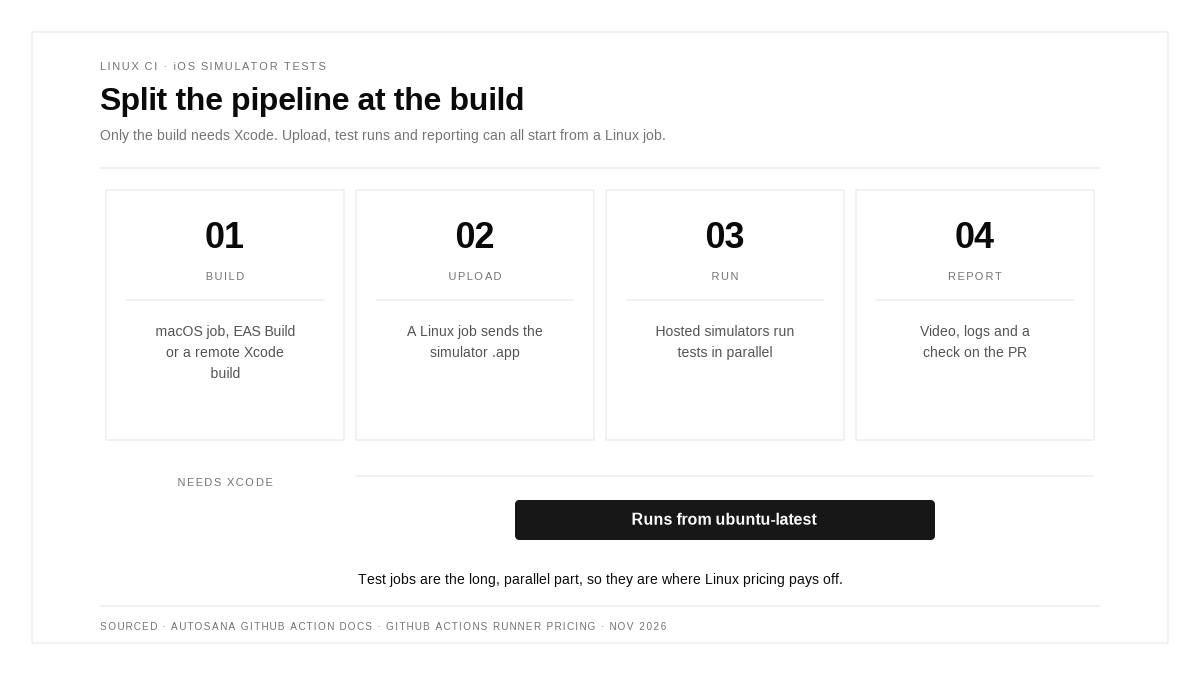
- A Linux pipeline keeps one short macOS step, the build, and moves upload, test runs and reporting to ubuntu-latest.
- Score a hosted simulator service on six things: builds, device lifecycle, simctl coverage, evidence, billing and network reach.
- At GitHub's list prices, a macOS runner minute costs about 10 times a Linux 2-core minute.
- The fastest evaluation is your own build, your three flakiest journeys and one afternoon.
iOS simulator testing from Linux CI keeps the pipeline on Linux runners and leases the simulator from a Mac somewhere else, driven over an API or a CI action. Only the build needs Xcode; every step after it can run from ubuntu-latest.
What iOS simulator testing on Linux means in practice
Searching for "iOS simulator on Linux" turns up two very different answers, and a lot of confusion comes from mixing them. One is running macOS inside a virtual machine on generic Linux hardware. Apple's macOS software license agreement permits up to two additional virtualized copies of macOS on each Apple-branded computer you own or control, which puts generic Linux hosts outside the grant.
The other answer is the one that works: a Linux job that talks to a Mac. It has four layers, and products differ by which ones they cover.
The build. Source becomes a simulator .app, which takes Xcode on macOS.
The device. A booted iOS Simulator on Apple hardware, reachable over the network.
The control surface. How the Linux job installs the app, drives it and reads what happened: a CLI, an API, a GitHub Action or a WebDriver endpoint.
The evidence. Screenshots, video, logs and a result the pull request can show.
Six criteria for a hosted iOS simulator service
1. Does it build, or start from your .app? If your team already produces a simulator build on a macOS runner or EAS Build, a service that accepts the .app is enough. If you want zero Mac jobs at all, the service has to compile Xcode projects too.
2. Can the Linux job create and destroy devices on its own? A device that needs a console visit is a device CI has to wait on. Look for an API call or an action input that picks the model and OS, and a teardown that happens on its own.
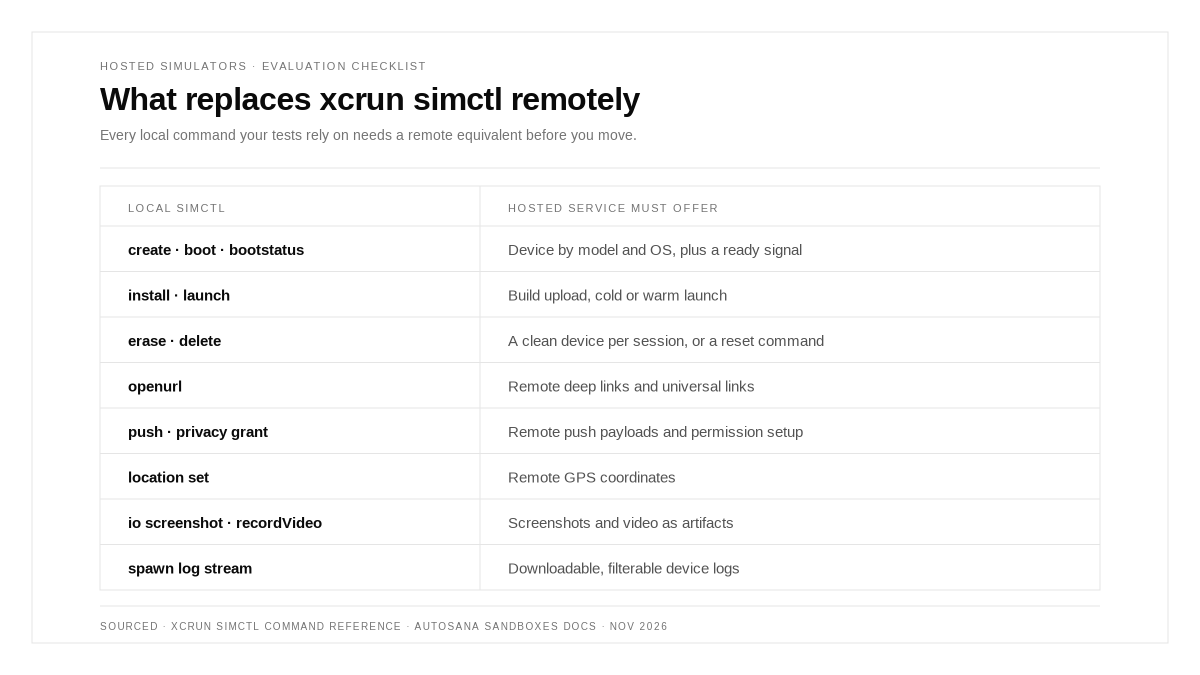
3. Does it cover the simctl commands your tests rely on? Every local capability your suite uses needs a remote equivalent, or those tests break the day you move. The table below works as a checklist.
Local simctl | What it does | What the hosted service must offer |
|---|---|---|
create, boot, bootstatus | Make a device and wait for boot | Model and OS selection, plus a ready signal |
install, launch | Install a .app and start it | Build upload, cold or warm launch |
erase, delete | Clean or remove the device | A clean device per session, or a reset command |
| openurl | Open a deep link | Remote deep-link open |
| push | Deliver a push payload | Remote push to the simulator |
| privacy grant | Preset permissions | Permission setup, or a step that answers the prompt |
| location set | Simulate GPS | Remote location |
io screenshot, io recordVideo | Capture evidence | Screenshots and video as artifacts |
| spawn log stream | Read device logs | Filterable log download |
4. What evidence comes back? A pass or fail is the least useful output. Video, per-step screenshots and device logs are what turn a red check into a fix.
5. How does it bill against the macOS minutes it replaces? The comparison point is your current macOS runner bill for test jobs, covered in the cost section below.
6. Can it reach your staging backend? Simulators on a provider's Macs call your APIs from the provider's network. Check for a published IP allowlist or a private-network option before you commit.
What a Linux pipeline changes for iOS teams
The build stays put. Xcode still compiles the app on a Mac, whether that Mac is a macos-latest job, EAS Build or a provider's remote build. What moves is everything after it, and that is usually most of the pipeline: test jobs are the long, parallel part, and they multiply with the device matrix.
Four limits come with the move:
- Deep debugging. Attaching LLDB or Instruments to a remote simulator from Linux is out of reach. Keep one Mac available for those sessions.
- Xcode and runtime alignment. Your build's SDK and the provider's iOS runtimes need to match, so check the provider's iOS versions before an Xcode upgrade.
- Latency. Each remote command crosses the network, and tests that assume instant input need longer waits.
- Existing XCUITest suites. XCUITest runs through xcodebuild on a Mac, so a Linux orchestrator either calls a provider that runs your bundle or moves those journeys to a different runner.
Hosted iOS simulator options in 2026
The options fall into three shapes, and each row reflects what the vendor documents on its own site.
| Option | Builds iOS for you | Control from Linux | Test style |
|---|---|---|---|
| Expo Simulators | Yes, through Expo Build | EAS CLI or REST API; Appium, agent-device or Argent | Your scripts or an agent |
| Limrun | Yes, remote Xcode builds | lim CLI, REST API, TypeScript, Go and Python SDKs | Your scripts, Appium, or an agent |
| Appetize | Upload a prebuilt app | CLI and REST API | Your scripts or an agent |
| Autosana | Upload a prebuilt app, or EAS from Linux | GitHub Action, CLI, MCP and Runs API | Natural-language flows, plus sandboxes for agents |
Simulator APIs suit teams that want to keep writing scripts. Testing platforms suit teams that want the journeys described once and run on every pull request. Renting a whole Mac, covered in this guide to choosing a cloud Mac, suits teams that want Xcode and the simulator on one machine they control.
A Linux CI pipeline for iOS simulator tests
Two patterns cover most teams. The first keeps a short macOS build job and runs every test job on Linux. This is the matrix pattern from Autosana's GitHub Action documentation:
jobs:
  build:
    runs-on: macos-latest
    steps:
      - uses: actions/checkout@v4
      # build the simulator app and zip it as build/MyApp.app.zip
      - uses: actions/upload-artifact@v4
        with: { name: ios-build, path: build/MyApp.app.zip }
  test:
    needs: build
    runs-on: ubuntu-latest
    strategy:
      matrix:
        device:
          - { model: "iPhone 17 Pro", upload: true }
          - { model: "iPad Pro 13-inch (M5)" }
    steps:
      - uses: actions/download-artifact@v4
        if: matrix.device.upload
        with: { name: ios-build, path: build }
      - uses: autosana/autosana-ci@main
        with:
          api-key: ${{ secrets.AUTOSANA_KEY }}
          platform: ios
          bundle-id: com.example.app
          build-path: ${{ matrix.device.upload && 'build/MyApp.app.zip' || '' }}
          device-model: ${{ matrix.device.model }}
          labels: smoke
One matrix job uploads the build and the others reuse the build already uploaded for that commit. The action waits for results by default and fails the job when a selected test fails, so it works as a required check.
The second pattern removes the Mac job entirely for Expo and React Native apps. An EAS profile with "ios": { "simulator": true } builds on Expo's servers, and eas build --platform ios --profile preview-simulator --non-interactive --wait --json runs from the same Ubuntu job. This guide to Expo E2E testing covers the profiles in detail.
The cost case for moving test jobs to Linux
GitHub's Actions runner pricing lists $0.062 a minute for a standard macOS runner and $0.006 for a Linux 2-core runner. A worked example for a 40-minute iOS test job on 400 PR runs a month:
| Setup | Runner minutes per run | Runner cost per run | Runner cost per month |
|---|---|---|---|
| Tests on a macOS runner | 40 macOS | $2.48 | $992 |
| Tests orchestrated from Linux | 40 Linux | $0.24 | $96 |
The Linux row leaves out the simulator provider's own charge, which replaces the Mac minutes. Compare that charge against the $896 difference, and against wall-clock time: a provider running eight simulators at once shortens the job the Linux runner waits on.
Evaluating a provider in an afternoon
Skip the feature matrix and run the pipeline you actually care about.
- Upload your real build. Sample apps hide the snags. Your own .app surfaces SDK mismatches and missing runtimes in the first run.
- Time the second run. The first one includes setup. The second tells you what every pull request will feel.
- Run your three flakiest journeys. If they pass reliably on the provider, the isolation story holds.
- Open the evidence for a failure. Force one test to fail and check how fast the video, screenshots and logs explain it.
- Run two jobs with one test account. If they collide, your test data needs a per-session account before you scale.
- Cancel a job mid-run. Then confirm the device was cleaned up and stopped billing.
For the per-PR side of the same setup, with fresh devices and sharding, see . For background on the simulator itself, read this iOS Simulator guide.
Conclusion
The iOS Simulator runs on Apple hardware, and your CI runner is a separate decision. Keep the Xcode build on a Mac or a cloud build service, and move upload, device selection, test runs and reporting to Linux jobs that call a hosted simulator.
Score providers on the six criteria, run the cost math with your own minutes, spend an afternoon on your own build, and keep one Mac for the debugging sessions that need LLDB.
FAQs
Can I run the iOS Simulator on Linux?
The simulator runs on macOS; Linux CI drives a simulator hosted on Apple hardware.
Is running macOS in Docker on Linux allowed?
Apple's license permits virtualized macOS only on Apple-branded computers already running macOS.
Do I still need a Mac to build the app?
Yes, Xcode builds need macOS, either your runner, EAS Build or a provider's remote build.
What replaces xcrun simctl on a remote simulator?
A provider CLI or API covering device creation, install, deep links, push, logs and video.
Can GitHub Actions ubuntu-latest run iOS UI tests?
Yes, when the job calls a hosted simulator service and waits for its results.
How does Autosana run iOS tests from Linux CI?
Its GitHub Action uploads the simulator build and runs flows on hosted iOS simulators.