
Device-to-Device Testing Tools: Automating Flows That Span Two Phones
How teams automate sender and receiver flows across two devices, from multiple Appium sessions to single-agent approaches, and what each costs to run.
Yuvan Sundrani · 15 min read
autosana.ai
TL;DR
- Autosana is the only option here where one agent drives both screens and handles the coordination.
- Appium with parallel sessions is the standard free answer and the most work to build.
- WebdriverIO multiremote wraps that pattern in a supported API.
- Maestro is excellent for single-device flows and openly lacks this capability.
- Device clouds supply the hardware and leave the coordination to you.
- Manual testing remains the honest fallback more teams use than admit it.
Some flows need two phones, and no amount of clever scripting gets around it. A message sent on one and received on the other, a payment request and its acceptance, a call connecting, a file handed from one handset to another.
Most mobile test automation assumes exactly one device. So these flows end up tested the old way, by two people sitting near each other holding phones, usually on the afternoon before a release.
The gap is well known and openly discussed. The Maestro repository carries an open discussion titled Multi-device interactive testing: how to test flows requiring 2+ devices, which is the clearest statement of the problem available anywhere: teams want the capability, and the tool they already chose does not provide it.
Why is device-to-device testing so hard to automate?
The difficulty is coordination rather than control. Driving one device is a solved problem with several good answers. Driving two in a known order, where the second has to wait for something the first caused and neither knows about the other, is a distributed systems problem wearing a QA hat.
The standard workaround shows the cost. Appium Pro documents running multiple simultaneous sessions by spawning separate servers on different ports, which works and leaves you owning session isolation, timing, and cleanup. A r/QualityAssurance thread comparing Appium with Maestro, at 8 votes and 16 comments, is a fair picture of what teams accept when they take that route, including the flakiness that comes with it.
Underneath sits the device question, because emulators make two-device testing cheaper and less convincing. A r/QualityAssurance thread weighing real devices against emulators runs 18 votes and 24 comments, and a r/softwaretesting thread on emulation missing real iOS issues makes the case for hardware at 23 votes.
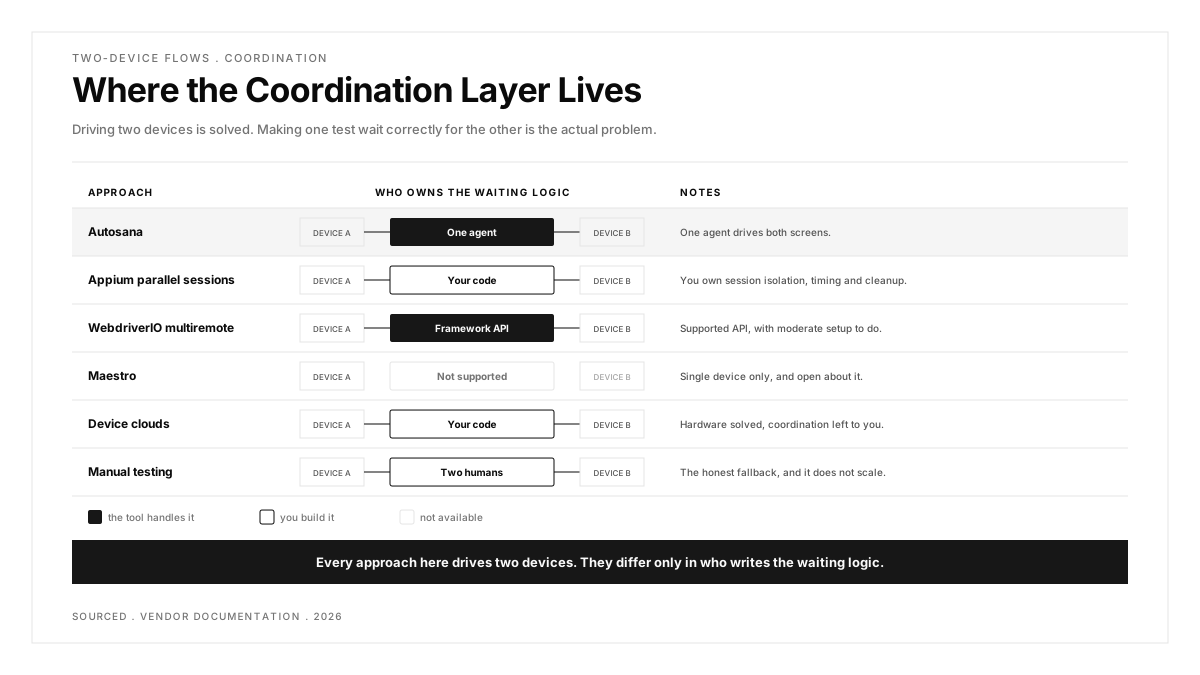
Here is the reframe worth holding onto: the hard part is not controlling two devices, it is making one test wait correctly for the other.
| Approach | What It Covers | Coordination | Cost |
|---|---|---|---|
| Autosana | iOS and Android, two devices | Handled by one agent | Per agent-run |
| Appium parallel sessions | iOS and Android, any cloud | You build it | Free, high engineering time |
| WebdriverIO multiremote | iOS, Android and web | Framework-supported API | Free, moderate setup |
| Maestro | Single device only | Not supported | Free, plus cloud tiers |
| Device clouds | Hardware only | You build it | From $29/mo upward |
| Manual testing | Everything | Two humans | Salary, and it does not scale |
Six ways to test a two-device flow
The question running through all six is the same: who writes the logic that makes one device wait for the other.
1. Autosana: Best Device-to-Device Testing Tool for Two-Phone Flows
Autosana leads this list because it is the only option here where the coordination is handled rather than built. Everything below either asks you to write the synchronisation yourself or does not attempt two devices at all.
Autosana's multi-device testing covers workflows that span two mobile devices with one agent, which changes where the coordination lives. The agent sees both screens and acts on both, so the waiting between them is handled rather than scripted.
The scope is worth stating precisely: two devices, not an arbitrary number. Flows are written in natural language through flows, run on virtual and physical iOS and Android devices, and the GitHub Bot can run them on a pull request and return results with video, which matters here because a two-device failure is hard to understand from a log alone.
Appetite for something lighter in this space is visible. A r/reactnative post announcing a faster testing tool for real iPhones drew 62 votes and 50 comments, and the thread reads as a wish for less ceremony rather than more framework.
Video matters more here than on a single-device test. When a two-device flow fails, the useful question is which side went wrong and when, and a log from each device separately rarely answers it.
Scope honesty matters here. If your product needs a group call across four participants, this does not reach it, and the manual answer below remains the only complete one.
Pros: one agent drives both devices so coordination is handled, natural language rather than session plumbing, video of both sides on failure, and a self-serve trial.
Cons: two devices is the documented limit, so three-party flows are out of scope, and this is paid where Appium and WebdriverIO below cost nothing. Teams with the engineering time to build a coordination layer should weigh that seriously.
Pricing: per agent-run.
Best for: teams who need the capability without building it.
2. Appium Parallel Sessions: Best for Full Control at Zero Licence Cost
Yes, and this is how most teams do it. You run two Appium server instances on different ports, open a session against each device, and orchestrate the sequence from your test code. Appium Pro documents the pattern, and it works on real hardware or simulators, across iOS and Android simultaneously.
What you are signing up for is the coordination layer. The sender must complete before the receiver checks, which means explicit synchronisation you write and maintain, plus session isolation so the two do not interfere, plus cleanup when one half fails and the other is left waiting.
Our Appium guide covers the single-device setup that this builds on.
One detail that surprises teams: the two sessions do not need to be the same platform. An iOS simulator can be the sender and a physical Android device the receiver, which is how you catch the cross-platform delivery bugs that single-platform suites miss entirely.
Teams that succeed with this usually extract the coordination into a small shared library early, rather than repeating waiting logic in every two-device test. Teams that skip that step tend to abandon the suite within a year.
Pros: free, works across iOS and Android together, runs on any device cloud, and you own every part of it.
Cons: you build and maintain the coordination, flakiness compounds across two sessions, and cleanup on partial failure is genuinely fiddly.
Pricing: free, Apache 2.0.
Best for: teams with engineering time and a need for full control.
3. WebdriverIO Multiremote: Best Supported API for the Two-Session Pattern
WebdriverIO supports multiremote, which opens several browser or device sessions in one test and lets you address them by name. Instead of juggling two clients by hand, you write against a single API that knows about both, which removes a meaningful slice of the boilerplate in the Appium approach.
It is still WebDriver underneath, so the synchronisation question remains yours, but the ergonomics are considerably better and the pattern is supported rather than improvised.
The practical gain is in readability. A multiremote test reads as one scenario with two named participants rather than as two interleaved scripts, which matters when someone else has to debug it six months later.
Because it speaks WebDriver, the same multiremote test can also drive a browser alongside the two phones, which covers the case where a web dashboard has to reflect something that happened on a device.
Pros: free, a supported multiremote API, same protocol as Appium so skills transfer, covers web alongside mobile.
Cons: JavaScript and TypeScript focused, and you still design the waiting between devices.
Pricing: free, MIT.
Best for: JavaScript teams who want the pattern without the plumbing.
4. Maestro: Best Single-Device Tool to Keep Running Alongside
Not currently, and the project is open about it. The GitHub discussion asking how to test flows requiring two or more devices is the canonical reference, and it remains a question rather than a feature.
This is worth knowing rather than holding against it. Maestro is genuinely good at what it does, and single-device YAML flows cover most of a typical suite. If two-device coverage is the one gap, running Maestro for everything else and a second tool for that slice is a reasonable arrangement.
The pragmatic reading is that tool gaps are normal and migrations are expensive. A suite that covers ninety percent of your flows well is worth keeping even when the last ten percent needs something else alongside it.
Worth watching rather than assuming: an open discussion means the maintainers are aware of the demand, so this may not stay a gap permanently.
Pros: free, fast to author, readable YAML, excellent for the single-device majority of your suite.
Cons: no two-device support, so this specific need goes elsewhere.
Pricing: free, with paid cloud tiers.
Best for: keeping, while solving the two-device gap separately.
5. Device Clouds: Best for Solving the Hardware Half
They solve the hardware half. Services like BrowserStack give you two real devices simultaneously, which removes the question of where the second phone comes from and whether its OS is current.
What they do not give you is the coordination. You still run two Appium sessions against those devices and write the synchronisation yourself, so a cloud is a complement to approach one rather than an alternative to it. Our BrowserStack alternatives guide compares the clouds.
Budget for double consumption on these tests. Every two-device scenario occupies two parallel sessions for its full duration, so a suite of thirty such flows costs what sixty single-device flows would.
They do remove a real operational burden though. Keeping two phones charged, updated and connected in an office is the kind of small recurring task that quietly stops happening.
Pros: real devices on demand, no hardware to own, broad OS coverage, and parallel sessions supported.
Cons: the coordination problem is untouched, and you pay per parallel session for both halves of every test.
Pricing: from $29 a month, scaling with concurrency.
Best for: teams who have solved coordination and need the hardware.
6. Manual Testing: Best for Three or More Devices
For many teams, honestly, yes for now. Two testers with two phones cover a messaging flow in minutes, and the setup cost is zero.
It stops working at scale and at frequency. A flow tested manually gets tested at release rather than on every pull request, which means a regression in your messaging path is found days after it shipped. The question is not whether manual works but whether your release cadence has outgrown it.
There is also a coordination advantage nobody mentions: two humans synchronise instantly without any waiting logic, which is precisely the part automation finds hardest.
The reproducibility gap is the one that bites during triage. A manual tester reporting that a message sometimes arrives late gives you far less to work with than a failed run with video of both screens.
Pros: no setup, catches things no script asserts, and handles three or more devices with no extra tooling.
Cons: does not run on every commit, scales with headcount, and the results are not reproducible.
Pricing: salary.
Best for: low-frequency releases and exploratory coverage alongside automation.
Which approach fits your situation?
You need the capability this quarter. Autosana handles the coordination with one agent, within a documented two-device limit.
You have engineering time and want full ownership. Appium parallel sessions, or WebdriverIO multiremote for a friendlier API over the same protocol. Budget the coordination layer as a project rather than a task.
You are on Maestro and happy otherwise. Keep it. Solve the two-device slice separately rather than migrating a working suite, since a migration driven by one gap usually costs more than the gap did.
Your blocker is hardware rather than code. A device cloud, paired with whichever coordination approach you choose, remembering that each two-device test consumes two parallel sessions.
Your flows involve three or more devices. None of the automated options here cover that properly. Group calls and multi-party collaboration stay manual, and pretending otherwise would cost you a quarter finding out.
Your suite is already flaky. Fix the single-device flakiness first. Adding a second device to an unstable suite doubles the failure surface and makes the cause harder to find.
You test messaging, payments or calling. This is not an edge case for you, it is the product. The automation investment pays back faster here than anywhere else in your suite, because these are the flows users notice immediately.
You are deciding whether to start at all. Count how many of your top ten user journeys need a second device. If the answer is more than two, the manual approach is already costing you more than it looks.
Conclusion
Two-device testing is the clearest remaining gap in mobile automation. The capability exists through Appium and WebdriverIO, and both ask you to build the coordination layer yourself, which is why so many teams still test these flows by hand.
Decide first whether this is an edge case or your core product. For a messaging or payments app it is the latter, and the flows least covered by automation are the ones your users notice first when they break. That asymmetry is the whole argument for investing here before anywhere else.
.png)
Frequently asked questions
What is device-to-device testing?
Testing a flow that requires two devices acting together, where an action on one produces a result on the other. Messaging, calling, peer-to-peer payments and file transfer are the common cases, and single-device automation cannot cover them.
Can Appium run two devices at once?
Yes. You run separate Appium server instances on different ports and open a session against each device, then orchestrate the order from your test code. The sessions work; the synchronisation between them is yours to write.
Does Maestro support testing across two devices?
Not at present. The Maestro repository has an open discussion asking exactly this, which remains unanswered as a feature, so teams needing two-device coverage pair Maestro with something else.
How do you test a chat app end to end?
Send from one device and assert receipt on the other, then cover delivery and read receipts, push notification arrival when the recipient's app is backgrounded, and ordering when messages arrive quickly. Each of those needs both devices live at once.
Can you test two devices with emulators instead of real hardware?
You can, and it costs considerably less. The trade is fidelity, since push delivery, network handover and background behaviour differ on real hardware, and those are exactly the behaviours a two-device flow depends on.
How many devices can be automated in one flow?
It depends on the tool. Appium and WebdriverIO multiremote have no hard ceiling beyond what you can orchestrate, while Autosana documents two. Three-party flows remain largely manual across the category.
Is multi-device testing the same as cross-platform testing?
No, and the terms get confused constantly. Cross-platform testing means running the same test across many devices to check coverage. Device-to-device testing means one flow spanning two devices at the same time.
What breaks most often in two-device flows?
Timing, by a wide margin. The receiving device checks before the sending device has finished, so the test fails intermittently rather than consistently. Intermittent failures erode trust faster than outright ones, which is why these suites are so often abandoned a few months after someone builds them.