
Best Tools for Testing Chat and Messaging Apps
Send, deliver, read receipt and push, verified across both devices in one test, plus why single-device automation misses most messaging defects.
Yuvan Sundrani · 15 min read
autosana.ai
TL;DR
- Autosana drives both devices in one flow, so send and receive are verified together.
- Appium parallel sessions is the free route to the same thing with more work.
- WebdriverIO multiremote wraps that pattern in a supported API.
- Artillery stress-tests the WebSocket layer the messages travel over.
- k6 does the same from Grafana's ecosystem with good CI ergonomics.
- BrowserStack supplies the device and browser matrix to check consistency across.
Chat is the one feature where a passing test on a single device proves almost nothing at all. A message leaving the sender tells you nothing about whether it arrived, arrived in the right order, arrived exactly once, or produced a read receipt afterwards.
The defects that reach users cluster in the gap between two clients: a message delivered twice after a reconnect, ordering that flips under a poor network, a typing indicator that never clears, a read receipt that updates on one side and not the other.
Testing that gap needs two devices live at the same time, talking to each other, and most mobile automation assumes exactly one device with nobody on the other end.
What makes chat apps hard to test?
Three problems stack on top of each other, and almost every tool solves exactly one of them.
The first is coordination. Driving two devices in a known order, where the receiver waits for something the sender caused, is a distributed systems problem rather than a scripting one. A r/QualityAssurance thread comparing Appium and Maestro, at 8 votes and 16 comments, shows what teams accept when they take the scripted route, flakiness included.
The second is the transport. Chat runs over WebSockets or similar long-lived connections, and functional tests say nothing about behaviour at a thousand concurrent connections. That is a separate discipline with separate tools.
The third is client consistency. The same conversation must render identically on iOS, Android and web, with the same ordering and the same reactions. A r/QualityAssurance thread on real devices versus emulators runs 18 votes and 24 comments on how much hardware that realistically takes, and a r/softwaretesting thread on emulation fidelity argues the case for hardware at 23 votes.
Worth holding onto: a chat test that touches one device is testing a form submission, not a conversation.
| Tool | What It Covers | Devices at Once | Cost |
|---|---|---|---|
| Autosana | Send, deliver, receipt, push across both sides | Two, coordinated | Per agent-run |
| Appium parallel sessions | Same, with coordination you write | Two or more | Free |
| WebdriverIO multiremote | Same, through a supported API | Two or more | Free |
| Artillery | WebSocket load and latency | Thousands simulated | Free, OSS |
| k6 | WebSocket load with CI reporting | Thousands simulated | Free, OSS |
| BrowserStack | Cross-client rendering consistency | Many, sequential | From $29/mo |
Six tools for testing a messaging app
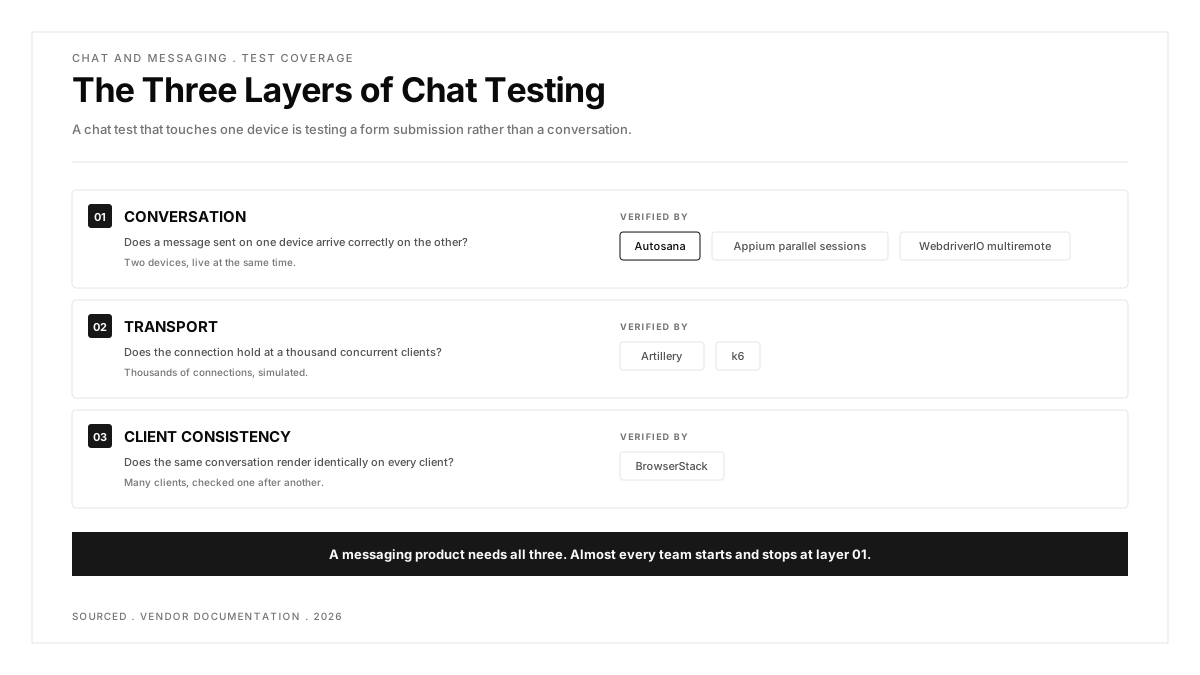
The six below split cleanly into three jobs, and mixing them up is how teams end up with a suite that proves the wrong thing. The first three verify that a conversation works between two clients. The next two verify that it survives thousands of concurrent connections. The last verifies that it renders the same everywhere. A messaging product of any size needs coverage in all three, and almost every team starts and stops at the first.
1. Autosana: Best for Verifying a Conversation Across Both Devices
Autosana leads because the coordination is handled rather than written. Its multi-device testing covers workflows spanning two mobile devices with a single agent, so the agent sees both screens and the waiting between them is managed for you.
For chat that maps directly onto the thing you need to assert. Send on device A, confirm arrival on device B, confirm the read receipt appears back on A, and confirm the push notification fired when B was backgrounded, all in one flow written in natural language.
Push matters here more than in most categories, since a message that arrives silently is functionally a message that did not arrive. The push notification guide covers real APNs and FCM delivery, and the GitHub Bot returns video of both sides, which is the quickest way to tell which device misbehaved.
Ordering is the case worth designing deliberately. Sending three messages quickly and asserting they arrive in sequence on the receiver catches a class of bug that a single send never will, and it is trivial to express once both devices are under one agent.
Offline and resume is the other scenario worth scripting early. Backgrounding the receiver, sending several messages, then returning exercises the sync path, and that path produces more duplicate-message reports than anything else in a chat product.
Best at: both sides of a conversation asserted in one run, coordination handled rather than scripted, push verified in the same flow, video of each screen on failure.
Weak spot: two devices is the documented limit, so group conversations with three or more participants sit outside it. This is also paid where the next two options are free.
Price: per agent-run, with a self-serve trial.
Go with it when: messaging is the product rather than a feature bolted onto something else, and a delivery bug is a customer-facing incident.
2. Appium Parallel Sessions: Best Free Route to Two-Device Testing
This is how most teams do it today. Run two Appium servers on different ports, open a session against each device, and orchestrate the sequence from your test code. It works across iOS and Android simultaneously and on any device cloud.
The cost is the synchronisation layer. The receiver must not assert before the sender has finished, which means waiting logic you design, plus session isolation and cleanup when one half fails. Teams that succeed here extract that into a shared library early. Our Appium guide covers the single-device foundation it builds on.
Mixing platforms deliberately is the underused trick. An iOS sender with an Android receiver exercises the cross-platform delivery path that single-platform suites never touch, and that path is where encoding and notification differences surface.
Cleanup deserves explicit design rather than an afterthought. When the sender half fails, the receiver session is left waiting, and a suite without teardown logic accumulates orphaned sessions that eventually exhaust the device pool.
Best at: free, mixes platforms in one test, runs anywhere, and you own every line of it.
Weak spot: you build and maintain the coordination, and flakiness compounds across two sessions rather than adding up.
Price: free, Apache 2.0.
Go with it when: you have the engineering time and want full control of every layer.
3. WebdriverIO Multiremote: Best Supported API for Two Clients
WebdriverIO's multiremote feature opens several sessions in one test and lets you address them by name, so a chat test reads as one scenario with two named participants rather than two interleaved scripts.
That readability matters disproportionately here, because a two-device test is already hard to reason about and will be debugged by someone who did not write it.
Driving a browser alongside the phones covers a case many messaging products have and few test: a web client that must reflect a conversation happening on mobile, with the same ordering and the same read state.
Because it speaks WebDriver, an existing Appium team can adopt multiremote without changing protocol or device infrastructure, which makes it the cheapest upgrade path on this list rather than a migration.
Best at: free, a supported API rather than an improvised pattern, same WebDriver protocol as Appium so skills transfer, and it can drive a browser alongside two phones.
Weak spot: JavaScript and TypeScript focused, and you still design the waiting between participants.
Price: free, MIT.
Go with it when: your team writes JavaScript and wants the pattern without building the plumbing first.
4. Artillery: Best for Stress-Testing the WebSocket Layer
Functional tests tell you a conversation works for two people. Artillery tells you whether it works for ten thousand. It supports WebSocket and Socket.IO alongside HTTP, so you can model realistic chat behaviour: connect, subscribe to a room, send at intervals, stay connected.
That last part is what separates chat load testing from ordinary API load testing. The connections persist, so the failure mode is resource exhaustion over time rather than a slow response.
Reconnection behaviour is the scenario to model first. Mobile clients drop and resume constantly, and the bugs that follow, duplicated messages and missed history, only appear when a test disconnects and comes back rather than holding a clean connection.
Running it against a staging broker rather than production is the obvious precaution, and the less obvious one is sizing the test to your actual peak rather than a round number, since the useful question is headroom above real traffic.
Best at: free and open source, native WebSocket and Socket.IO support, scenario definitions in YAML, and it models long-lived connections properly.
Weak spot: it tests the transport rather than the interface, so nothing here tells you a message rendered correctly.
Price: free, open source.
Go with it when: you need to know at what point the message broker gives up, before your users find out for you.
5. k6: Best Load Tool if You Already Use Grafana
k6 covers similar ground with a JavaScript scripting model and strong CI ergonomics, and it lands naturally for teams already running Grafana since the two share an ecosystem.
Choosing between this and Artillery is mostly about which fits your stack. Both handle persistent connections, both are free, and neither replaces the other.
Thresholds are what turn a load test into a regression check. Asserting that message round-trip stays under a set figure at a given concurrency gives you a build that fails when the broker degrades, rather than a report somebody reads occasionally.
Teams already reporting into Grafana get the comparison for free, which matters because a single load run means little and a trend across releases means a great deal.
Best at: free and open source, JavaScript scenarios, thresholds that fail a build, and dashboards your team already reads.
Weak spot: same boundary as Artillery, in that transport is not interface, and WebSocket support needs more setup than its HTTP path.
Price: free and open source, with a paid cloud option.
Go with it when: performance results need to live beside the metrics your team already watches.
6. BrowserStack: Best for Checking Every Client Shows the Same Thing
A conversation has to look the same on an old Android phone, a current iPhone and a desktop browser. BrowserStack supplies that matrix: 3,500 real devices, browsers across versions, and App Live for interactive checks on a specific handset.
It supplies hardware rather than coordination, so it pairs with the first three rather than competing with them. Our BrowserStack alternatives guide compares the clouds.
Older Android builds are where rendering problems concentrate. Message bubbles, emoji and right-to-left text all behave differently across OS versions, and those differences are invisible on a current flagship.
App Live is worth using for the reproduction step specifically. A user reporting that messages look wrong on one handset is far easier to act on once someone has opened that exact OS build and seen it.
Best at: the broadest device and browser matrix, published pricing, and interactive sessions for reproducing a client-specific rendering bug.
Weak spot: no coordination layer, and every two-device test consumes two parallel sessions for its full duration.
Price: from $29 a month, scaling with concurrency.
Go with it when: the complaint is that chat looks wrong on one particular client or OS version.
Which chat testing problem are you solving?
Messages are not arriving correctly. Autosana if you want the coordination handled for you, Appium or WebdriverIO multiremote if you would rather own every line of it and have the time to.
It breaks under load. Artillery or k6. Functional tools will never find a broker that falls over at scale, because two devices never generate the connection count that triggers it.
It renders wrong on one client. BrowserStack, for the matrix and an interactive session on the exact device and OS build the complaint names.
Group chats with several participants. None of the automated options here reach three or more devices cleanly. That coverage remains manual across the whole category, and claiming otherwise would cost you a quarter finding out.
Push notifications are the complaint. Test push and delivery in the same flow, because from a user's point of view a message that arrives without a notification is indistinguishable from one that never arrived at all.
You are starting from nothing. Begin with one two-device happy path covering send and receive. It is the single highest-value test a messaging team can own, and most do not have it in any form.
Reconnection is the suspected culprit. Model drop and resume explicitly in a load tool, since duplicate delivery and missing history almost always trace back to what happens when a client comes back.
Conclusion
Chat testing has three layers and most teams cover one. The functional layer needs two devices, the transport layer needs load tooling, and the consistency layer needs a device matrix, and nothing on this list does all three.
Pick by which layer is currently failing you rather than by which tool looks most capable. If messages arrive late under load, no amount of two-device functional testing will surface it, and if ordering breaks between two clients, a load test will run clean while your users complain.
.png)
Frequently asked questions
How do you test a chat application end to end?
Send from one device and assert receipt on the other, then cover delivery and read receipts, push arrival when the recipient is backgrounded, and ordering when messages arrive quickly. Each needs both devices live at once.
Can you automate chat testing with Appium?
Yes, by running separate Appium servers on different ports and opening a session against each device. The sessions work; the synchronisation between them is yours to write and is where these suites turn flaky.
How do you load test a chat app?
Use a tool with native WebSocket support such as Artillery or k6, and model real behaviour: connect, join a room, send at intervals and stay connected. Persistent connections fail through resource exhaustion rather than slow responses.
What chat features break most often?
Message ordering under poor network, duplicate delivery on reconnect, read receipts updating on one side only, and typing indicators that never clear. All four need two clients observed simultaneously.
How do you test read receipts and typing indicators?
Both need two clients observed at once, since the state change happens on the sender's screen in response to something the receiver did. A single-device test can trigger them and can never confirm them.
Does chat testing need real devices?
For delivery, push and background behaviour, yes. Emulators handle rendering and basic flows well enough, and they reproduce neither push delivery nor the network transitions that cause most reconnection bugs.
Can you test group chats with automation?
Partially. Two-participant flows automate well, and three or more remains largely manual across the category, so most teams automate the pairwise cases and exploratory-test the group ones.