
Best APM Tools for Mobile Apps in 2026: 6 Compared by What They Actually Measure
Six APM tools compared for mobile apps: New Relic, Datadog, Dynatrace, Sentry, AppDynamics and Elastic Observability. Pricing, mobile-specific features and which teams each one fits.
Gautam · 13 min read
autosana.ai

APM (Application Performance Monitoring) tools measure how a running application behaves in production, reporting latency, error rates, traces and crashes across every service behind a user action. On mobile, APM carries additional constraints that backend monitoring does not: the agent runs on hardware you do not control, data arrives with delays, and a fix takes days to reach users through store review rather than minutes through a deploy.
The distinction between crash reporting and APM matters when choosing a tool. Crash reporting tells you the app stopped working. APM tells you the app was slow for twelve seconds, the slowdown started at the network call to the inventory service, that service was running a new deployment, and the deployment introduced a query that scanned a full table. That chain of causation is the value APM provides over simpler monitoring.
This guide compares six APM tools by what they measure on mobile, what they cost, and which type of team each one fits.
Key Takeaways
- APM tools measure four data types: metrics (numeric time series), traces (request path across services), logs (detailed event records) and crash reports (failure with device context). Each has a different cost profile.
- New Relic offers the most generous free tier: 100 GB of data ingest per month and access to all capabilities including mobile monitoring.
- Datadog provides the deepest mobile session telemetry (RUM, Session Replay) but pricing is usage-based and harder to predict at scale.
- Dynatrace automates root cause analysis with AI, which is valuable for complex distributed systems and less necessary for simpler architectures.
- Sentry is the best option for teams that want error monitoring, tracing and performance in one platform without the complexity of a full infrastructure tool.
- The right choice depends on what you already run. Adding mobile monitoring to an existing observability platform is almost always better than adding a standalone mobile tool.
How do mobile APM tools compare?
| Tool | Free Tier | Starting Price | Mobile SDK | Distributed Tracing |
|---|---|---|---|---|
| New Relic | 100 GB/mo, 1 user | $0.40/GB beyond free | iOS, Android, RN, Flutter | Yes |
| Datadog | 14-day trial | Per session (usage-based) | iOS, Android, RN, Flutter | Yes |
| Dynatrace | 15-day trial | Usage-based | iOS, Android, RN, Flutter | Yes |
| Sentry | 5K errors, 1 user | $26/mo | iOS, Android, RN, Flutter | Yes |
| AppDynamics | 15-day trial | Contact sales | iOS, Android | Yes |
| Elastic Observability | 14-day trial | Usage-based | iOS, Android (via OpenTelemetry) | Yes |
New Relic
What it measures: Mobile crashes with stack traces and device context. HTTP request performance showing response times, error rates and throughput per endpoint. Interaction traces measuring how long each screen takes to render. Network failures grouped by domain. Custom events and attributes for business-specific metrics. All mobile data connects to backend APM, browser monitoring, infrastructure and logs in a single platform.
What it costs: The free tier includes 100 GB of data ingest per month, one full platform user and access to every capability including mobile monitoring. Beyond the free tier, additional data costs $0.40 per GB. Paid editions (Standard, Pro, Enterprise) add more users, advanced features and support levels.
Where it fits: Teams that want to start monitoring mobile for free and scale into full-stack observability as the product grows. The 100 GB free tier is large enough to run meaningful mobile monitoring for a small to mid-size app indefinitely. The platform is broad (50+ capabilities), which can feel overwhelming for teams that only need crash data, but the breadth pays off when a mobile issue traces back to a backend service.
Datadog
What it measures: Real User Monitoring captures every mobile session with screen views, user actions, errors, resources and long tasks. Mobile vitals cover app startup time, frame rate and resource consumption. Session Replay provides a visual reconstruction of what the user experienced. Error tracking groups errors automatically with stack trace symbolication. The platform correlates mobile data with backend APM traces, infrastructure metrics, log data and security signals.
What it costs: Usage-based pricing per session for RUM, with no permanent free tier. A 14-day trial is available. The exact per-session rate depends on volume commitment. Pricing details are on the Datadog pricing page. At high session volumes, costs can grow faster than teams expect.
Where it fits: Engineering organizations already running Datadog for infrastructure or backend APM. The value of seeing a mobile frame rate drop correlated with a backend deployment, a database slow query and a CPU spike on a specific host is substantial. But realizing that value requires instrumentation across the full stack, which is a significant investment for teams not already in the Datadog ecosystem.
Dynatrace
What it measures: Automatic and full-stack instrumentation covering mobile crashes, user actions, network requests, third-party API calls and backend traces. Smartscape maps dependencies across every service automatically. Davis AI detects anomalies and performs root cause analysis without manual configuration, identifying the deployment, service or infrastructure change that caused a degradation.
What it costs: Usage-based pricing with a 15-day free trial. Dynatrace prices by capability (infrastructure monitoring, application security, digital experience) with per-unit rates depending on commitment. There is no permanent free tier. Exact pricing requires contacting sales or using the online calculator.
Where it fits: Enterprise organizations with complex distributed systems where manual root cause analysis is too slow. The AI-driven automation is most valuable when the number of services, deployments and infrastructure components exceeds what a human can investigate during an incident. Smaller teams or simpler architectures may find the platform's automation solving a problem they do not yet have.
Sentry
What it measures: Error monitoring with full stack traces, contextual data and automatic grouping. Distributed tracing across mobile, frontend and backend services. Transaction performance metrics (duration, throughput, failure rate). Continuous profiling identifying slow functions. Session replays showing a reconstruction of what the user saw before the error. Release health tracking crash-free rate per release.
What it costs: Free for one user with 5,000 errors per month. The Team plan starts at $26 per month with 50,000 errors, unlimited users and third-party integrations. Business starts at $80 per month. The Seer AI debugging agent is an optional add-on at $40 per active contributor per month.
Where it fits: Teams that want error monitoring, tracing and performance in a single platform without the complexity of a full infrastructure observability tool. Sentry covers mobile, web and backend with the same SDK pattern. It is not a full APM platform in the Datadog or New Relic sense (it does not monitor infrastructure, databases or containers), but for teams whose primary concern is application-level errors and performance, the scope is exactly right.
AppDynamics (Cisco)
What it measures: Mobile Real User Monitoring capturing crash reports, HTTP requests, network errors and custom timers. Application flow maps showing how mobile requests traverse backend services. Business transaction monitoring correlating mobile user actions with backend performance. Integration with Cisco's broader observability and networking stack (ThousandEyes for network visibility, Full-Stack Observability for infrastructure).
What it costs: Enterprise pricing only. A 15-day free trial is available. AppDynamics does not publish per-unit pricing. Quotes depend on the number of agents, hosts and capabilities selected. The platform is sold as part of Cisco's Full-Stack Observability portfolio.
Where it fits: Enterprise organizations already in the Cisco ecosystem or those requiring business performance correlation (tying application performance to revenue impact). The platform's strength is connecting technical metrics to business outcomes, which resonates more with VP-level buyers than with individual engineering teams.
Elastic Observability
What it measures: APM via OpenTelemetry-compatible agents, distributed tracing, log correlation, infrastructure metrics and Real User Monitoring. Mobile support is provided through OpenTelemetry SDKs for iOS and Android rather than proprietary agents. The platform runs on Elasticsearch, which means observability data is searchable with the same query language used for logs and security events.
What it costs: A 14-day free trial of Elastic Cloud is available. Pricing is usage-based with multiple deployment options: Elastic Cloud (managed), self-hosted (free with the basic license, paid for advanced features) and serverless. The self-hosted option makes Elastic the only tool in this list with a meaningfully free self-managed path, though the operational cost of running Elasticsearch clusters is not zero.
Where it fits: Teams that already use Elasticsearch for logging or security and want to add APM to the same stack. The OpenTelemetry-based approach avoids vendor lock-in (data can move to another OTel-compatible backend), which matters for teams with strong opinions about portability. The tradeoff is that mobile SDK maturity lags behind the proprietary SDKs offered by Datadog and New Relic.
How to choose the best APM tool for your mobile app
If you have no observability today: Start with New Relic. The 100 GB free tier includes mobile monitoring, backend APM, logs and infrastructure. No other tool in this list offers that breadth at zero cost.
If you need error monitoring more than infrastructure monitoring: Sentry. It focuses on application-level errors and performance without the infrastructure, database and container monitoring that makes full APM platforms complex.
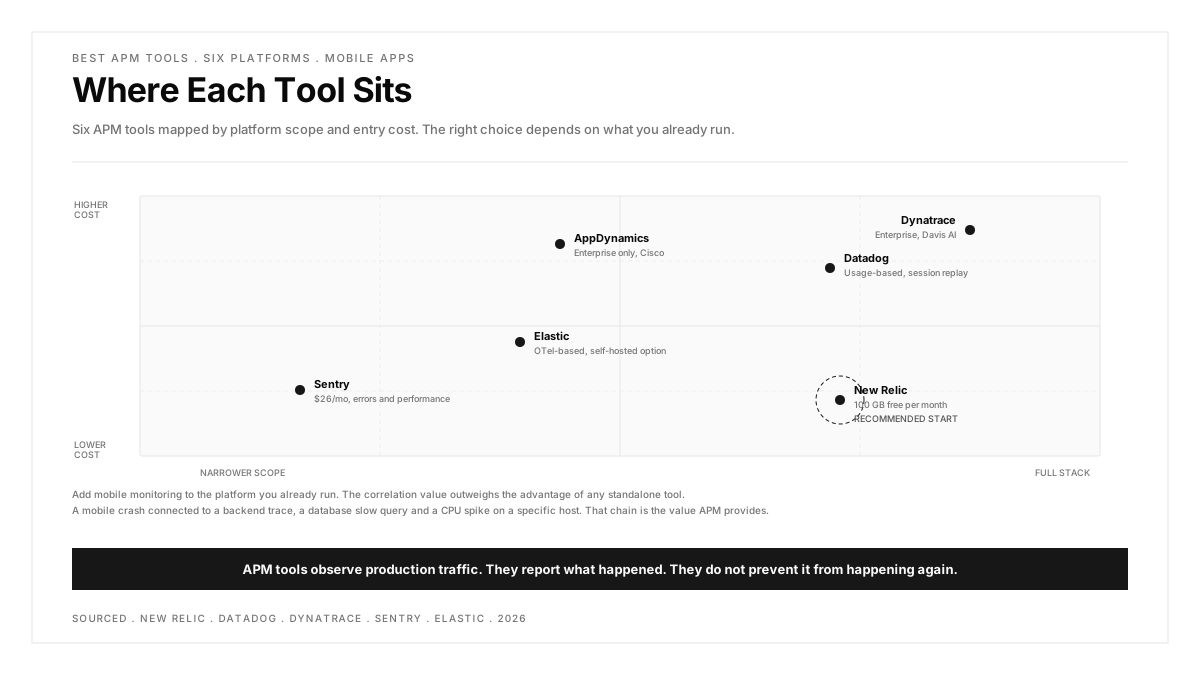
If you already run one of these platforms: Add mobile to the platform you have. The correlation value (seeing a mobile crash connected to a backend trace) outweighs the marginal advantage of any standalone mobile tool.
If automated root cause analysis matters: Dynatrace. Davis AI attributes problems to specific deployments, services or infrastructure changes without manual investigation. The value scales with system complexity.
If OpenTelemetry portability matters: Elastic Observability. The OTel-native approach means your instrumentation data is portable across backends, which reduces switching cost if you change platforms later.
Where APM stops and testing starts
APM tools observe production traffic. They report what happened. They do not prevent it from happening again.
A crash that APM catches on Monday becomes a test case that the regression testing suite catches on every subsequent build. That feedback loop, from production observation to pre-release verification, is where APM delivers its highest return.
Testing in production through synthetic monitors and canary deployments bridges the gap: it sends known requests to production and alerts on deviations before real users are affected.
.png)
FAQs
What is the difference between APM and monitoring?
Monitoring is the broader category. It includes infrastructure monitoring (CPU, memory, disk), network monitoring (latency, packet loss) and application monitoring. APM is the application layer specifically: it measures how the application performs from the user's perspective, traces requests across services, and reports errors and crashes. Every APM tool monitors, but not every monitoring tool does APM.
Is New Relic really free for mobile monitoring?
Yes. The free tier includes 100 GB of data ingest per month and access to all capabilities including mobile monitoring. One full platform user is included. The limitation is user count (additional full platform users require a paid edition) and data volume. For a small to mid-size mobile app, 100 GB is sufficient for months of monitoring data.
Can APM tools slow down the mobile app?
Every APM SDK adds overhead: binary size (1 to 5 MB), startup time (milliseconds) and background data transmission. The impact is measurable but small for a single SDK. The risk is stacking multiple SDKs. Two APM tools is unnecessary and wasteful. Choose one platform and commit to it rather than running parallel tools for comparison.
What is OpenTelemetry and why does it matter for APM?
OpenTelemetry (OTel) is an open-source observability framework that standardizes how applications emit metrics, traces and logs. It matters because instrumentation code written for OTel works with any compatible backend (Elastic, Grafana, Datadog, New Relic). Without OTel, instrumentation is locked to one vendor's SDK. With OTel, switching backends requires changing the exporter configuration rather than re-instrumenting the application.
How much APM data does a mobile app generate?
A typical mobile app generates 1 to 10 MB of APM data per active user per month, depending on configuration. Crash reports and error data are small and infrequent. Performance traces and session data are larger and continuous. At 100,000 monthly active users sending 5 MB each, the total is approximately 500 GB per month, which exceeds most free tiers but remains manageable on paid plans.
Should I use the same APM tool for mobile and backend?
Yes, whenever possible. The primary value of APM is tracing a user action from the mobile tap through the API gateway, the backend service, the database query and back. That trace breaks if the mobile and backend tools are different and do not share a trace context. Using one platform for both sides keeps the trace intact and the investigation fast.