
Best UI and UX Testing Tools for Mobile Apps in 2026
The term covers two different jobs. Comparing user research platforms, pixel-diff visual regression, and agents that flag UX problems during an ordinary functional run.
Yuvan Sundrani · 16 min read
autosana.ai
TL;DR
- Autosana flags UX problems during ordinary functional runs, so you find them without recruiting anyone.
- Maze validates prototypes before the code exists, with a free tier and a 7 million participant panel.
- UserTesting is the enterprise standard for moderated and unmoderated research.
- UXtweak is the best value alternative, free to start and priced in euros.
- Lookback prices by session per year rather than per seat, which suits occasional research.
- Optimal owns information architecture testing through card sorting and tree testing.
- Visual regression tools catch rendering change and nothing else.
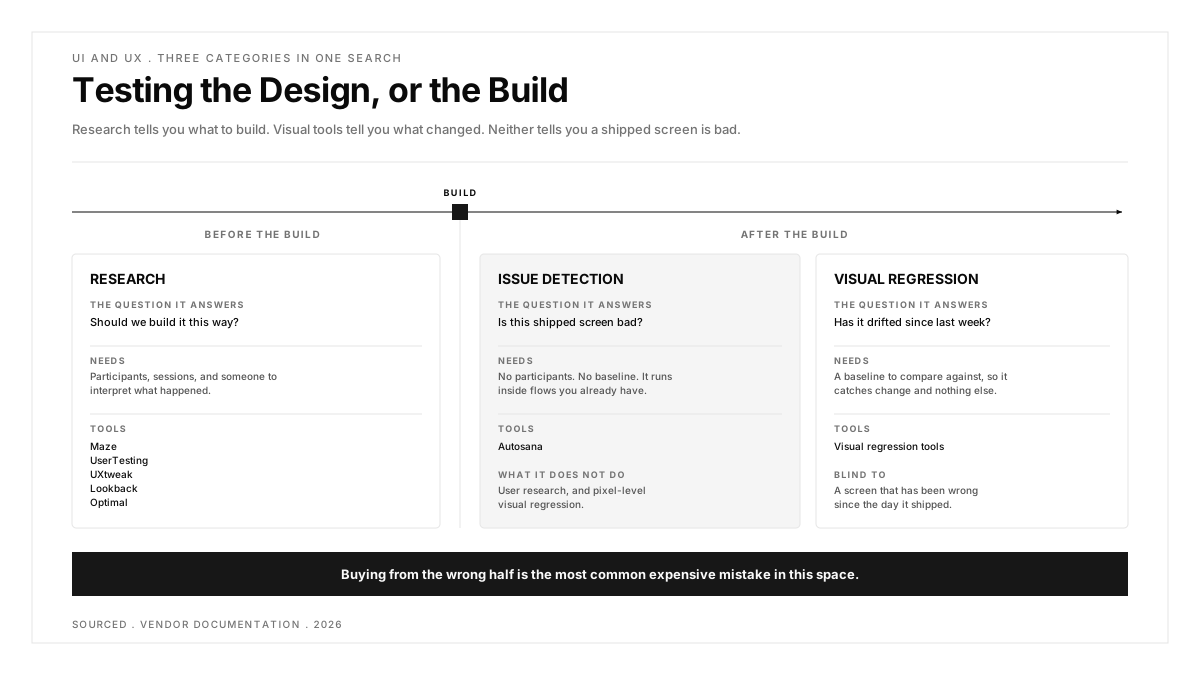
UX testing asks whether people can use the thing. It needs participants, sessions and someone to interpret what happened. UI testing asks whether the thing renders and functions correctly. It needs a pipeline, a baseline and nobody.
A third category sits between them and is the one most teams do not know exists: tools that surface usability problems during tests you were already running, with no participants and no baseline.
Are you testing the design or the build?
The honest answer decides your budget by a factor of ten.
Testing the design happens before or alongside build. Does the navigation make sense, is the label understood, will people find the setting. Maze, UserTesting, UXtweak, Lookback and Optimal all live here, and all of them cost money per participant or per session.
Testing the build happens after. Does it render, does it function, has it drifted from last week. Visual regression and functional automation live here, priced by snapshot or by run.
Testing the build for design problems is the gap: a shipped screen nobody validated and no baseline flags, because it has been wrong since launch. A r/QualityAssurance thread on where a bug ends and bad UX begins, at 2 votes and 12 comments, is teams discovering this category has no owner.
Worth holding onto: research tools tell you what to build, visual tools tell you what changed, and neither tells you that a shipped screen is bad.
| Tool | Category | Needs Participants | Published Entry Price |
|---|---|---|---|
| Autosana | Issue detection during functional runs | No | Per agent-run |
| Maze | Unmoderated research and prototypes | Yes, panel or your own | Free, then $99 per month |
| UserTesting | Moderated and unmoderated research | Yes, large panel | Not published |
| UXtweak | All-in-one research | Yes, panel or your own | Free, then 120 euros |
| Lookback | Live moderated interviews | Yes, bring your own | $299 per year, 10 sessions |
| Optimal | Information architecture | Yes, credit-based | $199 per month |
| Visual regression | Rendering change detection | No | Free to $667 per month |
Which half of this list should you actually be reading?
If your product has not shipped, everything below section 1 is relevant and section 1 is not. If it shipped two years ago and users keep complaining about screens your suite says are fine, section 1 is the only part that addresses it. Teams with both problems should buy one from each half, because a research platform and an issue detector overlap far less than their marketing suggests.
1. Autosana: Best for Finding UX Problems With No Participants and No Baseline
Autosana goes first because it addresses the gap the other six leave open. Issues are generated on every flow run and flag the cause of a failure, a UI or UX improvement, or an unclear test instruction, citing exactly where in the run it happened.
The structure is what makes the output actionable. Every issue carries a severity of critical, major or minor, where only critical fails the test, and a type drawn from functional, UI, UX, performance, state and instructions. Issues then collect into Issue Groups that match on meaning rather than wording, so the same problem seen across different runs, flows, apps and devices arrives as one entry with an occurrence count. Groups land in Critical, UI/UX or Instruction.
The practical effect is that UX findings arrive as a by-product of regression testing you already pay for. No recruitment, no session fee, and the coverage is every screen the suite touches rather than the five a study had budget for.
Now the boundary, because it matters more here than on any other page. Autosana does no pixel-level visual regression, has no baseline image and no approval workflow. It also does no user research: there are no participants, no panel, no recorded interviews and no card sorting. It will never tell you whether your information architecture matches how people think. Everything below section 1 exists because those are real jobs that Autosana does not do.
Wins on: UX findings with no participants and no baseline, severity and type on every issue, semantic grouping across runs and devices, and coverage of every screen the suite touches.
Loses on: no user research of any kind, no pixel-level visual regression, and it cannot tell you what to build before the build exists.
Price: per agent-run, published on the Autosana pricing page.
Reach for it when: the product has shipped, the suite is green, and users are still reporting problems.
2. Maze: Best for Validating a Design Before It Is Built
Maze is where most teams should start research, because the cost of being wrong here is the lowest. It runs unmoderated testing on prototypes, which means you learn the navigation is confusing before anyone writes the screen.
The commercial shape is friendly. There is a genuine free plan for individuals, a tier at $99 per month, and enterprise by quote. Participants come from a global panel of more than 7 million, or you bring your own users at no extra cost, and interview studies are included on the free plan.
Unmoderated is the trade. You get what people did and what they said aloud, and not the follow-up question you would have asked watching live. A r/UXResearch thread on the best unmoderated platform right now, at 3 votes and 23 comments, spends most of its length on exactly that limit.
Wins on: prototype testing before code exists, a real free tier, a published $99 tier, a 7 million participant panel, and bring-your-own participants at no cost.
Loses on: unmoderated only on the lower tiers, so you cannot probe a surprising answer in the moment.
Price: free plan, $99 per month, enterprise by quote.
Reach for it when: the design is still a Figma file and changing it is cheap.
3. UserTesting: Best Enterprise Research Platform
UserTesting is the category incumbent and the one procurement departments already have a vendor record for. It covers both moderated live interviews and unmoderated studies, with deep demographic filtering on a large panel.
It keeps winning enterprise deals on scale and governance rather than any single feature. When a study needs forty participants in three markets next week, this is the platform that delivers them.
Pricing is the known friction. The pricing page carries no figures at any tier, only Contact Us, and a r/userexperience thread weighing UserTesting against UserZoom and other platforms, at 18 votes and 8 comments, is largely people comparing quotes they cannot publish.
Wins on: moderated and unmoderated in one platform, large panel with deep demographic filtering, and the governance an enterprise procurement process expects.
Loses on: no published pricing at any tier, and the entry cost is widely reported as the highest in the category.
Price: not published. Contact Us on every tier.
Reach for it when: research is a funded function with its own budget line and recruitment volume is high.
4. UXtweak: Best Value Across the Widest Set of Study Types
UXtweak is the alternative people name when the incumbent quote arrives. It starts free at 0 euros, with paid tiers published at 120 euros and 1,429 euros, and annual options from 288 euros and 480 euros a year.
Breadth is the argument. One platform covers prototype testing, website testing, card sorting, tree testing and mobile app analysis, where the alternative is two or three subscriptions. Moderated study counts are the tier lever: lower plans cap concurrent studies and include twelve moderated studies, higher plans make them unlimited.
Participant recruitment is priced separately in bundles, at 1,438 euros a year per 120 participants, which is the line most often missed when comparing the headline figure against Maze.
Wins on: genuinely free entry, published euro pricing at every tier, and prototype, website, card sorting, tree testing and mobile analysis in one subscription.
Loses on: recruitment is a separate bundle on top of the plan, and concurrent study limits bite on the lower tiers.
Price: free at 0 euros, paid tiers from 120 euros, annual options from 288 euros a year, participants in bundles.
Reach for it when: you need several study types and the incumbent quote does not survive your budget.
5. Lookback: Best Pricing Model for Occasional Research
Lookback prices differently from everything else here and that is the reason to consider it. Freelance is $299 a year for 10 sessions, then $1,782 a year for 100 sessions and $4,122 a year for 300, with unlimited by arrangement. Every tier includes bringing your own participants at no extra cost.
Per session per year, rather than per seat per month, matches how most product teams actually work: three studies a quarter rather than continuous research. A per-seat subscription idles between studies and a session bundle does not.
The platform is tuned for live qualitative work, letting a researcher converse with a participant while recording the on-screen interaction, which is exactly the thing unmoderated tools cannot do. A r/userexperience thread comparing remote testing tools including Lookback is the usual starting point for that comparison.
Wins on: session-based annual pricing that matches intermittent research, a low $299 entry, bring-your-own participants free on every tier, and strong live moderated tooling.
Loses on: you supply the participants, so there is no panel to draw on, and sessions are a hard allowance rather than a soft limit.
Price: $299 a year for 10 sessions, $1,782 for 100, $4,122 for 300, unlimited by contact.
Reach for it when: you run a few studies a quarter and already know who to invite.
6. Optimal: Best for Information Architecture
Optimal, formerly Optimal Workshop, is the specialist nobody replaces. Card sorting and tree testing answer a question no other tool on this list touches: does your navigation match the mental model people actually hold.
Pricing starts at $199 a month, and the structure is unusually buyer-friendly in one respect: all tools and study types are available on every plan, with the tier controlling how many studies you launch per year rather than which features you get. The entry plan allows five studies launched per year. Participants are credit-based, one credit each through Standard Recruitment, with Managed Recruitment quoted separately.
The scope is narrow by design. It is where you find out that the setting everyone complains about is filed under a heading nobody would ever open.
Wins on: card sorting and tree testing done properly, all study types on every plan, and published $199 entry pricing.
Loses on: narrow scope, a five-study annual allowance on the entry plan, and participant credits priced on top.
Price: from $199 a month, five studies launched per year on the entry plan, participants by credit.
Reach for it when: people cannot find things and you need to know where they looked instead.
7. Visual Regression Tools: Best for Catching What Changed
The automated half of this search term belongs to a different comparison. Applitools, Percy, Chromatic and BackstopJS all compare the rendered screen to a stored baseline and report the difference, and axe DevTools does the equivalent for accessibility rules.
Pricing spans the widest range on this page: BackstopJS is free under MIT, Percy and Chromatic both start free at 5,000 images a month, and Applitools Starter is $667 a month paid annually.
The structural limit is the same for all of them and worth repeating here. A baseline captures what the screen looked like, not whether it was any good. A screen that has been wrong since launch becomes the approved baseline, and every future run confirms it.
We compare these five in detail, including where each one breaks down, in tools that catch UX problems a passing test hides. If the automated half is the half you need, read that page rather than this one.
Wins on: catching rendering regressions with no human in the loop, a free entry point in three of the five, and full CI integration.
Loses on: change detection only, review fatigue at scale, and a bad screen becomes the baseline.
Price: free under MIT for BackstopJS, free tiers on Percy and Chromatic, $667 a month for Applitools Starter.
Reach for it when: the screens were right and you need to know the moment they stop being right.
Which approach fits your situation?
The design is still a prototype. Maze, because fixing a Figma file costs nothing and fixing a shipped screen costs a sprint.
Research is a funded function. UserTesting, with the quote conversation started early.
You need several study types on a real budget. UXtweak, remembering that participant bundles are priced on top.
You run three studies a quarter. Lookback, for session-based annual pricing that does not idle.
People cannot find things. Optimal, for tree testing, which is the only tool here that answers that question.
The screens were right and may have drifted. A visual regression tool, compared properly in the companion guide.
The product shipped and users are unhappy with screens your tests say are fine. Autosana, because that gap belongs to neither research nor visual regression.
Do not buy two tools from the same half. Two research platforms duplicate recruitment, and two visual tools split the diff review nobody has time for. One from each half is the pairing that works.
Conclusion
This search term is really two searches wearing one phrase, and the cost of answering the wrong one is a year of budget spent on a problem you did not have.
Decide first whether you are validating a decision or verifying a build. If the design is unsettled, research is cheap and delay is expensive. If the build has shipped and the suite is green while users are not, neither research nor a baseline will find it, and that is the gap worth closing first.
.png)
Frequently asked questions
What is the difference between UI testing and UX testing?
UI testing checks that the interface renders and functions correctly, which is automatable and needs no participants. UX testing checks whether people can actually use it, which needs participants, sessions and interpretation. They share a search term and almost nothing else.
Which UX testing tool is cheapest to start with?
Maze and UXtweak both have genuine free tiers, and Lookback's $299 a year for 10 sessions is the lowest paid entry point. Optimal starts at $199 a month and UserTesting publishes no figures at all.
Can you test UX without recruiting participants?
Partly. You cannot learn whether a concept makes sense without asking someone. You can detect usability problems on screens that already exist, by having an agent flag them during functional runs, which is what Autosana Issues does and what no research platform does.
Does Autosana replace a user research platform?
No. Autosana runs no studies, has no participant panel, records no interviews and does no card sorting. It finds usability problems on screens that exist. Deciding what to build still needs Maze, UserTesting, UXtweak, Lookback or Optimal.
Does Autosana do visual regression testing?
No. There is no baseline image, no pixel diff and no approval workflow. Applitools, Percy, Chromatic and BackstopJS are the tools built for that, and they are compared in the companion guide.
What is tree testing and do you need it?
Tree testing presents your navigation structure without any visual design and asks people to find something, which isolates whether the structure works from whether the page looks good. You need it when users say they cannot find a feature that is plainly there.
How many participants does a usability study need?
Fewer than teams expect for finding problems and more than they expect for measuring anything. Five participants surface most severe usability issues in a flow. Any claim about percentages or preferences needs a sample large enough to survive scrutiny.
Should mobile UX testing use real devices?
For anything involving touch targets, one-handed reach, keyboard overlap or notification interruption, yes. Those are the defects that only appear on hardware, and a desktop browser emulating a phone viewport reproduces none of them.