
React Native E2E Testing: Setup, Examples and Tools
A practical guide to React Native E2E testing: release builds, Detox vs Appium vs Autosana, worked failure examples, CI setup and fixes for flaky runs.
- Written by
- Gautam Agarwal
- Read time
- 10 min read
- Published
Quick answer: React Native E2E testing runs your release build on a simulator, emulator or phone and drives it the way a user would, tapping, typing and checking what appears on screen. It proves that sign up, login, payments and your core feature work in the app people install.
If you have ever handed your phone to a friend and watched them sign up for your app, you have run an end to end test. The automated version repeats that walkthrough on every build, on iOS and Android, and records the exact step where the journey breaks.
Key Takeaways
- Run E2E tests against a release build: the React Native docs recommend it, and Autosana requires Release mode because debug builds look for the Metro bundler.
- Component tests run in Node.js, so only E2E tests exercise the iOS and Android code behind your components.
- Detox and Appium are free frameworks; Autosana swaps selectors for a written flow.
- Cover 3 to 5 vital journeys first: sign up, login, the core action and payments.
- Most failing E2E runs trace back to four causes: debug builds, timing, renamed testID values and shared test data.
What is React Native E2E testing?
React Native E2E testing checks a complete user journey inside a running app. The React Native testing guide describes the shift well: at this layer you stop thinking about components, stores and business logic, and you work only with what appears on screen.
Every E2E test follows the same three steps:
- Build. Produce a release build for iOS (.app) and Android (.apk).
- Drive. Launch it on a device and perform the user's actions.
- Assert. Confirm the expected screen, text or state appears.
That spine holds for one login test or a 200 flow suite.
E2E testing compared with other React Native tests
| Test type | What it checks | Runs on | Common tool |
|---|---|---|---|
| Static analysis | Type and lint errors as you write code | Your editor | TypeScript, ESLint |
| Unit | One function or class | Node.js | Jest |
| Integration | Several modules working together | Node.js | Jest |
| Component | A component's rendering and interactions | Node.js | React Native Testing Library |
| End to end | A full user journey in the built app | Simulator, emulator or phone | Detox, Appium, Autosana |
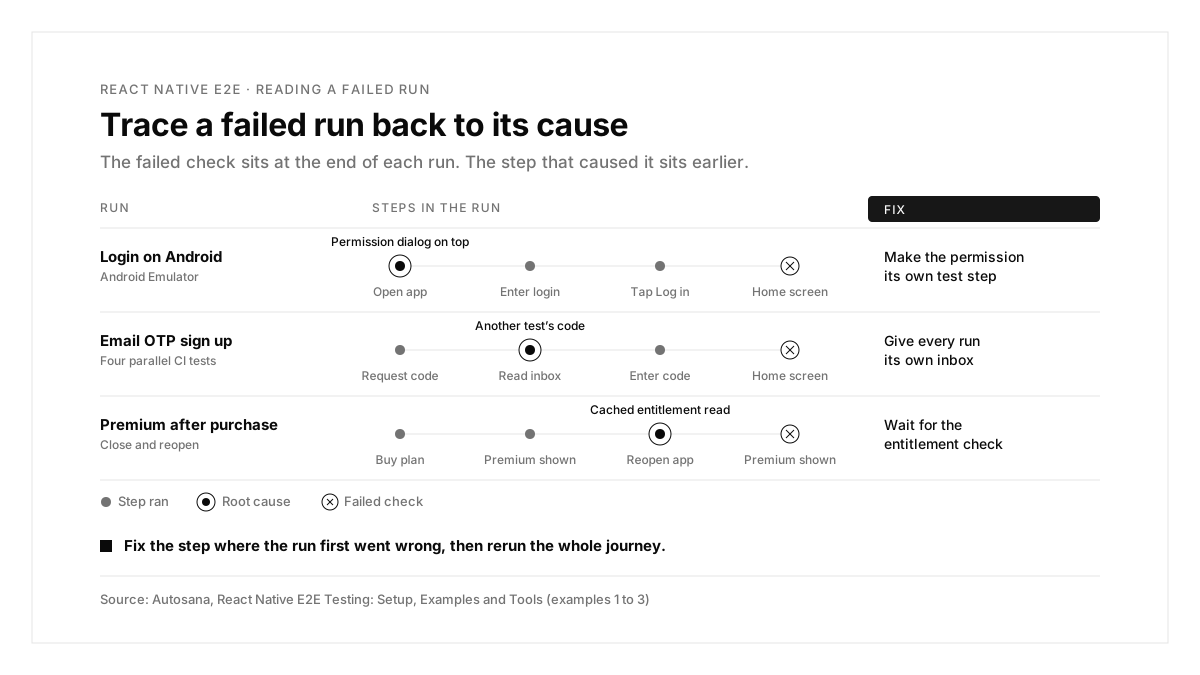
Every layer above the last row runs in Node.js. This ranking of mobile app testing tools shows where each one fits.
Why E2E testing matters for React Native apps
Component tests stop at the JavaScript layer. They run in Node.js, so bugs in the iOS or Android code behind a component stay hidden from them.
The release build behaves differently. It bundles JavaScript into the binary instead of loading it from Metro.
One codebase ships two apps. Permission prompts, keyboards and back navigation differ between iOS and Android.
Detox vs Appium vs Autosana: which tool fits?
| Detox | Appium | Autosana | |
|---|---|---|---|
| Test format | JavaScript with Jest | Client code in several languages | A written flow, in YAML or the dashboard |
| Finding elements | testID, text or label matchers | Locators such as accessibility IDs and XPath | The agent reads the live screen |
| Waiting | Gray box sync with your app's async work | Explicit waits you write | The agent interacts the way a user does |
| Devices | Simulators, emulators, real devices | Simulators, emulators, real devices | Cloud virtual and physical devices, plus your local ones |
| Pull request feedback | Your CI job and reporter | Your CI job and reporter | A PR comment with videos plus a GitHub Check |
| Cost | Free, open source | Free, open source | Free tier, then paid plans |
The Detox GitHub repository and the Detox documentation explain its gray box approach: access to the app's internals makes runs more predictable. Detox fits JavaScript teams, Appium fits mixed native and React Native suites, and Autosana fits teams shipping weekly who want flows that adapt to UI changes.
How to set up React Native E2E testing
Step 1: Create a release build
# iOS simulator build
npx react-native run-ios --mode Release
# Android release APK
cd android && ./gradlew assembleRelease
# output: android/app/build/outputs/apk/release/app-release.apk
Expo projects produce both artifacts with EAS Build.
With Autosana: Release mode is a requirement, since a debug build tries to reach Metro and fails on a cloud device. Upload with autosana builds upload MyApp.app; the CLI accepts a simulator .app, an .ipa for real devices and an Android .apk.
Step 2: Write your first test
A Detox login test targets each element through its testID prop:
describe('Login', () => {
it('shows the home screen after login', async () => {
await element(by.id('email-input')).typeText('test@example.com');
await element(by.id('password-input')).typeText('secret123');
await element(by.id('login-button')).tap();
await expect(element(by.text('Home'))).toBeVisible();
});
});
The same journey as an Autosana flow:
```yaml
# .autosana/login.flow.yaml
name: Login
instructions: |
Log in with test@example.com and password secret123.
Verify the home screen loads.
```
With Autosana: a flow describes what the user does and what they should see. The only required keys are name and instructions, the file lives in your repo under .autosana/, and autosana flows validate catches typos before you push.
Step 3: Run tests locally
With Detox, run detox build and then detox test against the configuration you defined for your simulator or emulator.
With Autosana: boot a device, then run:
autosana up --platform ios
autosana run login --local
The CLI detects every booted device, so an iOS Simulator and an Android Emulator run the same flow in one pass. This guide to Android emulator setup covers the first step. Coding agents use the same path: tell Claude Code or Cursor "Build the feature. Test it locally using Autosana and fix anything that fails." The Autosana local testing docs list every supported target.
Step 4: Run tests on every pull request
A Detox CI job runs both commands on each push, using a macOS runner for iOS.
With Autosana: add the GitHub Action after your build step:
```yaml
- uses: autosana/autosana-ci@main
with:
api-key: ${{ secrets.AUTOSANA_KEY }}
bundle-id: com.company.app
platform: android
build-path: android/app/build/outputs/apk/release/app-release.apk
labels: smoke
```
The Autosana GitHub bot then reads the PR diff, selects or writes the relevant flows, runs them in parallel and posts a comment with videos plus a GitHub Check. Expo teams can upload straight from an EAS build hook and save CI minutes.
React Native E2E testing examples
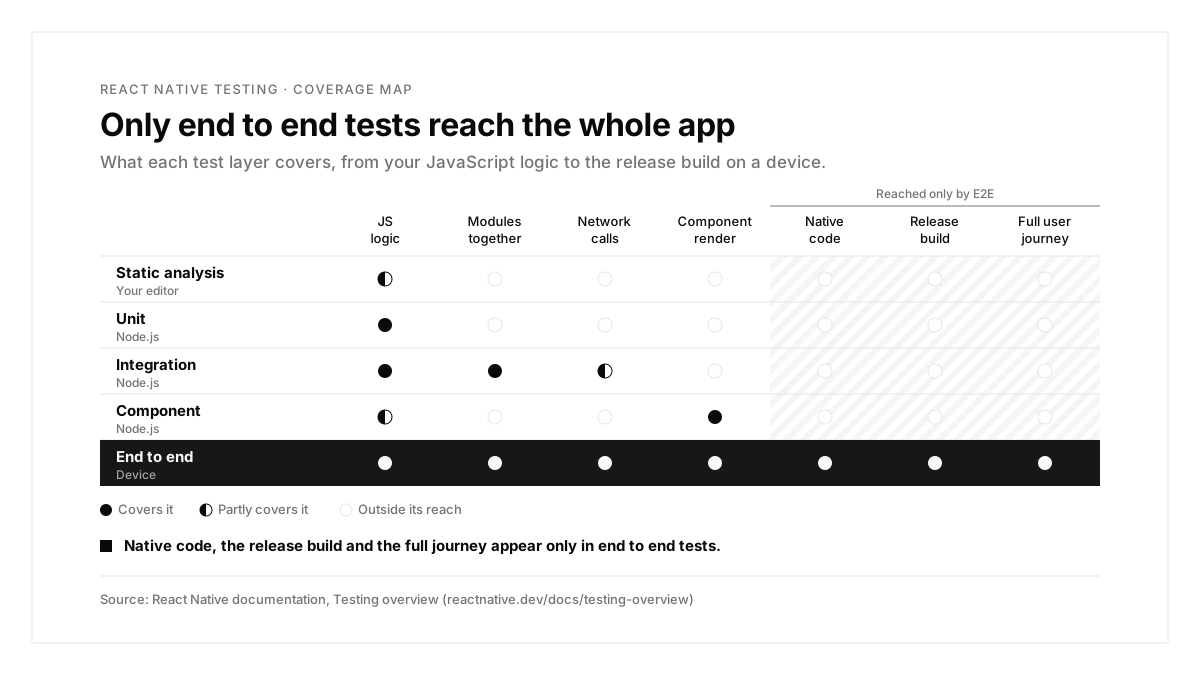
Each example starts from a failing run and traces it to a cause and a fix.
Example 1: Login passes on iOS and fails on Android
Scenario: after a release adds push notifications, login passes on the iOS Simulator and fails on the Android Emulator.
| Step | Expected | What the Android run showed |
|---|---|---|
| Open the app on a fresh install | Login screen | Login screen with a notification permission dialog on top |
| Enter email and password | Fields filled | Text typed behind the dialog |
| Tap "Log in" | Home screen | Login screen |
Cause: Android 13 and later ask for notification permission at runtime, and the new build requests it at launch.
Fix: make the permission choice its own test step, and cover both answers.
With Autosana: every run records a video, so the dialog shows in the first seconds of the failed run on the PR. This walkthrough of push notification testing covers permission, delivery and the tap.
Example 2: Email OTP sign up fails only in CI
Scenario: the sign up test passes locally and fails when four tests run in parallel in CI.
| Step | Expected | What the CI run showed |
|---|---|---|
| Request a code | Email sent | Email sent |
| Read the inbox | This user's newest code | Another test's newer code |
| Enter the code | Home screen | "Wrong code" error |
Cause: four tests share one inbox and read the newest email.
Fix: give every run its own address and read only the mail sent to it.
With Autosana: attach the built in Lease email address hook. Each run gets a fresh inbox in AUTOSANA_EMAIL_ADDRESS, reads only the codes sent there, and types the code in for you:
1. Tap "Continue with email"
2. Sign in with email: $AUTOSANA_EMAIL_ADDRESS
3. Enter the code from the inbox
Test passes if you reach the home screen.
SMS codes work through a leased phone number; see this guide to OTP testing.
Example 3: Premium access resets after reopening the app
Scenario: the purchase passes, then reopening the app fails.
| Step | Expected | What the run showed |
|---|---|---|
| Buy the monthly plan | Premium screen | Premium screen |
| Close and reopen the app | Premium screen | Paywall |
| Wait five seconds | Premium screen | Premium screen |
Cause: the launch screen reads a cached entitlement before the purchase SDK refreshes the customer's status.
Fix: hold a loading state until the entitlement check finishes, then route the user.
With Autosana: with RevenueCat Test Store, the agent selects a successful, failed or cancelled purchase in the test dialog and checks entitlement state after the app reopens. Test Store keys begin with test_, so keep them in dedicated test builds and ship store builds with your platform keys.
How to keep a React Native E2E suite fast and stable
Group tests by journey. Separate suites for login, checkout and onboarding point each failure at one area. Autosana suites group related flows, and labels let CI run a subset such as smoke.
Run the right tests at the right time. Run a smoke set on every pull request and the full suite nightly. Autosana automations schedule flows daily, weekly or on every new build.
Watch more than pass or fail. Autosana records memory, CPU and rendering metrics plus every network request in a run, and its Issues view flags app bugs and UX suggestions found along the way.
Common React Native E2E problems and fixes
| Symptom | Likely cause | Fix |
|---|---|---|
| Red screen mentioning Metro | A debug build is installed | Rebuild in Release mode |
| Passes locally, fails in CI | Timing on slower machines | Rely on Detox sync or explicit waits; Autosana's agent acts the way a user does |
| Dozens of tests fail after a refactor | Renamed or moved testID values | Keep IDs stable, or describe journeys; Autosana flows adapt while the user journey stays intact |
| Random failures in parallel runs | Shared accounts or inboxes | Give each run its own data |
| Cloud simulator rejects the iOS build | An Xcode Archive device build | Build for a Simulator destination |
The React Native E2E process, summarized
| Step | What you do | Output |
|---|---|---|
| 1. Build | Create release builds for iOS and Android | .app and .apk |
| 2. Write | Cover each vital journey | Login, core action and payment tests |
| 3. Run locally | Run on a simulator and an emulator | A passing first run |
| 4. Automate | Run on every pull request | Results attached to each PR |
| 5. Diagnose | Trace each failure from symptom to cause | A fix in the app or the test |
| 6. Scale | Group, schedule and isolate tests | A fast, stable suite |
Conclusion
React Native E2E testing covers what unit and component tests leave open: the real release build, running native code on both platforms. Build in Release mode, test vital journeys first, and trace every failing run from symptom to cause.
A good first step this week: write your login journey as one Autosana flow and run it on an iOS Simulator and an Android Emulator side by side.
FAQs
Is Detox better than Appium for React Native?
Detox suits React Native specifically through gray box sync, while Appium covers native and cross platform stacks more broadly.
Can Jest run React Native E2E tests?
Jest serves as Detox's test runner, so Jest plus Detox gives you full E2E tests on devices.
Can you test Expo apps end to end?
Yes. Build a simulator .app and an .apk with EAS Build, then run your E2E tool against them.
Do React Native E2E tests need a release build?
Yes. Release builds bundle your JavaScript, so they match exactly what your users install.
How many E2E tests should a React Native app have?
Start with 3 to 5 vital journeys: sign up, login, the core action and payment.
Can a coding agent run React Native E2E tests?
Yes. Through Autosana's MCP server or CLI, Claude Code and Cursor can run flows and fix failures.