
9 Best Mobile App Testing Tools in 2026 (Ranked and Compared for iOS + Android Teams)
Mobile testing splits into authoring, execution, and infrastructure layers where AI-native tools like Autosana disrupt traditional human-maintained frameworks. While tools like Maestro or Appium still dominate execution, AI agents are taking over authoring to eliminate maintenance bottlenecks.
Yuvan Sundrani · 20 min read
autosana.ai
Key Takeaways
- Mobile testing has three layers: authoring (write test), execution (run it), and infrastructure (which device). The right tool depends on which layer is costing you the most engineer-hours.
- Autosana is an AI-native pick at the authoring layer an agent runs your iOS, Android, and web app by intent (not selectors), self-heals when UI changes, and closes the loop with coding agents like Cursor and Claude Code.
- Open-source automation frameworks (Appium, Maestro, Detox, XCUITest, and Espresso) still dominate the execution layer, each with a different trade-off on setup speed, flakiness, and platform coverage.
- Real-device clouds (BrowserStack, Sauce Labs, and Kobiton) solve infrastructure layer device fragmentation, the iOS/Android version matrix, biometric injection, and GPS mocking that no framework alone covers.
- Autosana handles the authoring layer natively; an AI agent runs flow across iOS + Android + web, self-heals on UI change, records the session, and posts the result back to PR without a test author touching selectors.
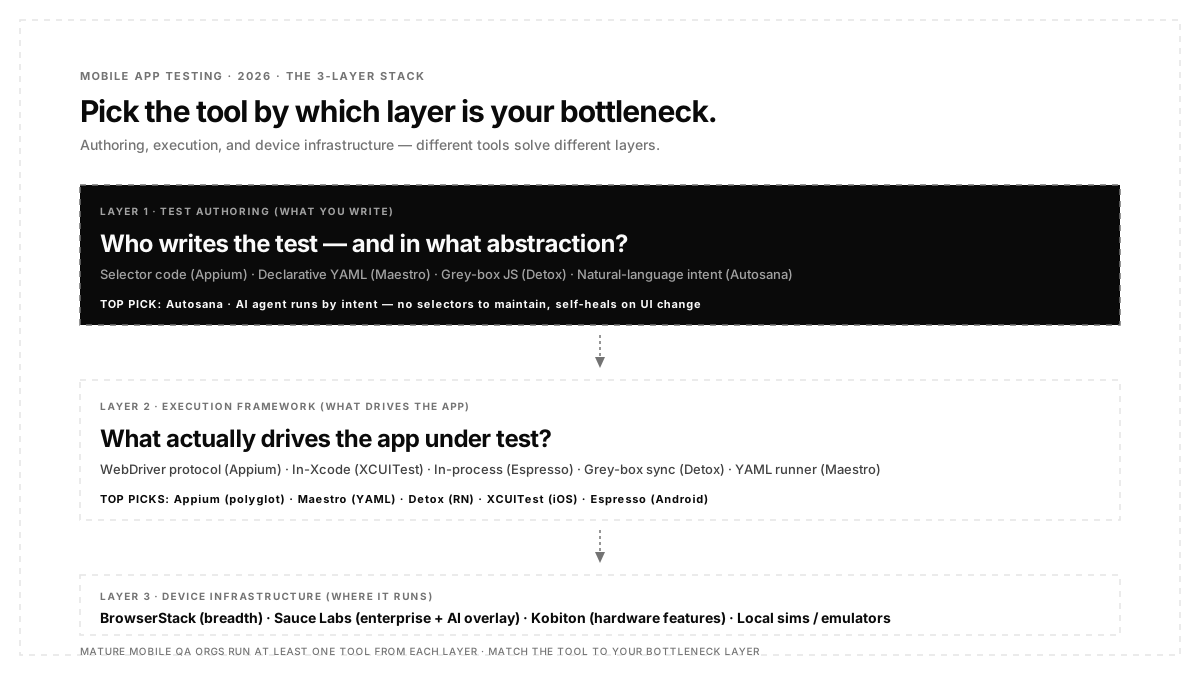
The three layers of a modern mobile testing stack
Before you pick a tool, know which layer your team's bottleneck actually sits in. Every "best of" listicle mixes layers together, which is why teams end up buying overlapping tools that solve different problems.
- Layer 1: Test authoring. Who writes the test, and in what language/abstraction? Selector-based code (Appium, Espresso), declarative YAML (Maestro), grey-box JS (Detox), or natural-language intent (Autosana).
- Layer 2: Execution frameworks. What actually drives an app? Appium's WebDriver protocol, XCUITest's in-Xcode runner, Espresso's in-process runner, or an AI agent that plans against the current screen.
- Layer 3: Device infrastructure. Where do tests run? Local emulators, cloud simulators, or real physical devices at scale (BrowserStack, Sauce Labs, Kobiton). This is orthogonal to the framework; you can run Appium tests on BrowserStack, or Autosana runs on its own hosted device layer.
If your bottleneck is authoring speed and maintenance cost, you want an AI-native tool. If it's execution stability, you want a native framework. If it's device coverage, you want a cloud. Most enterprise teams need at least one tool from each layer.
Quick comparison of 9 ranked tools
| Rank | Tool | Layer | Platforms | Free? | When to Pick |
|---|---|---|---|---|---|
| 1 | Autosana | Authoring + hosted execution + hosted devices | iOS + Android + Web | Trial + paid | Selector maintenance is pain and you ship weekly with coding agents in loop |
| 2 | Appium | Execution framework | iOS + Android + Web + Windows | ✓ | Multi-language QA teams, existing WebDriver ecosystem |
| 3 | Maestro | Authoring (declarative) | iOS + Android | ✓ + paid cloud | Fast happy-path smoke tests, YAML flows |
| 4 | Detox | Authoring + execution (grey-box) | React Native only | ✓ | React Native apps where flake is your #1 pain |
| 5 | XCUITest | Native execution | iOS only | ✓ | Native iOS teams that own their Xcode setup |
| 6 | Espresso | Native execution | Android only | ✓ | Native Android teams with dev-owned suites |
| 7 | BrowserStackApp Automate | Device cloud | iOS + Android real devices | Paid | Massive device matrix coverage, existing framework in place |
| 8 | Sauce Labs | Device cloud + AI (AURA) | iOS + Android real devices | Paid | Enterprise release assurance with self-healing overlay |
| 9 | Kobiton | Real-device cloud + hardware features | iOS + Android real devices | Paid | Biometric injection, GPS mocking, hardware-in-the-loop testing |
Notice categorization is by layer, not by feature checklist. Tools 7–9 (device clouds) aren't really competitors to tools 2–6 (frameworks); they're infrastructure those frameworks run on. Autosana at rank 1 spans all three layers because it's a hosted product: it authors, executes, and provides the device layer under one surface.
1. Autosana: AI-native pick
Best for: Teams that want the whole mobile testing stack authoring + execution + hosted devices collapsed into one product, especially when coding agents are opening PRs faster than a human can author tests.
Autosana is a cloud-hosted AI agent that tests iOS, Android, and web apps the way a real user would. You describe a flow in natural language or hand agent a code diff, and it opens your build, navigates by intent, and confirms the outcome. There are no selectors to author, no locators to maintain, and no capability tuning. When UI changes, the agent re-anchors to whatever button now says "Continue" instead of "Next." That mechanism running by intent rather than by pinned locator is what separates Autosana structurally from every other tool on this list.
Key features:
- Natural-language test authoring: no code, no YAML (see features overview)
- Self-healing on UI change agent replans against current screen each run
- iOS + Android + Web parity from a single test authoring surface
- Cloud-hosted real device testing no WebDriverAgent, no capabilities, no provisioning
- Session replay video posted to every PR via GitHub integration
- MCP server for coding-agent integration (Cursor / Claude Code / Devin can invoke a run)
- Framework-agnostic: React Native, Flutter, Swift, Kotlin, mobile web
Pricing: On request via Book a Demo. The paid unit is agent-run, not per-seat.
Pick Autosana if your bottleneck is at the authoring layer, selector maintenance is eating engineer-hours, and your PR volume is climbing because coding agents are writing more code than humans can test. First run under ten minutes via quickstart. Public customer stories, including Gobi Maps case study, show what production adoption looks like.
2. Appium: Open-source workhorse
Best for: Cross-platform QA teams with dedicated automation engineers who need language flexibility and existing WebDriver infrastructure.
Appium is an industry-standard open-source mobile automation framework. It wraps XCUITest (iOS) and UIAutomator (Android) under a WebDriver-based API and supports Java, Python, JavaScript, Ruby, C#, and PHP. If you've written mobile tests professionally in the last decade, you've probably touched Appium.
Key features:
- iOS + Android + Web + Windows coverage under one API
- Multi-language support for every major language, native
- Appium 2.0 introduced modular driver architecture + plugin ecosystem
- Deep community support and mature Page Object Model patterns
- Runs on real devices, simulators, and cloud farms
Pricing: Free (open source). Device execution costs live in whatever cloud farm you plug into (BrowserStack, Sauce Labs, or Kobiton).
Limitations: WebDriver Agent rebuilds on iOS updates, selector fragility on modern SPAs, and brittle Object Spy on iOS across Xcode versions. Practitioners on r/softwaretesting put it precisely: "Stop writing scripted tests for the long tail; that's where Appium maintenance compounds fastest."
Pick Appium if your team is polyglot and multi-platform, and you have dedicated engineers who can absorb the maintenance profile.
3. Maestro: YAML flows, the fastest setup
Best for: Small teams that need happy-path smoke tests running in an afternoon.
Maestro is an open-source mobile testing framework by Mobile.dev. Instead of code, you write flows in YAML, one line per user action, one binary to install, iOS + Android from a single file. Setup that took Appium a week takes Maestro under an hour. That fact alone explains most of Maestro's adoption momentum in 2026.
Key features:
- YAML flows (tapOn, assertVisible, inputText)
- Single CLI binary install and run in minutes
- Cross-platform (iOS + Android) with same flow file
- Growing agentic tooling + MCP server per Mobile.dev
- Free open source + Maestro Cloud paid tier for hosted runs
Pricing: Free (Apache 2.0). Maestro Cloud pricing on request.
Limitations: Conditional logic and dynamic loops hit a ceiling fast. Practitioners on r/softwaretesting captured trade honestly: "Maestro is perfect for cross-platform React Native" alongside the honest counterpoint that it "gets you into what I call 'closure' hell" on complex flows.
Pick Maestro if you need happy-path smoke tests fast on a small team, and you're not writing tests with heavy conditional logic yet.
4. Detox: React Native specialist
Best for: React Native teams where flake is your #1 complaint.
Detox is a grey-box E2E testing library built by Wix specifically for React Native apps. Grey-box means it synchronizes with the app's internals; it knows when animations finish, when async requests complete, and when the bridge idles. That eliminates the largest single source of mobile test flake. A Redditor on r/softwaretesting captured why teams pick it: "It looks into the app's internals so it knows when animations and async stuff finish… which is like 80% of why mobile tests end up flaky in the first place."
Key features:
- Grey-box synchronization eliminates most timing-based flake
- iOS + Android from one test file, JavaScript / TypeScript
- Tightly integrated with React Native's build system
- Free (Apache 2.0)
Pricing: Free.
Limitations: React Native only. Set up couples tightly to build config. Reanimated worklets and Fabric edge cases can trip synchronization heuristics. Selectors still exist. Detox reduces flake from timing, not from selector churn.
Pick Detox if you're on React Native and your Appium suite's flake comes from bad synchronization rather than bad selectors.
5. XCUITest: Apple's native iOS framework
Best for: Native iOS teams that own their Xcode setup.
XCUITest is Apple's UI automation framework for iOS, tvOS, and macOS apps. Runs on the accessibility layer, integrates directly into Xcode, Swift-first authoring and first-party Xcode Cloud CI. It's the underlying layer Appium's iOS driver actually calls. When you pick XCUITest over Appium, you're removing WebDriver abstraction and calling XCUITest directly.
Key features:
- Native Swift authoring inside Xcode
- Accessibility-layer element identification
- First-party CI support via Xcode Cloud
- Runs against simulators or real devices via xcrun
Pricing: Free (bundled with Xcode).
Limitations: IOS only. Swift-only authoring. An experienced XCUITest author on r/QualityAssurance captured the learning-resource gap: "Most courses I've found either cover Appium instead, are built for outdated Xcode, or only scratch surface in under 2 hours."
Pick XCUITest if you're iOS-only, Swift-fluent, and want first-party Xcode Cloud CI.
6. Espresso: Google's native Android framework
Best for: Native Android teams with strong developer ownership of the test suite.
Espresso is Google's official UI testing framework for Android. Runs in-process with app under test, near-zero synchronization overhead via IdlingResource, first-class Kotlin support, and the foundation Google itself uses. The consensus on r/softwaretesting is direct: "Espresso and XCUITest mostly. Targeting real devices for daily runs."
Key features:
- Runs in-process with no separate driver, no server, no capability tuning
- Automatic UI synchronization via IdlingResource
- Deep integration with Android Studio (recorder + debugger)
- Kotlin-first with Compose testing support
Pricing: Free (Apache 2.0, bundled with Android SDK).
Limitations: Android only. In-process design makes cross-app flows harder. UIAutomator complements it for system-level actions.
Pick Espresso if you're Android-only and the developers own the test suite.
7. BrowserStack: App Automate device cloud standard
Best for: teams with an existing Appium/Espresso/XCUITest suite that need to scale across an iOS + Android device matrix.
BrowserStack App Automate is a cloud device farm with 30,000+ real iOS and Android devices. It's not a test framework; it's the infrastructure your framework runs on. You point your Appium, XCUITest, Espresso, or Maestro tests at BrowserStack's grid instead of local emulators, get real device coverage at scale, and pay per parallel session.
Key features:
- 30,000+ real iOS + Android devices in cloud
- Native integrations with Appium, XCUITest, Espresso, WebdriverIO, Maestro
- Debugging tools (video, screenshots, device logs)
- CI/CD plugins for Jenkins, GitHub Actions, CircleCI, Bitrise
Pricing: Paid. Plans start around $150/parallel session per month.
Limitations: Not a test framework; you bring your own. Cost scales with parallel sessions. Not an answer if your bottleneck is authoring, only if it's device coverage.
Pick BrowserStack if you have a mature Appium/native suite and need real-device-scale coverage without owning device farm yourself.
8. Sauce Labs: Enterprise cloud
Best for: Enterprise teams that want device cloud plus AI-assisted test authoring under one commercial contract.
Sauce Labs has been a device cloud since 2008; an interesting 2026 addition is AURA, their "AI-Unified Release Assurance" agentic layer that authors, runs, and self-heal mobile UI tests on top of the underlying framework. Comparable in category to Autosana at the AI-native layer, though built on top of Sauce's existing execution stack.
Key features:
- Real-device cloud (iOS + Android)
- AURA agentic AI for autonomous test authoring + healing
- Deep enterprise integrations (SSO, VPN, private clouds)
- Cross-platform (web + mobile) under one contract
Pricing: Enterprise commercial (contact sales).
Limitations: Commercial-only. AURA is newer than device cloud evaluation, which is worth doing on your real app before committing to enterprise pricing.
Pick Sauce Labs if you're an enterprise QA org that wants device cloud and AI-native testing under one vendor contract.
9. Kobiton real device + hardware feature testing
Best for: Apps that rely heavily on real hardware features like biometric authentication, GPS geofencing, and camera/receipt scanning that emulators can't fake.
Kobiton is a real-device cloud with a specialization other clouds don't emphasize: hardware feature injection. Face ID and fingerprint bypass. GPS location mocking for geofencing testing. Camera image injection for receipt scanning flows. Real Bluetooth pairing tests. Not every app needs this but ones that do (banking, delivery, fintech, ride-share) can't test their critical flows without it.
Key features:
- Real iOS + Android device cloud
- Biometric authentication injection (Face ID / Touch ID)
- GPS location mocking for geofencing / location-based apps
- Camera image injection for OCR / receipt / QR scanning
- Scriptless AI test authoring on top of Appium
Pricing: Paid. Custom quotes based on device coverage.
Limitations: Commercial. Narrower than BrowserStack / Sauce Labs for pure general-purpose device coverage.
Pick Kobiton if your app's critical flows depend on hardware features that emulators can't reproduce.
Which mobile testing tool should you actually pick decision by layer
- Authoring layer bottleneck: You're spending too many engineer-hours writing and maintaining tests: Autosana (AI-native) or Maestro (YAML), depending on whether you want selectors gone entirely or just easier to write.
- Execution layer bottleneck tests exist, but they're flaky, slow, or platform-specific: Detox for React Native, Espresso for native Android, and XCUITest for native iOS.
- Infrastructure layer bottleneck tests work locally, but you need real device coverage: BrowserStack for breadth, Sauce Labs for enterprise + AI overlay, Kobiton for hardware features.
- Cross-platform greenfield project Autosana (AI-native, iOS + Android + Web from one surface) or Appium (open-source polyglot).
- Enterprise, mature Appium suite, running two suites for iOS + Android natively, keep Appium at the framework layer, add BrowserStack/Sauce Labs at the device layer, and evaluate Autosana at the authoring layer for high-cost flows.
Match the tool to the specific layer that's your bottleneck. Don't buy a cloud device if your problem is authoring maintenance. Don't buy an AI-native tool if your problem is device fragmentation. Different pains, different layers, different tools.
The migration playbook: How to actually rebuild your mobile testing stack
Rebuilding a mobile testing stack is a project, not a swap. Here's honest sequencing.
- Audit which layer is costing you most engineer-hours. Time-box a two-week measurement of how many hours in authoring, how many in triage, how many in device/capability issues, and how many in flake reruns.
- Sort your existing suite into tiers. Tier A = critical business flows. Tier B = regression coverage. Tier C = long-tail. Most teams delete Tier C and rebuild only what production traffic proves necessary.
- Pick escape by layer. From the decision framework above, use one tool per layer; don't stack overlapping tools.
- Run parallel for one sprint. New tool alongside old. Compare flake rate, run time, and engineer-hours-per-week. The Autosana quickstart walks through the parallel-run pattern.
- Isolate Page Object Models before migrating. Extract application selectors into shared configuration modules so migration becomes a locator swap, not a rewrite.
- Kill old stack on a set date. Passive graveyards eat engineer time. Announce a decommissioning date and stop paying old-tool costs as new suite coverage ramps up.
Conclusion
Mobile testing isn't one tool; it's three layers. Authoring, execution, and infrastructure. Every "best of" listicle that lumps them together is helping you evaluate the wrong axis.
Frequently asked questions
What is the best mobile app testing tool in 2026?
There's no universal winner. Autosana for AI-native authoring + hosted execution + hosted devices under one surface. Appium for open-source polyglot flexibility. Maestro for fast YAML happy paths. Detox for React Native. XCUITest/Espresso for native. BrowserStack / Sauce Labs / Kobiton for real-device cloud infrastructure. Match the tool to the specific layer of your mobile testing stack that's your bottleneck.
What's the difference between mobile testing tools and mobile automation tools?
"Automation tools" is a subset. It covers execution layer frameworks that drive apps (Appium, XCUITest, Detox, etc.). "Testing tools" is broader; it includes automation, a authoring layer (Autosana, Maestro's YAML), and a layerinfrastructure layer (BrowserStack, Sauce Labs, Kobiton). A mature mobile QA org uses at least one tool from each layer.
Can Autosana replace Appium?
For UI-driven mobile E2E flows, yes. Autosana authors and runs the same flows an Appium suite covers, without selectors, capabilities, or WebDriverAgent. For heavy backend chaining (API + database + integration), keep whatever code-first stack you already run. Rule of thumb: if 60%+ of your Appium suite is user-facing UI flows, Autosana replaces it. If it's mostly backend chaining, keep both.
Do I still need a device cloud if I use Autosana?
Not necessarily. Autosana ships with its own hosted device layer, so for most teams there's no separate BrowserStack / Sauce Labs / Kobiton contract required. You'd add a cloud on top of Autosana only if you need very specific hardware features (Kobiton for biometrics / GPS mocking) or very broad legacy device coverage that goes beyond Autosana's version matrix.
What about testRigor, Mabl, and Testim?
Codeless / low-code testing tools that add self-healing on top of existing execution frameworks. Useful if you have non-technical QA staff and can accept commercial pricing. They're heuristic self-healing rather than intent-based agents; they patch selectors that break on cosmetic UI shifts, but they don't structurally solve the selector-maintenance problem way an intent-based agent does.
What's the best mobile testing tool for React Native?
Detox for grey-box execution + Autosana for coding-agent-in-the-loop workflows. Detox's synchronization solves timing flake at framework level; Autosana solves the selector-authoring problem at the agent level. Some RN teams run both Detox for critical flows they've already invested in, Autosana for new flows and coding-agent-driven PRs.
What's the best mobile testing tool for Flutter?
Patrol (Flutter-native, Dart-first) at the execution layer + Flutter's integration_test for widget-level coverage. If you also need cross-platform E2E covering non-Flutter surfaces (web, mobile web), add Autosana at the authoring layer.
How much does mobile testing cost in 2026?
Depends on which layers you buy. Open-source frameworks are free (Appium, Maestro, Detox, Espresso, XCUITest). Device clouds run $150–$3,000+/mo depending on parallel session volume (BrowserStack, Sauce Labs, Kobiton). AI-native tools (Autosana, Sauce Labs AURA) price per agent-run or per-seat via contract. A mid-size mobile team's realistic annual budget spans $10K–$100K depending on scale.
How do teams actually pick their mobile testing stack?
Two common patterns. Small teams pick one authoring + execution tool that also provides devices (Autosana, or Maestro Cloud, or Sauce Labs) and skip multi-vendor complexity. Enterprise teams pick one tool per layer: Autosana or Appium at the authoring layer, XCUITest + Espresso for native, and BrowserStack or Sauce Labs for device coverage. The bigger org, the more layers you'll unbundle.