
Testing Push Notifications on Android: 6 Tools Compared for 2026
Comparing tools for Android push testing: FCM delivery, notification channels, background and killed-app states, and post-OS-upgrade breakage.
Yuvan Sundrani · 15 min read
autosana.ai
TL;DR
- Autosana runs an Android push test from real FCM delivery through to the screen behind the tap.
- Firebase Notifications Composer is the free first-party way to send and read delivery reports.
- Android UI Automator reaches further into the notification shade than anything else here.
- FCM HTTP v1 API is what you script when the send needs to run in a pipeline.
- Appium adds the post-tap assertion if you already maintain a suite.
- adb is the fastest way to inspect channels and permission state on a connected device.
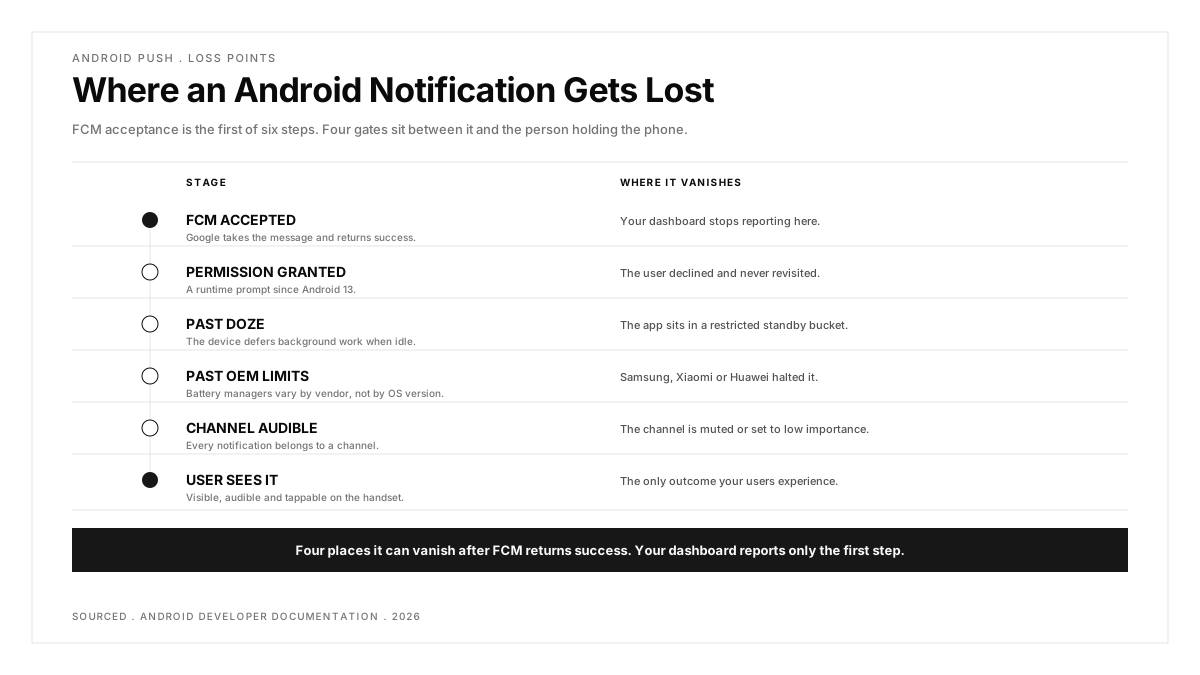
Android push carries complexity that iOS simply does not have. Notification channels let a user silence one category while leaving the others alone, so a notification can be accepted by Google, delivered to the handset, and still be completely invisible to the person holding it.
Then there is battery optimisation, Doze mode, manufacturer-specific background restrictions that differ by vendor rather than by Android version, and since Android 13 a runtime permission the user can simply decline and never revisit.
A send that succeeds tells you very little on this platform. It is the beginning of the question rather than the answer to it.
What makes Android push testing harder than iOS?
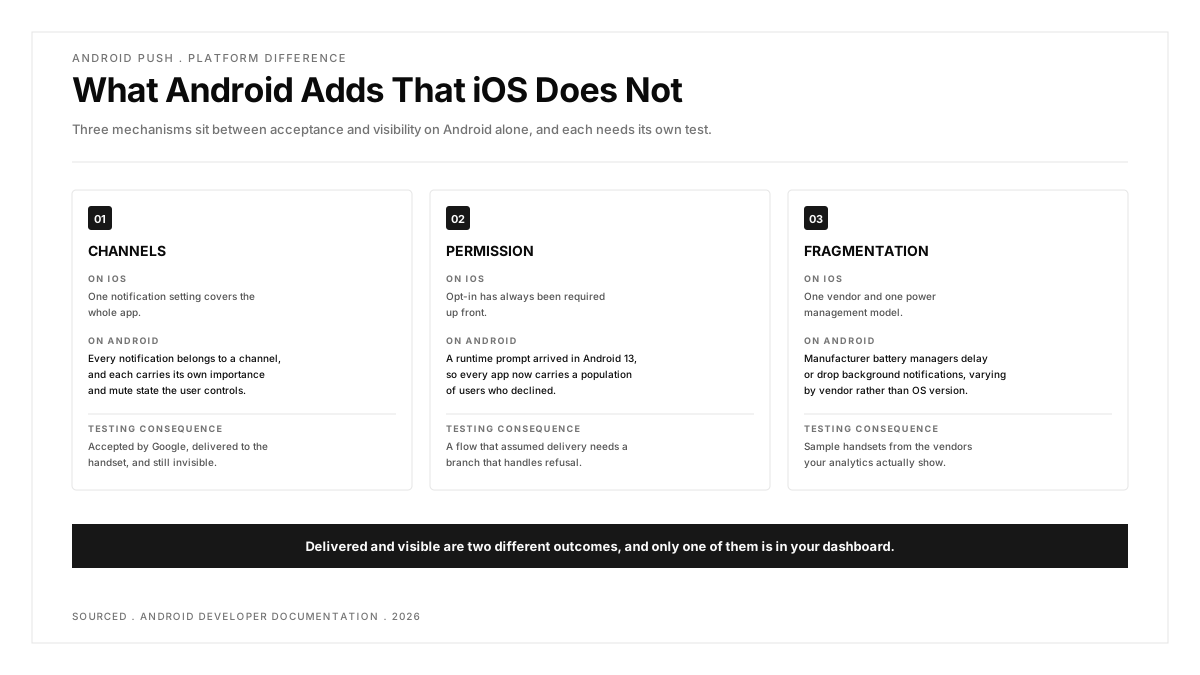
Channels are the first reason. Every notification belongs to one, each channel carries its own importance and sound, and a user can mute any of them individually. The r/androiddev deep dive on notifications, at 199 votes, gives a sense of how much configuration sits behind what looks like a single feature.
Permission is the second. Android 13 turned notification access into a runtime prompt, so every app now has a population of users who declined, and a flow that assumed delivery needs a branch that handles refusal gracefully.
Fragmentation is the third, and it is the one that bites after release. Manufacturer battery optimisation can delay or drop a background notification entirely, and that behaviour varies by vendor rather than by Android version. A r/QualityAssurance thread on maintaining your own emulator infrastructure runs 9 votes and 14 comments on the related question of how much device variety a team can realistically cover, while a r/softwaretesting thread on emulation fidelity argues the case for hardware at 23 votes.
Worth holding onto: on Android, delivered and visible are two different outcomes, and only one of them is in your dashboard.
| Tool | What It Proves | Covers Channels | Cost |
|---|---|---|---|
| Autosana | FCM delivery and resulting app behaviour | Yes, on device | Per agent-run |
| Firebase Notifications Composer | FCM accepted the send | Partially | Free |
| Android UI Automator | Shade, actions and channel behaviour | Yes | Free |
| FCM HTTP v1 API | Scripted send and provider response | No | Free |
| Appium | In-app state after the tap | Limited | Free |
| adb | Channel and permission state on device | Yes | Free |
The six Android push testing tools, one by one
Google's tooling is strong on sending and weaker on proving the result, so the useful split below is by which half each tool covers.
1. Autosana: Best for Testing Android Push Through to the App Screen
Every other tool here covers one side of the FCM handoff. The Composer and the API prove the send, UI Automator and Appium prove the screen once something else has delivered, and adb explains why nothing appeared. Joining them up is manual work someone has to repeat.
Autosana is first because it spans delivery and outcome in one run. The push notification guide covers testing real FCM delivery on Autosana virtual devices, so a single flow sends, waits, taps and asserts what the app did afterwards.
On Android that matters more than on iOS, because the gap between accepted and visible is wider. Flows are written in natural language through flows, run on virtual and physical iOS and Android devices, and the GitHub Bot returns video with each run, which is the quickest way to settle whether a notification never arrived or arrived silently.
Data-only messages are a case worth naming separately. A payload with no notification block produces nothing visible and instead wakes your handler to do work, so the only evidence it succeeded is a state change inside the app, which no provider console can see.
Permission branches are the other manual cost it removes. Since Android 13 every app has granted and denied populations, and resetting permission between runs by hand means reinstalling the app, which is why the denied path is so often untested.
Works well for: real FCM delivery rather than a mock, the post-tap destination asserted in the same run, both platforms from one surface, and a self-serve trial.
Watch out for: push testing runs on virtual devices per the documentation, so manufacturer-specific battery behaviour on a particular handset is outside it. Five tools below are free.
Cost: per agent-run.
Choose when: the defect you keep shipping is what happens after the notification lands.
2. Firebase Notifications Composer: Best Free First-Party Sender
Most Android teams already have this. The Composer sends to a registration token or a topic from a web UI, and Firebase messaging reports show aggregate delivery across real traffic, which is useful for spotting a drop that no single test would catch.
Its honest limit is the one every provider console shares. A successful send proves FCM accepted the request, not that a user saw anything, and on a platform with channels and battery optimisation that gap is wide.
The aggregate reports earn their place over time rather than in a single test. A gradual decline in delivery rate for one Android version usually means a background restriction changed, and that pattern is invisible from any individual run.
Topic subscriptions are worth checking here too, since a device subscribed to the wrong topic receives nothing while every log on your side looks correct.
Works well for: free, already configured, aggregate delivery reporting, and topic sends for broadcast testing.
Watch out for: proves acceptance rather than display, reports lag rather than being live, and it says nothing about channel state.
Cost: free.
Choose when: you want a quick manual send without writing any code first.
3. Android UI Automator: Best for Notification Shade and Channel Checks
UI Automator crosses application boundaries into the Android system UI, which is exactly where notifications live. Opening the shade, reading the notification text, tapping an action button, dismissing by swipe and checking channel importance are all reachable.
Nothing else here goes as deep on the presentation layer. What it cannot do is produce the notification, so it always runs paired with a sender.
Grouped and bundled notifications are where this earns its keep. Android collapses multiple notifications from one app into a summary, and whether your individual messages remain readable inside that group is a presentation question only a system-level tool can answer.
Heads-up display is the other thing to verify. A high-importance channel shows a floating banner while a default one lands quietly in the shade, and users describe the second as "not receiving notifications" even though delivery succeeded.
Works well for: free, first-party, genuine access to the shade and system surfaces, and the only practical route to asserting channel behaviour in an automated test.
Watch out for: Android only, cannot send a notification, and the API sits at a lower level than most teams want to work at daily.
Cost: free.
Choose when: your notifications carry action buttons, use grouping, or rely on channel configuration to reach the user.
4. FCM HTTP v1 API: Best for Scripted Sends in a Pipeline
When the send needs to happen inside CI rather than inside a browser tab, the HTTP v1 API is the supported route. It takes an authenticated POST, returns a structured response, and slots into whatever test runner you already use.
This is the half the Composer cannot automate. Pair it with UI Automator or Appium and you have an end-to-end check assembled from two free tools.
Topic sends are the underused part. Testing a broadcast to a topic rather than a single token exercises the fan-out path your marketing sends actually use, which is usually a different code path from the transactional one QA focuses on.
Worth noting the legacy endpoint is retired, so older scripts using server keys need migrating to OAuth rather than merely updating a URL.
Works well for: free, scriptable, well documented, and it fits naturally into existing API test suites.
Watch out for: stops at the provider boundary with no view of the device, and OAuth setup is a small hurdle the legacy API did not have.
Cost: free.
Choose when: you want the send itself under version control and running on every build rather than on request.
5. Appium: Best When an Android Suite Already Exists
If an Appium suite is already running, extending it to push costs licence nothing and reuses your existing infrastructure. Appium drives app UI, permission dialogs and Android system notification interactions through the relevant driver, so the assertion lives beside your other tests.
The coordination is yours. Something fires the send, something waits an appropriate amount of time, then the assertion runs, and that waiting logic is where these tests become flaky. Our Appium guide covers the broader setup.
One practical note for mixed teams: because Appium speaks the same WebDriver vocabulary on both platforms, an Android push scenario written here is structurally close to its iOS counterpart, even though the system UI access differs considerably underneath.
Works well for: free, reuses an existing suite, portable across device clouds, and strong on Android system UI through UiAutomator2.
Watch out for: cannot send the notification, and the timing between send and assert needs designing rather than guessing.
Cost: free, Apache 2.0.
Choose when: the suite exists and you are adding a scenario to it.
6. adb: Best for Inspecting Channel and Permission State
adb is not a test framework, and it is the fastest way to answer what the device currently believes. Dumping notification state shows which channels exist, their importance, whether any are blocked and what the app's permission status is.
During debugging this is often the step that ends the investigation, because the answer is regularly that a channel was created with low importance and never surfaced a banner at all.
Keeping a one-line dump command in your team's debugging notes saves a surprising amount of time. The channel-importance question comes up every few months, and it is forgotten between occurrences.
Works well for: free, already installed with the SDK, immediate answers on channel and permission state, and scriptable in a shell.
Watch out for: a debugging instrument rather than a test tool, requires a connected device or emulator, and produces no assertions you can run unattended.
Cost: free with the Android SDK.
Choose when: a notification is accepted by FCM and nobody can see it.
A reasonable team habit is to run that check before filing any push bug. It converts a vague report of notifications not working into either a channel configuration issue or a genuine delivery problem, and those go to different people.
Which Android push testing tool should you pick?
You keep shipping post-tap defects. Autosana, because the assertion you need is about the destination screen and most of this list stops before it.
You want a quick manual send. Firebase Notifications Composer. Free, already set up, and sufficient for a smoke check before anything more elaborate.
Your notifications use channels or action buttons. Android UI Automator. Nothing else on this list reaches that layer inside an automated test, and channel importance is the single most common explanation for an invisible notification.
You want the send in CI. FCM HTTP v1 API, paired with UI Automator or Appium for the assertion half. Two free tools, assembled once, cover the journey end to end.
An Appium suite already exists. Add the scenario there before introducing another tool, and spend the saved effort on the waiting logic instead.
A notification is accepted but invisible. adb first, before changing any code. Nine times out of ten the channel importance explains it, and the fix is a one-line change rather than an investigation.
You support a wide device matrix. Accept that manufacturer battery behaviour is the one thing no tool on this list fully covers, and sample real handsets from the vendors your analytics actually show rather than the ones your team happens to own.
You send data-only messages. Nothing appears on screen, so the assertion has to be about app state. A console will report success for a message your handler never processed correctly.
You want push covered in CI. Both halves have to run unattended. The HTTP v1 API sends without a person and UI Automator or Appium asserts, so the pair works where a console-based workflow cannot.
Conclusion
Android push testing goes wrong in a specific way. A team verifies that FCM accepted the message, sees green, and ships a notification that arrives on a muted channel or never wakes a Doze-restricted app at all.
The useful question is not whether your send works, since FCM will tell you that for free. It is whether anything in your stack asserts that a real user could see the notification and act on it, because on Android those are genuinely different claims and only the first one appears in a dashboard.
.png)
Frequently asked questions
How do you test FCM push notifications?
Send to a registration token using the Firebase Composer for a manual check or the HTTP v1 API for a scripted one, then assert the result on the device with UI Automator or Appium. The send and the assertion are separate tools unless your platform covers both.
How do you test notification channels on Android?
Create the channel, send to it, then verify importance and visibility on the device. adb reports channel state quickly during debugging, and UI Automator is the route to asserting it inside an automated test.
Why do Android push notifications work on some devices but not others?
Manufacturer battery optimisation. Several vendors apply aggressive background restrictions beyond stock Android, which can delay or drop a notification entirely, and the behaviour varies by manufacturer rather than by OS version.
How do you test the Android 13 notification permission prompt?
Cover both outcomes and the re-prompt path. A user who declines should still get a working app, and your test matrix needs a denied state as well as a granted one, which means resetting permission between runs.
Can you test push notifications on an Android emulator?
Yes for delivery and handler logic, since emulators with Google Play services receive FCM messages normally and cost nothing to spin up. Doze behaviour and manufacturer background restrictions do not reproduce faithfully, so the cases most likely to break in the field still need real hardware.
What is the difference between a notification message and a data message in FCM?
A notification message is rendered by the system and appears without your code running. A data message wakes your handler to decide what to do, so it produces nothing visible by default and needs an assertion about app state rather than about the shade.