
8 Best Push Notification Testing Tools for Mobile Apps in 2026
Tools that test push end to end, from APNs and FCM delivery to permission prompts, background states and the deep link behind the tap.
Yuvan Sundrani · 15 min read
autosana.ai
TL;DR
- Autosana runs the whole journey, from real APNs and FCM delivery through to what the app does after the tap.
- Apple Push Notifications Console is the reference tool for proving an iOS send left Apple's side.
- Firebase Notifications Composer does the same job for FCM, free and already in your project.
- Appium scripts the notification shade and post-tap behaviour if you already run a suite.
- Android UI Automator goes deeper on Android system UI than anything else here.
- OneSignal Test Users is the sensible pick when OneSignal already sends your campaigns.
- Postman gives you repeatable provider requests and stops cleanly at the API boundary.
- Charles Proxy is the one you reach for when registration is failing and nobody knows why.
Push is the only feature in a mobile app where the thing you are testing is handed to a third party in the middle.
Your backend asks Apple or Google to deliver a message. They decide when, whether and how it appears. Then your app has to do something sensible when a user taps it, possibly from a cold start, possibly logged out.
That handoff is why most push bugs reach production. The send succeeded, so the dashboard was green.
Why is push notification testing so hard?
Because the journey crosses four systems and most tools watch one of them.
A provider console proves your request was accepted. It cannot tell you whether the notification rendered, whether the channel was muted, or where the deep link went. BrowserStack's own guide to this category is unusually honest about that, noting of Postman that it "stops at the API boundary and cannot assert device display", and of Android UI Automator that it "does not create a remote notification by itself".
Device fidelity is the second problem. Push behaviour differs between a simulator and a handset, and a r/softwaretesting thread on emulation missing real iOS issues makes that case at 23 votes, while a r/QualityAssurance thread weighing devices against emulators runs 18 votes and 24 comments on the same trade.
The third is that permissions moved. Android 13 made notification permission a runtime prompt, so a flow that worked for years now has a branch where the user said no. The r/androiddev deep dive on notifications, at 199 votes, is a good measure of how much surface area this actually has.
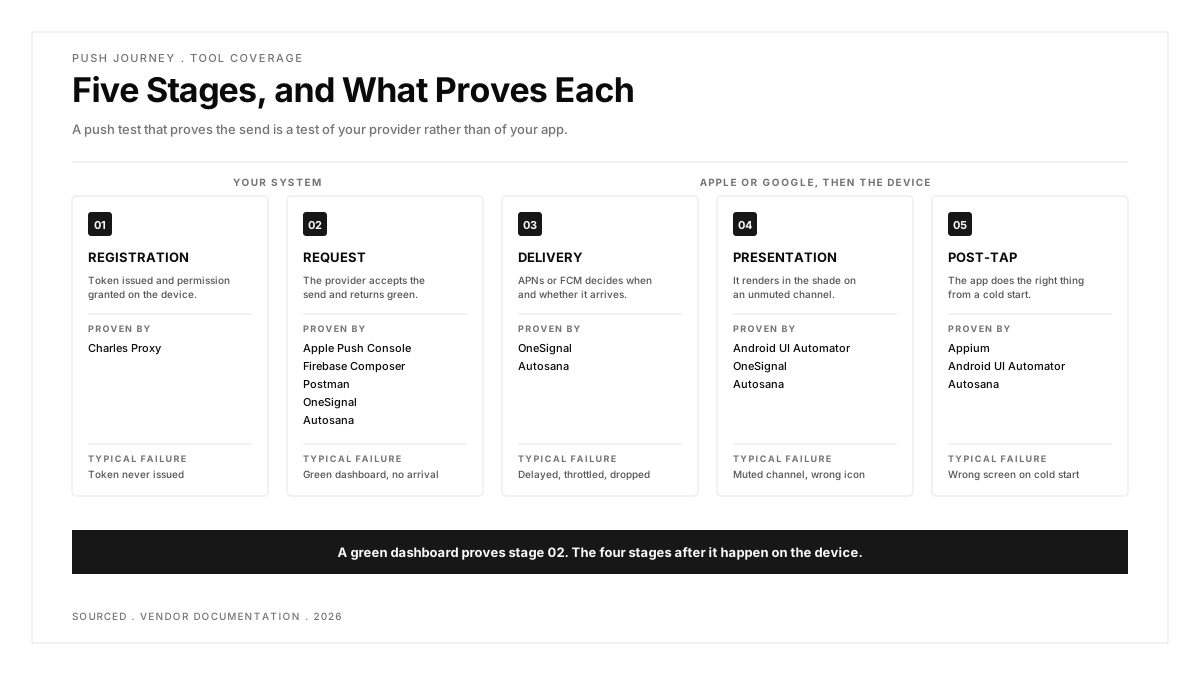
Here is the way to think about it: a push test that proves the send is a test of your provider, not of your app.
| Tool | What It Proves | Stage Covered | Cost |
|---|---|---|---|
| Autosana | Delivery and resulting app behaviour | Send to post-tap | Per agent-run |
| Apple Push Notifications Console | APNs accepted the send | Request | Free |
| Firebase Notifications Composer | FCM accepted the send | Request | Free |
| Appium | Shade interaction and in-app outcome | Interaction | Free |
| Android UI Automator | Android system UI behaviour | Presentation, interaction | Free |
| OneSignal Test Users | Delivery and rendering via OneSignal | Request to presentation | Included with plan |
| Postman | Provider request and response | Request | Free tier |
| Charles Proxy | Registration and network traffic | Registration | Paid licence |
Push notification testing tools compared in detail
Each tool below is strong at one part of the journey. The comparison that matters is which part, and what it leaves for something else to prove.
1. Autosana: Best for Testing the Whole Push Journey in One Run
Autosana is first here because it is the only option that spans the handoff rather than stopping at one side of it. The push notification guide describes testing real APNs and FCM delivery on Autosana virtual devices, so a single run covers the send, the arrival, the tap and whatever the app does next.
Flows are written in natural language through flows and run on virtual and physical iOS and Android devices, which matters here because the assertion you actually want is about a screen, not a status code. The GitHub Bot can run those flows on a pull request and return video, which is worth more on push than on most features, since a failure three systems away is hard to read from a log.
The practical difference shows up in what a failure tells you. A provider console failing says the request was rejected. A full-journey run failing says the notification arrived, the user tapped, and the app opened the wrong screen, which is a different bug with a different owner.
Strengths: real APNs and FCM delivery rather than a mock, the post-tap destination asserted in the same run, both platforms from one authoring surface, and a self-serve trial.
Limitations: push testing runs on virtual devices per the documentation, so a physical-handset-only requirement needs a conversation. It is also paid where five tools below cost nothing.
Cost: per agent-run.
Use it when: the bug you keep shipping is what happens after the tap.
2. Apple Push Notifications Console: Best for Proving an iOS Send Left Apple
Apple's own console is the reference point for iOS. You send to a device token or channel, iterate on the payload, validate tokens and read APNs delivery logs, which makes it the fastest way to answer whether a failure is yours or Apple's.
It is diagnostic rather than assertive. As BrowserStack's guide puts it, the console "does not replace assertions for notification presentation or the destination screen", so it belongs in your toolkit next to something that checks the device.
The delivery logs are the part people underuse. They record per-token outcomes including why a send was dropped, which resolves the common argument about whether a missing notification was a backend bug or a device that unregistered weeks ago.
Strengths: first-party, free, authoritative delivery logs, and excellent for payload iteration.
Limitations: iOS only, manual, and it proves nothing about what the user saw. Cost: free with an Apple Developer account.
Use it when: you need to know whether APNs accepted the message.
3. Firebase Notifications Composer: Best Free Console for FCM
The FCM side of the same job, and most Android teams already have it. The Composer sends to registration tokens from a UI, the HTTP v1 API does it programmatically, and Firebase messaging reports give you aggregate delivery data.
The same caveat applies in Google's direction: a successful console send does not prove the final user-visible result, only that FCM took the request.
Worth separating the two surfaces. The Composer is for a human sending one test message, and the HTTP v1 API is what you script into CI. Teams often try to automate the Composer and conclude the tooling is poor, when the API was the intended route.
Strengths: free, already in your project, both a UI and an API, and aggregate reporting across real traffic.
Limitations: proves acceptance rather than display, and Firebase reporting lags rather than being real time.
Cost: free.
Use it when: you want a fast FCM send without writing code.
4. Appium: Best for Teams With a Suite Already Running
If you already maintain an Appium suite, extending it to push is the cheapest option on this list in licence terms. Appium drives the app UI, permission flows and Android system notification interactions through the relevant driver, so the post-tap assertion lives next to your existing tests.
The limit is the one Appium always has here: it does not send the notification. You pair it with a provider console or an API call, and the two halves have to be coordinated by you.
The coordination overhead is the thing to budget for. Something has to fire the send, wait long enough for delivery without waiting arbitrarily, then assert, and that waiting logic is where these tests usually turn flaky.
Strengths: free, standards-based, reuses an existing suite, and portable across device clouds.
Limitations: cannot create the notification itself, and some system UI behaviour stays platform-specific. Our Appium guide covers the setup overhead honestly.
Cost: free, Apache 2.0.
Use it when: the suite exists and you want one more scenario in it.
5. Android UI Automator: Best for Android System UI Depth
UI Automator reaches across application boundaries into the Android system UI, which is exactly where notifications live. Pulling down the shade, tapping an action button, dismissing, checking a channel: this is the tool that sees all of it.
It is Android only and, like Appium, it observes rather than sends.
Channels are the specific reason to reach for it. A notification that arrives on a channel the user silenced is technically delivered and practically invisible, and verifying channel behaviour needs system-level access rather than in-app assertions.
Strengths: free, first-party, genuinely deep access to the notification shade and system surfaces.
Limitations: Android only, cannot generate a remote notification, and the API is lower level than most teams want day to day.
Cost: free.
Use it when: your notification has action buttons or custom channel behaviour to verify.
6. OneSignal Test Users: Best When OneSignal Already Sends Your Push
If OneSignal is your delivery platform, its test subscription feature is the path of least resistance. You designate test users and verify delivery, rendering, deep links and audience behaviour inside the same tool that runs your campaigns.
The scope is honest and narrow: it validates your OneSignal implementation rather than an unrelated provider stack.
The argument for staying inside one platform is real. Each extra tool in a push stack adds a boundary where evidence has to be correlated by a human, and correlation is where push investigations lose most of their time.
Strengths: no extra tooling, tests the exact path production uses, covers rendering and deep links.
Limitations: only useful if you run OneSignal, and it tells you nothing about a direct APNs or FCM integration.
Cost: included with a OneSignal plan.
Use it when: OneSignal is already your sender.
7. Postman: Best for Repeatable Provider Requests
Postman turns a provider call into something you can version, parameterise and assert on. Authentication, headers, payload variants and response bodies all become repeatable, which makes it a good fit for backend teams who own the send and want it covered in CI.
It stops exactly where you would expect, at the API boundary, with no view of the device.
It pairs naturally with UI automation. Postman fires the send on a schedule or from a pipeline step, the UI tool asserts the result, and between them you have an end-to-end check assembled from two tools you probably already own.
Strengths: free tier, scriptable assertions, easy to share across a team, and it fits existing API test suites.
Limitations: cannot assert anything on the device, so it covers one stage of five.
Cost: free tier, with paid plans for collaboration.
Use it when: the send itself is what you need to regression test.
8. Charles Proxy: Best for Debugging Registration Failures
When tokens are not arriving and nobody can say why, Charles is the tool that answers it. Inspecting HTTPS traffic between the app and your backend shows whether registration happened, what token was sent and where it went, and the throttling features let you reproduce the poor-network conditions where push registration quietly fails.
It is a debugging instrument rather than a test tool, and it sees nothing after the provider accepts.
Throttling deserves a specific mention. Registration failures cluster on poor connections, and reproducing a flaky mobile network on a desk is otherwise surprisingly hard to do deliberately.
Strengths: unmatched for registration and network-condition problems, with request interception and throttling built in.
Limitations: manual, paid, and blind to anything that happens inside APNs or FCM.
Cost: paid licence.
Use it when: registration is broken and the logs are not enough.
Which push testing tool should you choose?
You keep shipping post-tap bugs. Autosana, because the assertion you need is about the destination screen and most of this list stops before it.
You need to know if the send worked. Apple's console for iOS, Firebase Composer for FCM. Both free, both authoritative, both finished once the provider says yes.
You already run Appium. Add the scenario there and pair it with an API call for the send. Cheapest route when the suite exists.
Your notification has action buttons. Android UI Automator on Android, because the shade behaviour is where the defects hide.
OneSignal sends your push. Use its test users. Introducing a second tool to test the first one rarely pays.
Registration is failing. Charles Proxy, before anything else. You cannot test delivery to a token that was never issued.
Conclusion
Push testing fails in a predictable way: teams verify the part that is easy to see. A provider console returns a success, the ticket closes, and the bug waiting in the deep link reaches production anyway.
Pick tools by which stage they genuinely prove rather than by what the marketing page claims, and make sure something in your stack asserts the screen the user actually lands on. That final step is the one most commonly missing from a push suite, and it is the one your users notice first when it breaks.
.png)
Frequently asked questions
How do you test push notifications end to end?
Cover five stages rather than one: registration and permission, the provider accepting your request, delivery and presentation on the device, the tap and resulting app state, and failure behaviour. Most tools cover one stage, so either combine several or use one that spans the journey.
Can you test push notifications on a simulator?
Partly. iOS simulators accept a drag-and-dropped .apns file and Xcode's simctl can send one, which is enough for handler logic. Real APNs delivery, background behaviour and channel handling need a device or a platform that provides one.
What is the difference between testing APNs and FCM?
APNs is Apple's transport and FCM is Google's, though FCM can also deliver to Apple devices. The practical difference in testing is Android's notification channels and runtime permission model, which have no iOS equivalent and need their own cases.
Why do push notifications pass testing and fail in production?
Usually because the test proved the send rather than the outcome. A provider console confirms acceptance, which says nothing about a muted channel, a backgrounded app, a cold start or a deep link pointing at a screen that now requires login.
Do you need real devices to test push notifications?
For anything involving background delivery, OS-level behaviour or channel configuration, yes. Simulators are fine for handler logic and faster to run, so most teams use both rather than choosing.
How do you test the deep link behind a notification?
Tap it from several app states: foreground, background and fully closed, logged in and logged out. The cold-start logged-out case is where most deep link defects live, and it is the one manual testing skips most often.
Can push notification testing run in CI?
Yes, if the tool can both send and assert without a human. Provider consoles cannot, UI automation needs a separate sender, and platforms that handle both run unattended on a pull request.