
Parallel iOS simulator testing in CI with a fresh device per PR
Give every pull request a fresh iOS simulator per shard: the simctl recipe, sharding models, cold boot and snapshot tactics, Mac costs, and managed options.
- Written by
- Gautam Agarwal
- Read time
- 9 min read
- Published

Key Takeaways
- Most cross-PR flakes on iOS come from state a reused simulator carries: keychain items, permission grants, app data and stale installs.
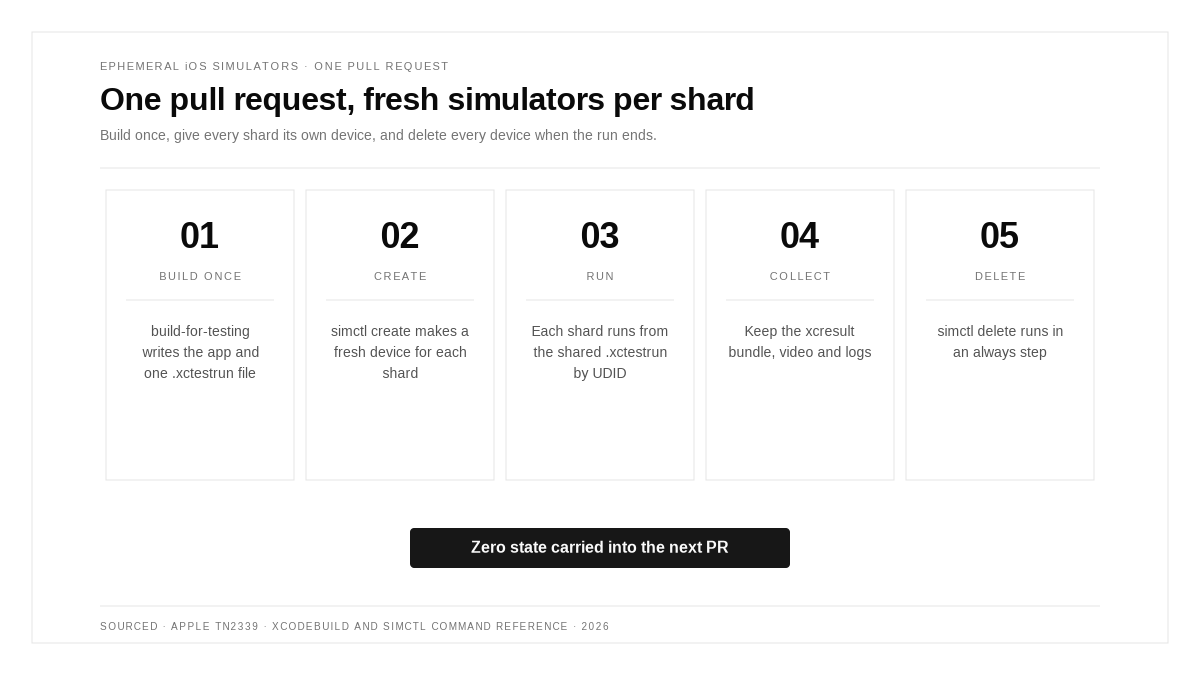
- Build once with build-for-testing, then run every shard from the same .xctestrun file, so shards spend their minutes testing.
- Create one simulator per shard by UDID and delete it in a step that always runs.
- A cloned golden simulator gives each shard a prepared starting state at a fraction of the setup time.
- Sharding cuts wall-clock time and raises macOS minutes, so count the bill before you add shards.
Parallel iOS simulator testing splits a UI suite across several simulators that each start clean, so a pull request finishes in minutes and carries zero state from earlier runs. The work is in the pipeline: one build, one fresh device per shard, and a cleanup step that always runs.
Find the iOS simulator state that leaks between runs
The usual symptom is a test that passes on the branch, fails on main and passes on retry. The cause sits outside the diff, in the device itself. A shared simulator kept a login token, a permission grant or an app version from the previous pull request, and the test started from a state its author left out of the plan.
| State | Where it lives | What it does to the next run |
|---|---|---|
| Keychain items | Simulator keychain | The login screen gets skipped, so auth tests pass on the wrong path |
| Privacy grants | Simulator permission database | The permission prompt stays hidden and onboarding tests fail |
| App container data | The app's sandbox | Feature flags and cached responses from another branch leak in |
| Installed app version | The device's app list | An upgrade path runs where a fresh install was expected |
| Locale, time zone, status bar | Device settings | Snapshot tests drift by a row of clock pixels |
Two simctl commands decide how much of this survives. xcrun simctl erase resets one device's contents and settings and keeps the device. xcrun simctl delete removes it. Per-PR pipelines delete; warm pools erase. Every step below assumes the first.
Build once with build-for-testing
Compiling the app inside every shard is the most common waste in parallel iOS CI. Eight shards that each build pay for eight identical builds before a single test runs.
Apple's command-line testing FAQ, TN2339, documents the split that fixes it. xcodebuild build-for-testing produces the app, the test bundle and an .xctestrun file. xcodebuild test-without-building then runs tests from that file, and its -only-testing and -skip-testing filters are all sharding needs. The build job runs once and uploads its products; every shard downloads them.
Give every shard a fresh iOS simulator
# .github/workflows/ios-ui-tests.yml
jobs:
  build:
    runs-on: macos-latest
    steps:
      - uses: actions/checkout@v4
      - run: |
          xcodebuild build-for-testing \
            -scheme App -destination 'generic/platform=iOS Simulator' \
            -derivedDataPath build
      - uses: actions/upload-artifact@v4
        with: { name: products, path: build/Build/Products }
  ui-tests:
    needs: build
    runs-on: macos-latest
    strategy:
      fail-fast: false
      matrix:
        shard: [CheckoutUITests, OnboardingUITests, SettingsUITests, SearchUITests]
    steps:
      - uses: actions/download-artifact@v4
        with: { name: products, path: products }
      - name: Create a fresh simulator
        run: |
          UDID=$(xcrun simctl create "pr-${{ github.event.number }}-${{ matrix.shard }}" \
            "iPhone 16" "com.apple.CoreSimulator.SimRuntime.iOS-18-2")
          echo "UDID=$UDID" >> "$GITHUB_ENV"
          xcrun simctl boot "$UDID"
          xcrun simctl bootstatus "$UDID" -b
      - name: Run one shard
        run: |
          xcodebuild test-without-building \
            -xctestrun products/*.xctestrun \
            -destination "platform=iOS Simulator,id=$UDID" \
            -only-testing:${{ matrix.shard }} \
            -resultBundlePath results/${{ matrix.shard }}.xcresult
      - name: Delete the simulator
        if: always()
        run: xcrun simctl delete "$UDID"
Three lines in that file carry most of the reliability.
simctl bootstatus -b. It blocks until the device finishes booting. Tests that start on a half-booted simulator fail with "app failed to launch" errors that look like flakes and are really timing.
The device name. Naming each simulator after the PR and shard means a failed cleanup on a self-hosted Mac leaves something you can find and sweep with a nightly job.
if: always(). The delete step runs when tests fail, which is exactly when leftover state does the most damage.
Start with one shard per UI test class, read the .xcresult durations after a week, and regroup until shards finish within a minute of each other. Retries need their own policy; this breakdown of covers retry budgets and quarantine.
Pick where the parallel iOS simulators run
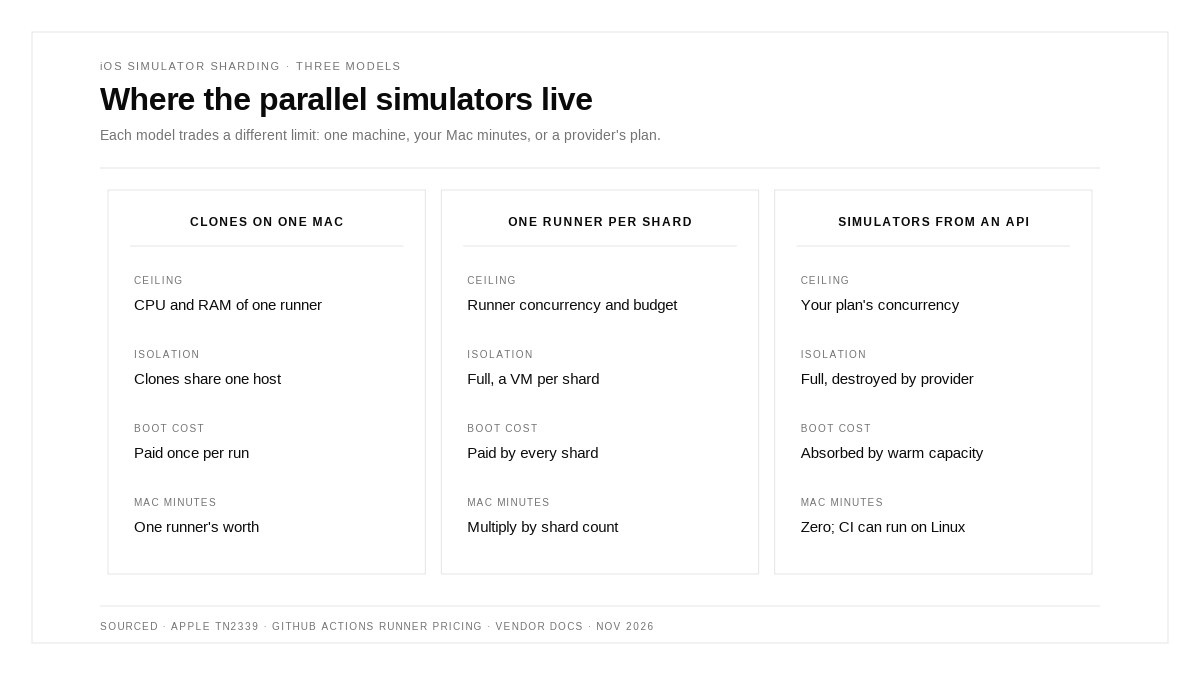
Once one shard works, the next decision is where its siblings live. Each option trades a different limit.
| Model | Where simulators run | Parallel ceiling | Isolation | Boot cost |
|---|---|---|---|---|
| Clones on one Mac | -parallel-testing-enabled YES clones devices on one runner | That Mac's CPU and RAM | Clones share one host and disk | Paid once per run |
| One runner per shard | A matrix job per shard | Runner concurrency and macOS minute budget | A separate VM per shard | Paid by every shard |
| Simulators from an API | A hosted service on its own Macs | Your plan's concurrency | Destroyed by the provider | Absorbed by warm capacity |
Clones are the cheapest start and the first to stall, since every clone competes for one machine's memory. A runner per shard scales cleanly and multiplies macOS minutes. The API model moves the Mac fleet out of your pipeline, and the orchestrating job can then run on Linux, which this guide to walks through.
Clone a golden simulator to cut cold boot time
Ephemerality has one direct cost: every device starts from scratch. The time goes to three places, each with its own fix.
- A missing runtime. If the iOS runtime is absent, simctl create triggers a multi-gigabyte download. Bake the runtimes you test against into the runner image so creation takes seconds.
- First boot. A new device does setup work on first boot. Waiting on bootstatus once makes that cost visible in the log, which is where you will notice it growing.
- Fixtures. Certificates, seeded keychains and test profiles take time to install per shard.
The iOS Simulator lacks a snapshot command, and a golden device does the same job. Create a device, boot it, install the fixtures, shut it down, then simctl clone it for every shard. Each clone starts prepared and is deleted after its run, so isolation holds and setup leaves the critical path.
A warm pool goes one step further: keep booted devices ready and simctl erase them between leases. It sits between fully ephemeral and fully shared, so guard it with a canary test that fails on any leftover keychain item.
Count the macOS minutes before adding shards
Every self-hosted approach ends at the same constraint. The simulator runs on macOS, macOS runs on Apple hardware, and Apple's license allows two additional virtualized macOS instances per Apple-branded computer. Hosted runners move that ceiling into the bill: GitHub's Actions runner pricing lists $0.062 a minute for a standard macOS runner and $0.006 for a 2-core Linux runner.
A worked example at those list prices:
| Scenario | Minutes per PR run | Cost per PR run | Cost at 400 PR runs a month |
|---|---|---|---|
| 1 macOS runner, suite in series | 40 | $2.48 | $992 |
| 8 macOS shards of 6 minutes, plus a 4-minute build | 52 | $3.22 | $1,290 |
Sharding cut wall-clock time from 40 minutes to about 10 and increased the minute count, because every shard pays its own setup. That trade is usually right for the check that blocks merges. Keep a tagged smoke set on each pull request and the full regression on a nightly schedule.
Hand the simulator fleet to a managed service
Several services take the Mac fleet off your hands. Each row states what the vendor documents on its own site.
| Option | What it runs | Device lifecycle |
|---|---|---|
| Xcode Cloud | Your XCTest plans on Apple's infrastructure | Apple documents full test runs across multiple configurations |
| Marathon Cloud | XCTest, XCUITest, KIF and Maestro suites | Devices appear for the run and are gone afterwards; flaky tests rerun on a fresh device |
| Expo Simulators | Remote iOS Simulators via EAS CLI or REST API, driven by Appium, agent-device or Argent | Sessions run until stopped or a configured limit |
| Limrun | Cloud iOS simulators on real Macs via REST API and SDKs, plus remote Xcode builds | Created and controlled per instance through the API |
| Autosana | Natural-language end-to-end flows on iOS simulators, iOS 17 to 26 | Runs per PR from the GitHub app or the CI action |
The deciding question is what you already own. A large XCUITest suite points toward a service that runs your existing bundle. A team that wants journey coverage with zero XCUITest code to maintain points toward flows. Many teams run both, keeping unit and component tests in XCTest; this primer on XCUITest and where it fits covers the native layer.
Put the user journeys on every pull request
Autosana runs the journey layer per pull request. With the GitHub app connected, opening a PR reads the diff, selects the relevant flows, runs them in parallel on iOS simulators as your build completes, and posts results to the PR as a comment with videos plus a GitHub Check.
Isolation works the way this article argues it should. With Run flows in parallel on, setup hooks run independently in each session, so every flow creates its own test account and data and deletes them in teardown. A flow reads like the journey it checks: "sign in with the seeded account, add the first product to the cart, pay with the test card, and confirm the order number appears." When the UI changes, the flow adapts as long as the journey is intact. This walkthrough of end-to-end results on the pull request shows what reviewers see.
Conclusion
A fresh simulator per shard trades a few seconds of boot for a test result that means the same thing on every pull request. The pipeline is short: build once, create a device per shard by UDID, run from the shared .xctestrun, delete always.
The decisions that remain are capacity and cost. Clone a golden device to keep boot short, count macOS minutes before adding shards, and decide whether the Mac fleet belongs in your pipeline or behind an API.
FAQs
How do I run iOS UI tests in parallel on CI?
Build once with build-for-testing, then run test-without-building per shard against separate simulators.
How does simctl erase differ from simctl delete?
Erase resets a device's contents and settings; delete removes the device and its data entirely.
Can iOS simulators be snapshotted like Android emulators?
The closest equivalent is cloning a prepared golden device with simctl clone for each run.
How many iOS simulators can one Mac run at once?
It depends on CPU and RAM; each booted simulator consumes memory, so measure on your runner.
Why do UI tests fail only on shared CI simulators?
Leftover keychain items, permission grants or app data from earlier runs change the starting state.
Does Autosana run my existing XCUITest suite?
Autosana runs natural-language flows on iOS simulators, which sit alongside an existing XCUITest suite.