
Best Mobile App Performance Testing Tools: Memory, CPU and Rendering
Comparing tools that measure memory, CPU, frame rate and rendering on real devices, and which capture it during functional runs rather than separately.
Yuvan Sundrani · 15 min read
autosana.ai
TL;DR
- Autosana records memory, CPU and rendering while a normal functional test runs.
- Android Studio Profiler is the deepest free view into an Android app's behaviour.
- Xcode Instruments does the same for iOS and remains the reference tool.
- Apptim turns a session on a physical device into a shareable report.
- PerfDog measures either platform without instrumenting the app at all.
- BrowserStack supplies the real device fleet to measure across.
Performance regressions rarely announce themselves. Nobody files a ticket saying the list scrolls slightly worse than it did last month, and no functional test fails because a screen takes an extra second to settle. The suite stays green and the experience degrades anyway.
They surface later, as a review mentioning the app feels sluggish, or a retention chart bending gently in the wrong direction with no single release to blame.
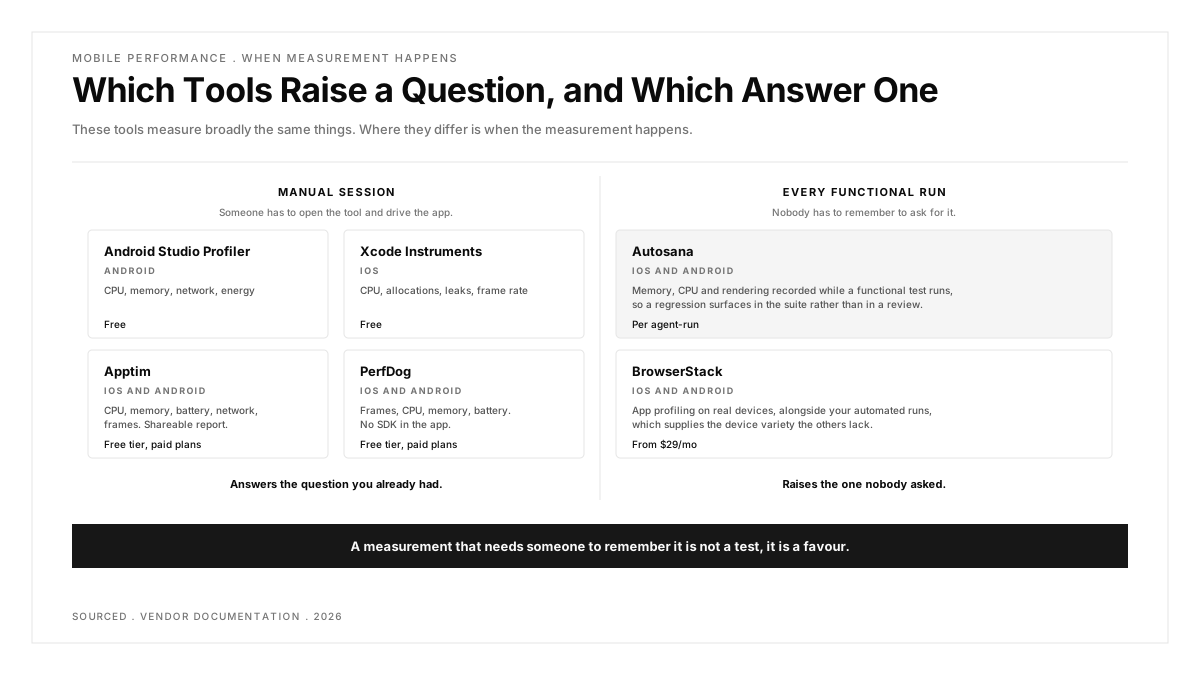
The tools below all measure broadly the same things, and comparing them on metrics alone produces a near-tie. Where they genuinely differ, and it matters more than any feature list suggests, is when the measurement happens and whether anyone has to ask for it.
Why does mobile performance testing get skipped?
Because it is usually a separate exercise. Profiling means someone opens a tool, attaches it to a running session, drives the app by hand and then reads a graph. Each of those is a deliberate act nobody schedules, so it happens once before a big release and then not again for months.
Functional testing has the opposite shape. It runs on every pull request without anyone deciding to, which is exactly why it catches things nobody was looking for. A r/QualityAssurance thread asking what everyone is doing wrong with end-to-end testing, at 33 votes and 23 comments, is a fair picture of how much attention the functional suite absorbs before anything else gets any.
Device variety compounds the problem. A frame rate that looks fine on a current flagship can be unusable two tiers down, and a r/QualityAssurance thread weighing real devices against emulators runs 18 votes and 24 comments on how much hardware a team can realistically cover. Emulators are especially poor proxies for this particular question, since they borrow a desktop's processor and memory rather than a phone's, and a r/softwaretesting thread on emulation fidelity makes the general case at 23 votes.
Worth holding onto: a measurement that needs someone to remember it is not a test, it is a favour.
| Tool | Platforms | Measures | When It Runs | Cost |
|---|---|---|---|---|
| Autosana | iOS and Android | Memory, CPU, rendering | During functional runs | Per agent-run |
| Android Studio Profiler | Android | CPU, memory, network, energy | Manual session | Free |
| Xcode Instruments | iOS | CPU, allocations, leaks, frame rate | Manual session | Free |
| Apptim | iOS and Android | CPU, memory, battery, network, frames | Manual session, reported | Free tier, paid plans |
| PerfDog | iOS and Android | Frames, CPU, memory, battery | Manual session, no SDK | Free tier, paid plans |
| BrowserStack | iOS and Android | App profiling on real devices | With automated runs | From $29/mo |
Six tools for measuring mobile app performance
The first question to settle is whether you want a deep look at one session or a continuous signal across many runs. They are different purchases solving different problems, and most teams need both while owning only the first. The list below is ordered by that distinction rather than by depth, since depth is where these tools differ least.
1. Autosana: Best for Catching Regressions Without a Separate Profiling Session
Autosana leads here because of timing rather than depth. The docs cover performance monitoring that tracks memory, CPU and rendering metrics during test runs, alongside network traffic inspection of the HTTP requests the app made.
The consequence is that performance data arrives from a suite that already runs. A flow written to check that checkout works also records what checkout cost in memory, on virtual and physical iOS and Android devices, every time it runs rather than when someone remembers.
Against a dedicated profiler this is shallower. Android Studio will show you which method allocated an object; this tells you the screen got heavier. For catching a regression early those are different jobs, and the second one is the one most teams have no coverage for at all.
The comparison that makes this concrete is a release where nothing broke. Functional tests pass, nobody investigates, and the checkout screen quietly allocates forty percent more memory than it did a month ago. A suite that records the number catches that in the diff. A profiler nobody opened does not.
Pairing is the sensible arrangement rather than a compromise. Continuous measurement tells you when and where something changed, and a profiler tells you why, and neither substitutes for the other.
Good at: measurement on every run rather than on request, both platforms from one surface, network inspection alongside the resource metrics, and a self-serve trial.
Less good at: method-level attribution. When a number moves, a dedicated profiler is still the tool that explains why.
Pricing: per agent-run.
Right choice when: you want to learn a screen got slower from your own suite rather than from a review.
2. Android Studio Profiler: Best Free Depth on Android
Google's built-in profiler is the reference tool on Android, and nothing here matches it for explaining a problem. CPU profiling shows thread activity and method execution, memory profiling tracks allocations and surfaces leaks, and the network and energy views cover the rest.
It is a debugging instrument. You attach it to a running app, reproduce something by hand and read the result, which makes it excellent for diagnosis and unsuited to regression detection.
Memory profiling deserves particular mention because leaks are the defect most often shipped. A retained Activity holds everything it references, and the symptom is an app that degrades over a long session rather than one that crashes on launch, which is exactly the pattern short manual tests never surface.
Worth knowing that profiling changes what you measure. Attaching the profiler adds overhead, so absolute numbers run worse than a user would see, and the useful reading is the shape of the curve rather than the figure itself.
Good at: free, bundled with Android Studio, method-level detail, and genuine leak detection.
Less good at: running unattended, so it finds nothing you were not already looking for. Android only.
Pricing: free with Android Studio.
Right choice when: a number has moved and you need to know which line of code moved it.
3. Xcode Instruments: Best Free Depth on iOS
Apple's equivalent, and equally strong. Time Profiler covers thread and CPU activity, Allocations and Leaks handle memory growth, and Core Animation measures frame rate and rendering, which is the instrument most teams reach for when scrolling feels wrong.
The same shape of limitation applies. It profiles a session you drive, so it answers questions rather than raising them.
Allocations and Leaks together answer the question teams usually phrase badly. Memory rising during a session is normal; memory that never returns after a screen closes is a leak, and the distinction is visible in minutes here and invisible from aggregate metrics.
The template chooser is the part that defeats newcomers. Starting from Time Profiler for responsiveness and Allocations for memory covers most investigations, and the remaining instruments can stay unexplored indefinitely without cost.
Good at: free, first-party, exceptional depth, and Core Animation is the clearest window into rendering problems available on iOS.
Less good at: manual by nature, iOS only, and the learning curve is steeper than the Android equivalent.
Pricing: free with Xcode.
Right choice when: you are investigating a rendering or memory problem that has already been reported on iOS.
4. Apptim: Best for Turning a Session Into a Shareable Report
Apptim runs performance tests on physical devices and produces a report covering CPU, memory, battery, network and frame rate, with spikes shown on a timeline. The reporting is the product: a profiler output is for the engineer who captured it, and an Apptim report can go to a product manager.
It also compares runs, which is the closest this list gets to regression detection outside a continuous tool.
Run comparison is the feature to use deliberately. Capturing the same journey before and after a release turns a vague impression that the app feels slower into two numbers, which is a far better conversation to bring to a prioritisation meeting.
Battery measurement is the other reason teams keep it. Drain is hard to reason about from code and easy to see on a timeline, and it is one of the few performance problems that produces direct user complaints rather than silent attrition.
Good at: readable reports for non-engineers, both platforms, run comparison, and a free tier to evaluate on.
Less good at: still a session you start rather than something continuous, and it needs a connected physical device.
Pricing: free tier with paid plans.
Right choice when: performance findings need to leave the engineering team and survive the journey.
5. PerfDog: Best for Measuring Without Touching the App
PerfDog, from Tencent, measures a running app on a real device without an SDK or any instrumentation. Frames, CPU, memory and battery, on iOS or Android, with nothing added to the build.
That matters in two cases that come up often: measuring a release build exactly as shipped, and measuring a competitor's app for comparison. Nothing else here does the second at all.
Measuring a release build matters more than it sounds. Debug builds carry logging, assertions and unoptimised code, so their numbers are pessimistic in ways that vary by project, and a team tuning against them can spend weeks optimising something users never experienced.
Competitive measurement is worth doing once even if never repeated. Knowing that a rival's list scrolls at a steady sixty while yours drops to forty converts an abstract quality argument into a number a roadmap discussion can act on.
Good at: no SDK or instrumentation, works on release builds and on apps you did not write, both platforms, strong frame-rate data.
Less good at: manual, no method-level attribution, and documentation is thinner in English than the alternatives.
Pricing: free tier with paid plans.
Right choice when: you cannot modify the build you are measuring, or it is not yours to modify.
6. BrowserStack: Best for Measuring Across Real Device Variety
Performance is a property of the device as much as the app, so one handset tells you little. BrowserStack supplies the fleet, with app profiling alongside its automation products so measurements come from a range of real hardware rather than whatever is on the desk.
It is infrastructure rather than a profiler, which means it pairs with the other tools here instead of replacing them. Our BrowserStack alternatives guide compares the device clouds.
Choosing the device set is the part worth thinking about. Testing on a flagship and a four-year-old budget handset brackets your real population better than three recent phones, and the lower bracket is where the complaints originate.
Thermal behaviour is one thing a cloud reproduces better than a desk. Sustained load throttles a real handset after a few minutes, and a short local test on a cool device never reaches the state where that happens.
Good at: real hardware across tiers and OS versions, profiling attached to automated runs, published pricing.
Less good at: shallower than a native profiler, and parallel session costs climb when every performance run needs a device.
Pricing: from $29 a month, scaling with concurrency.
Right choice when: your question is which devices struggle rather than why they struggle.
Which performance tool fits the question you have?
You want to catch regressions. Autosana, because measurement attached to a suite that already runs is the only way this happens without someone remembering.
You need to explain a number. Android Studio Profiler or Xcode Instruments. Free, deep, and still the right tools for diagnosis once something has already been flagged.
The finding needs an audience. Apptim, whose reports are built to be read by people who will never open a profiler and should not have to.
You cannot modify the build. PerfDog. Release builds and competitor apps are both reachable without an SDK.
Low-end devices are the worry. BrowserStack for the fleet, paired with whichever tool does the measuring, since the cloud supplies hardware rather than analysis.
You have none of this today. Start with the free native profiler for your platform and one measured flow in CI. The profiler handles the investigation you are about to run, and the measured flow is what stops the same problem arriving again unnoticed.
Your app is used on older hardware. Measure on the worst device your analytics show rather than the median one. Performance complaints come from the bottom of the distribution, and testing the middle hides them entirely.
Conclusion
Every tool here measures memory, CPU and frame rate competently, so the feature comparison is close to a tie and close to useless.
The real split is between tools that answer a question you already asked and tools that raise one you had not thought to ask. Most teams own several of the first kind and none of the second, which is precisely why performance regressions get found by users in a review rather than by the suite on a branch. Fix that imbalance before buying anything deeper.
.png)
Frequently asked questions
What metrics matter most in mobile app performance testing?
Memory growth across a session, CPU during interaction, frame rate while scrolling or animating, and network timing. Memory growth and frame rate produce the complaints users actually write down, so start there rather than with aggregate numbers.
Can you test mobile app performance on an emulator?
Poorly. An emulator borrows your machine's CPU and memory, so its numbers describe your laptop rather than a handset. Emulators are fine for finding an obvious leak and unreliable for anything comparative.
How do you add performance checks to CI?
Use a tool that measures during an automated run rather than in a manual session, then assert a threshold and compare against previous runs. A profiler cannot do this because it needs a human driving it.
Why do apps perform well in testing and badly for users?
Testing usually happens on recent devices with good networks and a freshly installed app. Real users have older hardware, worse connectivity and months of accumulated local data, and all three change the numbers considerably.
How often should performance be measured?
On every run if the measurement is attached to a suite that already executes, and before each release at minimum otherwise. The gap between those two cadences is where regressions accumulate unnoticed.
Do you need real devices for performance testing?
Yes, for any number you intend to act on. An emulator borrows the host machine's CPU and memory, so its readings describe your laptop rather than a handset, and thermal throttling never appears at all.