
Cypress Testing: A Practical Guide to Reliable Web Tests
Cypress testing explained: how Cypress runs inside the browser, setup, your first test, retry-ability, Cypress App vs Cloud, and the trade-offs to plan for
- Written by
- Gautam Agarwal
- Read time
- 8 min read
- Published
Cypress testing is the practice of writing automated end-to-end, component and API tests in JavaScript that run inside a real browser through the free, open source Cypress App. Because the tests execute in the same run loop as the application, they see the DOM, network traffic and timers directly.
That architecture explains both why teams adopt Cypress quickly and where they eventually hit its edges. Tests are fast to write and easy to debug, yet the same in-browser design shapes which browsers, domains and platforms a suite can cover.
This guide covers how Cypress works, the testing types it supports, setup, a first test with network stubbing, retry-ability, the split between the Cypress App and Cypress Cloud, and the trade-offs worth planning for.
Key Takeaways
- The Cypress App is free and open source, while Cypress Cloud is a paid service for recording runs, analytics and parallelisation.
- Cypress supports end-to-end, component, API and accessibility testing, all written in JavaScript.
- Cypress runs tests on Chrome-family browsers, including Edge, plus Firefox, with WebKit support marked experimental.
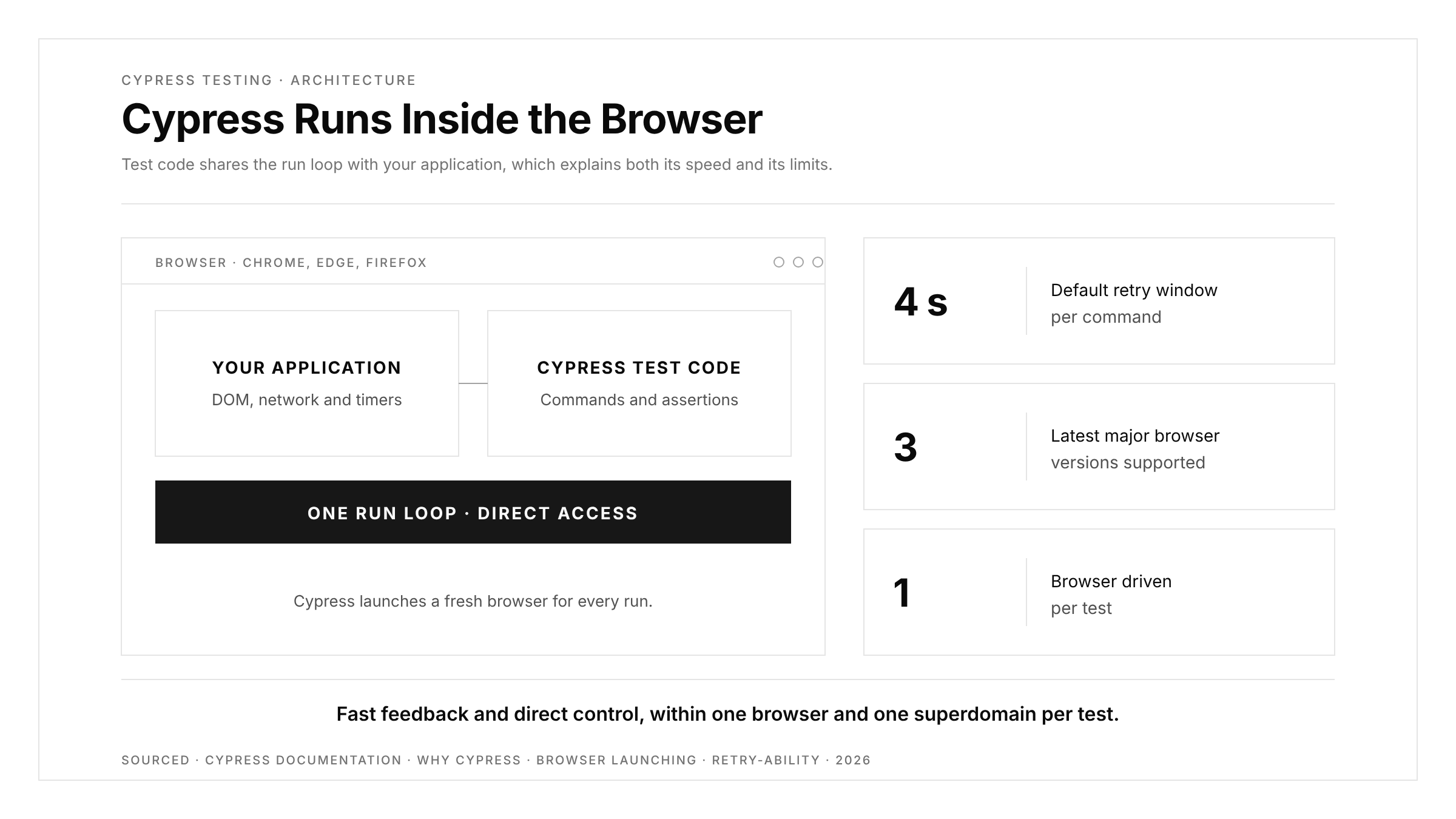
- Each Cypress command that retries does so for up to 4 seconds by default, controlled by
defaultCommandTimeout. - Cypress drives one browser at a time and targets web applications, so native mobile apps need a separate tool.
How Cypress Works
Most browser automation tools sit outside the browser and send it commands over a protocol. Cypress takes a different route. According to the Cypress documentation, its architecture avoids Selenium and WebDriver, and test code runs inside the browser alongside the application.
Three practical consequences follow:
- Direct access. Tests read and control the application, its network requests and its timers in place, which makes stubbing and spying straightforward.
- Readable debugging. Cypress takes snapshots as each command runs, so you can hover over the Command Log and see the page at every step.
- Automatic waiting. Commands and assertions wait for the application to reach the expected state before moving on.
Cypress launches its own browser instance for each run, starting from a clean state with fresh cookies and history. Supported browsers include Chrome, Chromium, Edge and Firefox, and Cypress officially supports the latest three major versions of Chrome, Firefox and Edge.
Testing Types Cypress Supports
| Testing type | What it checks | Typical use |
|---|---|---|
| End-to-end | Full user journeys from front end to back end | Sign-up, checkout, search flows |
| Component | A single UI component mounted in isolation | Design system parts, form logic |
| API | HTTP endpoints, status codes, bodies and headers | Contract checks, test data setup |
| Accessibility | Barriers that block users of assistive technology | Continuous checks during normal runs, a premium feature |
End-to-end tests deliver the most confidence per test and cost the most to maintain. Component tests run faster and isolate failures, so most teams combine both. Our guide to component testing explains where that layer fits.
Setting Up Cypress
Cypress installs as a development dependency in a Node.js project:
npm install cypress --save-dev
npx cypress open
cypress open launches the Cypress App, where you choose end-to-end or component testing and pick a browser. For CI, cypress run executes the suite from the command line, with the browser window hidden by default. Add --headed to watch the browser, or --browser firefox to switch engines.
Writing Your First Cypress Test
Here is an end-to-end test for a login flow. It stubs the login API with cy.intercept, which Cypress documents for spying on and stubbing network requests, so the test runs against a predictable response:
// cypress/e2e/login.cy.js
describe('Login', () => {
  it('signs in and lands on the dashboard', () => {
    cy.intercept('POST', '/api/login', {
      statusCode: 200,
      body: { name: 'Ada' },
    }).as('login');

    cy.visit('/login');
    cy.get('[data-cy=email]').type('ada@example.com');
    cy.get('[data-cy=password]').type('correct-horse-42');
    cy.get('[data-cy=submit]').click();

    cy.wait('@login');
    cy.url().should('include', '/dashboard');
    cy.contains('Welcome, Ada').should('be.visible');
  });
});
Notice the data-cy attributes. Cypress's best practices guide recommends dedicated data-* attributes for selecting elements, because class names and tag names change with styling and refactors, while a test attribute stays stable.
Retry-Ability and Automatic Waiting
Cypress queries such as cy.get and assertions such as .should retry until they pass or time out. By default each retrying command keeps trying for up to 4 seconds, set by defaultCommandTimeout. You can raise it for slow environments:
cypress run --config defaultCommandTimeout=10000
Retry-ability removes most hand-written sleeps, yet timing problems still appear when a test asserts on state that changes after a render, or when a chained query holds a stale element. Our guide on why end-to-end suites fail at waiting covers these patterns and how to structure assertions around them.
Running Cypress in CI
A suite earns its keep when it runs on every pull request. Any CI system that can install Node.js can run Cypress, because cypress run is an ordinary command. A minimal GitHub Actions job looks like this:
# .github/workflows/e2e.yml
name: e2e
on: [pull_request]
jobs:
  cypress:
    runs-on: ubuntu-latest
    steps:
      - uses: actions/checkout@v4
      - uses: actions/setup-node@v4
        with:
          node-version: 20
      - run: npm ci
      - run: npm run build && (npm start &) && npx cypress run --browser chrome
Three habits keep CI runs trustworthy. Pin the browser with --browser so local and CI runs match. Start the application and wait for it to respond before the suite begins. Save screenshots from failed runs as build artifacts, so the failure state is one click away.
Cypress App vs Cypress Cloud
| Capability | Cypress App (free, open source) | Cypress Cloud (paid) |
|---|---|---|
| Write and run tests locally | Yes | Works with the App |
| Time Travel snapshots and Command Log | Yes | Test Replay of CI runs |
| Run in CI | Yes, via cypress run | Records and analyses those runs |
| Parallelisation | Configured by your team | Smart Orchestration with spec prioritisation |
| Flaky test management | Tracked by your team | Flake detection and tracking |
| Pull request insights | Through your CI logs | Branch Review and Git provider integrations |
The free App covers writing, running and debugging. Cloud becomes useful once a suite runs on every pull request and the team needs history, parallel runs and flake tracking. If flaky CI runs are already slowing you down, our guide to fixing flaky tests in GitHub Actions walks through the common causes.
Trade-Offs to Plan For
Cypress documents its own trade-offs openly, and each one follows from the in-browser design:
| Trade-off | What it means in practice |
|---|---|
| JavaScript only | Test code runs in the browser, so server-side work happens through tasks or API calls |
| One browser at a time | Multi-user flows, such as chat between two people, need another approach |
| One superdomain per test | Cross-origin steps, such as a third-party login, use cy.origin |
| Web applications only | Native iOS and Android apps sit outside Cypress's scope |
| Focus on your own app | Cypress positions itself away from crawling, performance testing and scripting third-party sites |
The fourth row matters most for product teams that ship on mobile as well as web. A checkout that passes in Chrome still needs coverage on iOS and Android, which Cypress leaves to other tools. Our platform page shows how one flow can run across iOS, Android, the web, Chrome extensions and App Clips. For a wider comparison of frameworks, see our roundup of Cypress alternatives.
Cypress Best Practices
- Select with
data-cyattributes, so styling changes leave tests stable. - Stub the network for UI tests with
cy.intercept, and keep a smaller set of tests against the real back end. - Seed state through APIs, logging in or creating data with requests rather than clicking through the interface before every test.
- Keep each test self-contained, so any test can run alone and in any order.
- Assert on outcomes, such as a URL change or visible confirmation, rather than on intermediate animation states.
Conclusion
Cypress testing gives web teams a fast path from zero to a working end-to-end suite. Its in-browser architecture brings direct access to the application, automatic waiting and readable debugging, while the free App covers everything a team needs to write and run tests.
The same design sets the boundaries: JavaScript only, one browser per test, one superdomain per test, and web applications only. Start with a handful of data-cy-based end-to-end tests for revenue-critical journeys, add component tests for complex UI, and plan early for any flows that cross domains, users or platforms. Then wire the suite into CI so every pull request gets the same signal before it merges.
FAQs
What is Cypress used for?
Cypress is used to write end-to-end, component, API and accessibility tests for web applications in JavaScript.
Is Cypress free?
The Cypress App is free and open source, while Cypress Cloud is a paid service for recording and analytics.
Which browsers does Cypress support?
Cypress supports Chrome-family browsers including Edge, plus Firefox, with WebKit support available as an experimental option.
Can Cypress test mobile apps?
Cypress tests web applications in a browser, so native iOS and Android apps need a mobile testing tool.
Does Cypress use Selenium?
Cypress uses its own architecture, running test code inside the browser rather than through Selenium or WebDriver.
How long does Cypress wait for an element?
By default, each retrying Cypress command waits up to 4 seconds, adjustable through the defaultCommandTimeout setting.