
Best Visual Regression Testing Tools in 2026: 10 for UI Testing
Ten visual regression testing tools reviewed by how they compare screenshots: AI-diffing cloud platforms, framework-native snapshots, and component-level checkers. Honest tradeoffs from practitioners.
Yuvan Sundrani · 19 min read
autosana.ai
A functional test suite can pass every assertion while a button sits behind a modal, a font loads as the wrong weight, or a layout shifts 40 pixels on Safari. These are visual regressions. They pass every unit test and every E2E check because no assertion was written for what the page looks like. Visual regression testing catches them by comparing screenshots of your UI before and after a change.
The problem with most visual regression tools is not accuracy. It is noise. Pixel-diff comparisons flag anti-aliasing variations, sub-pixel rendering differences, and dynamic content changes as failures. Teams that get buried in false positives turn the tool off. Then the next UI bug ships to production. The right tool catches meaningful regressions without turning every spacing change into an approval meeting.
Key Takeaways
- Visual regression testing catches UI bugs that functional tests miss: layout shifts, font rendering changes, z-index stacking errors, and responsive breakpoint failures.
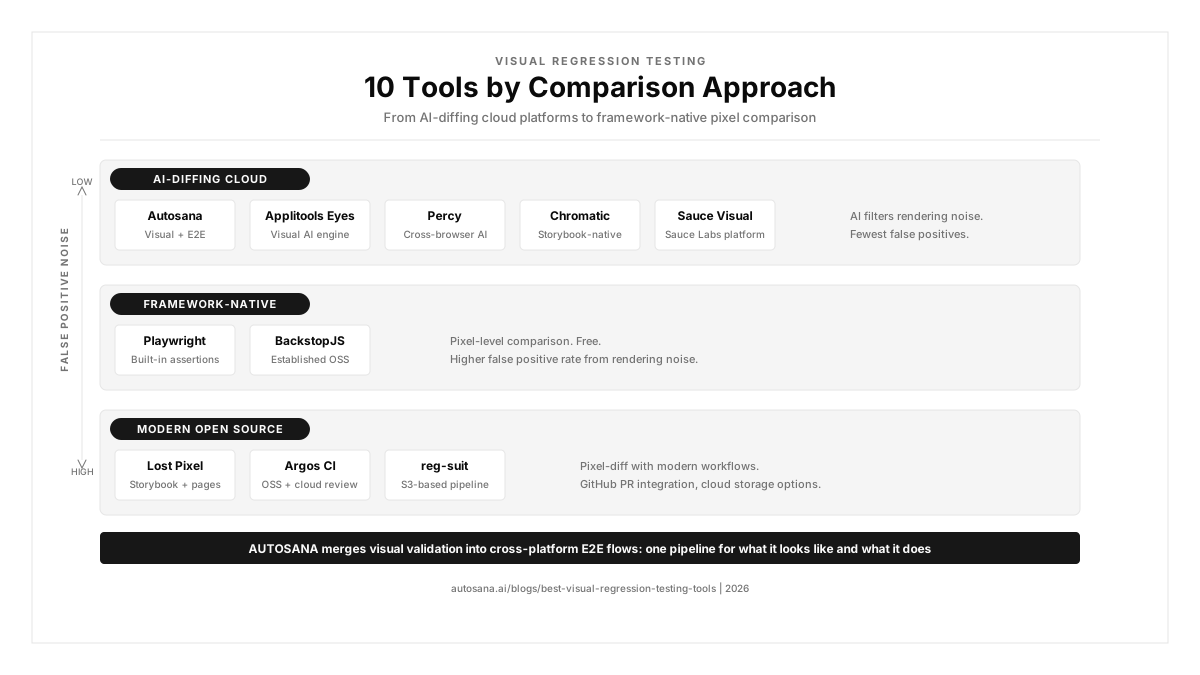
- The 2026 market splits into three approaches: AI-diffing cloud platforms that understand visual intent, framework-native snapshot tools that do pixel comparison, and component-level checkers that test design system consistency.
- False positives kill visual testing adoption. Tools that generate constant noise get turned off, and teams that turn off visual testing get the bugs.
- Free options (Playwright toHaveScreenshot, BackstopJS, Lost Pixel) work for solo developers but lack team review workflows and cross-browser rendering.
- Autosana adds visual validation to E2E flows across web, iOS, and Android, catching visual regressions during functional testing without running a separate screenshot pipeline.
Which visual regression testing tools are teams using in 2026?
| Tool | Approach | Best For | Pricing |
|---|---|---|---|
| Autosana | AI visual validation in E2E | Teams wanting visual checks embedded in cross-platform E2E flows | Contact for pricing |
| Applitools Eyes | AI-diffing cloud | Enterprise teams needing the most mature visual AI with Figma integration | Custom pricing |
| Percy | AI-diffing cloud | Teams wanting cross-browser visual testing with a generous free tier | Free 5K screenshots; from $599/mo |
| Chromatic | Component-level cloud | Storybook teams needing visual review for component libraries | Free 5K snapshots; from $179/mo |
| Sauce Visual | AI-diffing cloud | Teams already on Sauce Labs needing integrated visual testing | Included in Sauce Labs plans |
| Playwright | Framework-native pixel-diff | Developers wanting built-in screenshot assertions with zero additional cost | Free, open source |
| BackstopJS | Framework-native pixel-diff | Teams needing established open-source visual regression with HTML reports | Free, open source |
| Lost Pixel | Modern OSS | Teams wanting open-source visual testing for Storybook, Ladle, or page screenshots | Free OSS; cloud plans available |
| Argos CI | OSS + cloud | Teams wanting open-source capture with cloud review and approval workflow | Free 5K screenshots; from $100/mo |
| reg-suit | OSS pipeline | Teams wanting S3-based visual regression integrated into GitHub PR workflows | Free, open source |
AI-diffing cloud platforms
These use computer vision or perceptual algorithms to compare screenshots, reducing false positives by understanding what humans actually see. They re-render your pages in cloud browsers, so you get cross-browser coverage without maintaining a local browser matrix.
Autosana: best for visual validation inside E2E flows
What you get:
- Visual validation embedded in intent-based E2E test flows across web, iOS, and Android
- Self-healing tests that re-anchor visually when the UI changes between builds
- Session replay posted to every PR via CI/CD integration
- Cross-platform coverage on real devices without running a separate screenshot pipeline
- Catches layout shifts, missing elements, and rendering differences during functional test execution
Why teams pick it: Most visual regression tools run as a separate pipeline. You write functional tests in one tool and visual tests in another. Autosana combines both. When a flow runs, it validates what the page looks like as part of the same execution. A QA engineer on r/QualityAssurance described the standard: "Slow automation is garbage. Flaky automation is garbage. Automation should prove your application works to requirements, quickly." Running two separate pipelines doubles the feedback loop. Autosana collapses it into one.
The tradeoff: Not a standalone screenshot comparison tool. Does not generate pixel-level diff reports or support design-to-code validation against Figma mockups. For teams that need granular visual diffing with approval workflows across hundreds of Storybook components, a dedicated visual testing platform (Applitools, Chromatic) provides deeper coverage. The Gobi Maps case study shows where the combined approach pays off.
Applitools Eyes: best AI-powered visual testing
What you get:
- Visual AI trained on billions of app screens that understands layout, content, and rendering intent
- Cross-browser and cross-device screenshot comparison with AI noise filtering
- Figma Plugin for comparing production screenshots against design mockups
- Storybook Addon for component-level visual testing
- Ultrafast Grid for parallel rendering across browsers and viewports
Why teams pick it: Applitools has been building AI visual testing longer than anyone. Their Visual AI does not do pixel comparison. It uses computer vision to judge whether a change is meaningful. A one-pixel anti-aliasing difference gets ignored. A button hidden behind a modal gets flagged. For enterprise teams running thousands of screenshots per build across a dozen browser and viewport combinations, that false positive reduction is the difference between a tool that gets used and one that gets turned off. In January 2026, Applitools shipped Eyes 10.22 with design-to-code validation via Figma.
The tradeoff: Expensive. Applitools does not publish pricing, and costs climb quickly for high screenshot volumes. The setup complexity matches enterprise expectations. For teams running fewer than 500 screenshots per build, the AI advantage does not justify the cost over free alternatives. An engineer on r/softwaretesting noted that "our toolkit from 2020 looks roughly the same in 2026," pointing to the fact that many teams stick with what they have rather than investing in premium visual testing.
Where Autosana fits in: Applitools validates screenshots. Autosana validates functionality and visuals in one flow. Teams use Applitools for deep visual diffing on web and Autosana for cross-platform E2E regression testing that includes visual checks across iOS, Android, and web.
Percy: best cross-browser visual testing with free tier
What you get:
- Cloud-based cross-browser rendering across Chrome, Firefox, Safari, and Edge
- AI-powered Visual Review Agent that auto-approves safe changes (shipped late 2025)
- Git-integrated review workflow with per-PR visual diffs
- Free tier with 5,000 screenshots per month
- Integrates with Playwright, Cypress, Selenium, Storybook, and most CI systems
Why teams pick it: Percy is the most widely adopted visual regression testing platform. BrowserStack acquired it in 2020, giving it access to real browsers and devices for rendering. The free tier at 5,000 screenshots per month is generous enough for small teams and open-source projects. The AI Visual Review Agent reduces approval burden by auto-approving changes that are visually safe. Teams on r/devops described AI tooling that "planned and worked with hundreds of files, found what it needs to do, and did it first try." Percy's auto-approval follows that same pattern: let AI handle the noise, surface the signal.
The tradeoff: Paid plans start at $599/month, which is steep for teams that outgrow the free tier. Cross-browser re-rendering adds latency to CI pipelines. Percy captures page-level and component-level screenshots but does not run functional tests. You still need a separate E2E tool.
Where Autosana fits in: Percy validates how pages look across browsers. Autosana validates how they work across platforms. Teams pair Percy for cross-browser visual diffing with Autosana for functional E2E coverage on real devices.
Chromatic: best for Storybook component libraries
What you get:
- Visual regression testing built specifically around Storybook
- Captures every component story as a screenshot and compares across builds
- UI review workflow where designers and developers approve visual changes
- Interaction testing for component behavior alongside visual snapshots
- Free tier with 5,000 snapshots per month
Why teams pick it: Chromatic makes sense if your frontend lives in Storybook. It tests components in isolation, which catches visual regressions at the component level before they compound into page-level bugs. The review workflow lets designers approve visual changes alongside developers, closing the gap between design intent and production output. Cheaper than Applitools for most teams, especially those already invested in Storybook.
The tradeoff: Storybook-only. If your team does not use Storybook, Chromatic does not apply. Does not test assembled pages, user flows, or cross-platform rendering. Component-level snapshots miss bugs that only appear when components interact on a real page: z-index stacking, layout overflow, and responsive behavior at specific viewport widths.
Where Autosana fits in: Chromatic validates components in isolation. Autosana validates assembled pages and full user flows. Teams use Chromatic for design system consistency and Autosana for end-to-end regression testing that catches integration-level visual bugs.
Sauce Visual: best for teams on Sauce Labs
What you get:
- AI-powered visual diffing integrated into the Sauce Labs testing platform
- Cross-browser rendering through Sauce Labs' device and browser cloud
- Works with existing Selenium, Cypress, and Playwright tests
- Visual assertions added directly to functional test code
Why teams pick it: Sauce Visual is the natural choice for teams already running functional tests on Sauce Labs. Adding visual assertions to existing test code avoids standing up a second tool. The integration means visual results appear in the same dashboard as functional test results.
The tradeoff: Locked to the Sauce Labs ecosystem. Pricing is bundled with Sauce Labs plans, which are enterprise-oriented. Less visual AI depth than Applitools. For teams not already on Sauce Labs, Percy or Applitools offers more standalone value.
Where Autosana fits in: Sauce Visual adds visual checks to Sauce Labs tests. Autosana provides its own cross-platform testing with visual validation built in, so teams that want a single tool for functional and visual coverage across web, iOS, and Android can use Autosana without a separate platform.
Framework-native snapshot tools
These capture screenshots inside your existing test framework and compare against baselines using pixel-level or perceptual diff algorithms. No cloud rendering, no external service. You own the infrastructure and the baselines.
Playwright toHaveScreenshot: best built-in visual testing
What you get:
- Built-in screenshot assertion in Playwright with zero additional dependencies
- Configurable pixel threshold, maximum diff percentage, and comparison regions
- Generates visual diff images alongside test results
- Runs in headed or headless Chromium, Firefox, and WebKit
Why teams pick it: Playwright ships with toHaveScreenshot() out of the box. No additional tool, no paid service, no configuration beyond writing the assertion. For teams already running Playwright for E2E testing, adding visual regression checks is one line of code. A commenter on r/softwaretesting described Playwright as working "out of the box, auto-waits, has better error messages" and "taking market shares from Selenium." That adoption momentum carries into visual testing too.
The tradeoff: Pixel-level comparison only. No AI diffing, no perceptual filtering. Anti-aliasing differences, font rendering variations across OS versions, and dynamic content generate false positives. No team review workflow. No cross-browser cloud rendering. You compare against baselines captured on your own machine or CI runner, which means baselines can drift when the CI environment changes.
Where Autosana fits in: Playwright captures screenshots locally. Autosana captures visual state on real devices across platforms. Teams use Playwright's toHaveScreenshot for fast development feedback and Autosana for production-grade visual validation on real devices.
BackstopJS: best established open-source option
What you get:
- Headless Chrome screenshots via Puppeteer or Playwright
- HTML report with side-by-side, overlay, and scrubber diff views
- Configurable viewports, selectors, and scenarios
- Docker support for consistent rendering environments
- Active maintenance since 2014
Why teams pick it: BackstopJS is the most established open-source visual regression tool. It has survived a decade of framework churn, which speaks to its design stability. The HTML diff report with scrubber view is genuinely useful for reviewing visual changes. Docker support solves the baseline drift problem by ensuring consistent rendering across environments. A commenter on r/softwaretesting described how "every test comes from that same mental model." BackstopJS gives you a different mental model: what does the page actually look like?
The tradeoff: Pixel-diff only, same false positive exposure as Playwright. No team review workflow beyond the HTML report. No mobile device rendering. Configuration grows complex for large applications with dozens of viewports and scenarios. For teams beyond 200 scenarios, the maintenance overhead of managing baselines becomes a job in itself.
Where Autosana fits in: BackstopJS validates page-level screenshots on web. Autosana validates full user flows with visual checks across web, iOS, and Android. Teams graduating from BackstopJS to cross-platform visual coverage use Autosana to absorb the maintenance BackstopJS baselines require.
Modern open-source tools
These are newer entrants that combine open-source capture with modern workflows: GitHub PR integration, cloud storage, and approval workflows without the price tag of enterprise platforms.
Lost Pixel: best modern OSS for Storybook and pages
What you get:
- Open-source visual regression testing for Storybook, Ladle, Histoire, and page screenshots
- GitHub PR integration with visual diff comments
- Runs locally or in CI with Docker for consistent baselines
- Cloud platform available for team review workflows
Why teams pick it: Lost Pixel fills the gap between BackstopJS (page-level only) and Chromatic (Storybook-only, paid). It handles both component stories and assembled page screenshots in one tool, with GitHub PR integration that puts visual diffs where developers already review code. For teams that want Chromatic's Storybook coverage without the Chromatic price tag, Lost Pixel is the open-source alternative.
The tradeoff: Smaller community than BackstopJS or Playwright. Pixel-diff comparison. The cloud platform is newer and less mature than Percy or Chromatic for team review workflows. For large-scale enterprise visual testing, the ecosystem depth is not there yet.
Where Autosana fits in: Lost Pixel validates components and pages on web. Autosana extends visual validation to mobile and cross-platform E2E flows, covering the surfaces that Lost Pixel does not reach.
Argos CI: best OSS with cloud review
What you get:
- Open-source screenshot capture in your real test browser (not cloud re-rendering)
- Cloud review platform with approval workflows and GitHub integration
- Free tier with 5,000 screenshots per month
- Integrates with Playwright, Cypress, Puppeteer, and Storybook
Why teams pick it: Argos captures screenshots in your actual test browser, not a cloud-rendered copy. That means what you see in your test is what gets compared. The cloud review platform adds team approval workflows on top of open-source capture, giving you the collaboration features of Percy at a fraction of the cost ($100/month flat after the free tier).
The tradeoff: No AI diffing. No cross-browser cloud rendering. Screenshots are captured in whatever browser your tests run in, so you miss cross-browser visual bugs unless you run tests in multiple browsers yourself. Smaller ecosystem than Percy or Applitools.
Where Autosana fits in: Argos validates web screenshots in your test browser. Autosana validates full flows on real devices across platforms, catching visual regressions that browser-only tools miss on iOS and Android.
reg-suit: best for S3-based pipelines
What you get:
- Open-source visual regression tool that stores baselines in S3 or GCS
- GitHub PR comments with visual diff reports
- Works with any screenshot capture tool (Puppeteer, Playwright, Storybook)
- Lightweight and composable
Why teams pick it: reg-suit is the lightest-weight option. It does one thing: compare screenshots stored in cloud storage and post results to your PR. For teams that already have screenshot capture set up and just need the comparison and review layer, reg-suit avoids the overhead of a full platform.
The tradeoff: Bring your own capture tool. No built-in screenshot capture, no AI diffing, no cloud rendering. Configuration requires cloud storage setup. For teams starting from scratch, BackstopJS or Lost Pixel provides a more complete out-of-box experience.
Where Autosana fits in: reg-suit compares screenshots you already have. Autosana generates and validates visual state as part of cross-platform E2E testing, removing the need to manage a separate screenshot pipeline.
How do you pick the right visual regression testing tool?
The choice depends on three questions.
How many false positives can your team tolerate? Pixel-diff tools (Playwright, BackstopJS, Lost Pixel) generate noise from anti-aliasing and rendering variations. AI-diffing tools (Applitools, Percy, Sauce Visual) filter that noise but cost money. An engineer on r/QualityAssurance noted that the operational reality is clear: "tools that generate constant false positives get turned off, and teams that turn off visual testing get the bugs."
Do you need cross-browser rendering? If your users split across Chrome, Safari, Firefox, and Edge, you need a tool that renders in all four. Percy and Applitools provide cloud rendering. Framework-native tools only compare against the browser your tests run in.
Do you also need functional E2E coverage? Most visual regression tools only check what the page looks like. They do not test whether buttons work, forms submit, or flows complete. Autosana combines functional and visual validation in one flow across web, iOS, and Android. When Airbnb engineers on r/ExperiencedDevs faced 3,500 test files to migrate, the maintenance burden was not just functional. Visual baselines across platforms multiply that cost.
Conclusion
Visual regression testing catches the bugs that functional tests miss. The right tool depends on your comparison approach: AI-diffing for enterprise accuracy, framework-native for developer speed, or component-level for design system consistency. If your team is drowning in false positives, upgrade from pixel-diff to AI-diffing. If you need visual checks across web, iOS, and Android in one flow, add an agent layer.
.png)
FAQ
What is visual regression testing?
Visual regression testing compares screenshots of your UI before and after a code change to detect unintended visual differences: layout shifts, font changes, missing elements, and styling regressions that functional tests do not catch.
What is the best free visual regression testing tool?
Playwright toHaveScreenshot is free and built into Playwright. BackstopJS is free and open source with HTML diff reports. Lost Pixel is free and open source with Storybook and page support. All three use pixel-level comparison.
What is the difference between pixel-diff and AI-based visual testing?
Pixel-diff compares screenshots pixel by pixel, flagging any difference including anti-aliasing and rendering noise. AI-based testing uses computer vision to judge whether a change is visually meaningful, reducing false positives from rendering variations.
Is Applitools worth the cost?
For enterprise teams running thousands of screenshots across multiple browsers, Applitools' AI reduces false positives enough to justify the cost in reviewer time saved. For teams under 500 screenshots per build, free tools provide sufficient coverage.
How do you reduce false positives in visual regression testing?
Use AI-diffing tools (Applitools, Percy) instead of pixel-diff. Mask dynamic content (timestamps, ads, animations). Use Docker for consistent rendering environments. Set appropriate diff thresholds rather than requiring pixel-perfect matches.
Can visual regression testing replace E2E testing?
No. Visual testing validates what the page looks like. E2E testing validates what the page does. A page can look correct while buttons are non-functional. You need both. Autosana combines visual and functional validation in one flow.
What is the best visual testing tool for Storybook?
Chromatic is purpose-built for Storybook with component-level snapshots and designer review workflows. Lost Pixel is the open-source alternative. Applitools and Percy also integrate with Storybook but are not Storybook-specific.
How do you set up visual regression testing in CI?
Add screenshot assertions to your test suite (Playwright toHaveScreenshot, Percy snapshot, or Applitools check). Run tests in CI with consistent browser versions. Store baselines in version control or cloud storage. Review visual diffs in PRs before merging.