
Self-healing mobile tests: where the healing actually happens
"Self-healing" covers three different mechanisms in mobile testing. What each one fixes after a UI change, what it hides, and who pays for the repair.
- Written by
- Gautam Agarwal
- Read time
- 10 min read
- Published

Key Takeaways
- "Self-healing" names three different mechanisms: an agent repairing a test while you develop, a runner tolerating timing at run time, and an agent re-resolving the step at run time.
- Repairs an agent makes during development only last if they are committed; the agent's context window forgets the rest when the session ends.
- Retries and auto-waits fix timing. They do nothing for a renamed button, and Maestro's own docs call wrapping large blocks in
retryan anti-pattern. - Run-time re-resolution survives UI refactors, but it can pass a screen you meant to pin down, so exact UI text belongs in the test only where the text is the contract.
- The useful question for any tool is where the repair happens, who reviews it, and whether a pass still means what you think it means.
Self-healing mobile tests are UI tests that keep passing after the app's interface changes, because something repairs or re-targets the broken step. What does the repairing varies a lot between tools. That difference decides your maintenance cost.
Three things vendors call self-healing
Change one button label in a mobile app and count the red builds. Every team that has maintained a UI suite knows the number is never one.
"Self-healing" is the industry's answer, and it is used for three different mechanisms:
- Repair at authoring time. A coding agent runs the test, sees it fail, edits the test or the app, and runs it again. The fix lands in a commit.
- Tolerance at run time. The runner waits for the screen to settle and retries a step that failed because something hadn't loaded yet. Nothing in the test changes.
- Re-resolution at run time. The test states an intent, and an agent finds the control that satisfies it on today's build. The test file stays the same; the path through the UI doesn't.
These fail in different ways and cost different people. To compare them, take one small, realistic change and run it through each.
A worked example: one renamed button
The login screen of a shopping app has a button labeled Continue. A product change renames it Next and moves it from the bottom of the form to the top right. Nothing about login behavior changes.
The original test, written in Maestro YAML:
appId: com.example.shop
---
- launchApp
- tapOn: "Email"
- inputText: "qa@example.com"
- tapOn: "Password"
- inputText: ${PASSWORD}
- tapOn: "Continue"
- assertVisible: "Welcome back"
After the rename, tapOn: "Continue" finds nothing and the flow fails. That failure is correct in a narrow sense, since the label really is gone, and useless in the sense that matters, because login still works.
Here is what each mechanism does with it.
Authoring-time repair with Maestro MCP
Maestro's MCP server gives a coding agent tools to inspect the view hierarchy (inspect_screen), take screenshots, and execute flows (run, which accepts inline YAML). Installed in Claude Code with claude mcp add maestro -- maestro mcp, it closes the loop: the agent runs the flow, reads the hierarchy, sees a button labeled Next where Continue used to be, edits the YAML and runs it again.
The agent will often go one step further and make the test stable against the next rename, by switching to an identifier:
Button("Next") { submit() }
    .accessibilityIdentifier("login-continue")
- tapOn:
id: "login-continue"Maestro's UIKit docs call accessibilityIdentifier the gold standard for id selectors, and this is a reasonable fix. It also means an agent edited production UI code so a test would pass. That deserves the same review as any other app change.
Two properties of this model are easy to miss.
The repair only exists if it is committed. On the Test Guild podcast, Maestro's CEO Leland Takamine demonstrated exactly this loop. The agent tapped the wrong element, picked a better selector, recovered from an unexpected navigation and re-ran the whole flow. He also pointed out that what the agent learned lived only in its context window. A new session would know nothing about it and could make the same mistake again. The durable output is the committed YAML and the identifier, and nothing else.
Someone has to run the agent. Fifteen flows that tap Continue mean fifteen repairs, and whether the agent finds all fifteen depends on the agent harness and the prompt, not on Maestro. Maestro's stance, stated on the same podcast, is deliberate: no AI at run time, agents write the flows, and CI runs them deterministically. Takamine also described a natural-language runtime product the team built and shipped, which demoed well and which users moved away from in favor of plain flows.
That is a coherent position. You pay for maintenance at authoring time, in agent sessions and code review, and in exchange each CI run is reproducible.
Run-time tolerance with retries
The second mechanism is older and narrower. Maestro describes "built-in tolerance": it waits for network content and animations automatically, so flows don't need sleep() calls. When that isn't enough, a retry block re-runs a group of commands:
- retry:
maxRetries: 3
commands:
- tapOn:
id: "login-continue"In our example this does nothing useful. A label that no longer exists is missing on the first attempt and on the third. Tolerance fixes timing: a spinner that took 900 ms on a slow emulator, a list that rendered after the assertion fired.
It also has a cost that the retry documentation states plainly: wrapping large parts of a flow in retry is an anti-pattern, because it can hide genuine app flakiness, such as a button that only works half the time. maxRetries is capped at 3 for the same reason. A retry that passes on attempt two is a signal to investigate, and CI dashboards usually report it as a plain pass. For the CI side of that problem, see this guide to flaky tests in GitHub Actions.
Run-time re-resolution with natural-language flows
The third mechanism moves the repair into the run. Autosana flows are written as intent, an approach covered in this piece on natural-language E2E testing, and an agent executes them on a cloud device:
Log in with email ${env:TEST_EMAIL} and password ${env:TEST_PASSWORD}.
Submit and verify you land on the welcome screen.
Nothing in that flow names the button, so the rename from Continue to Next, and the move to the top right, require no edit. The agent finds the submit control on the current build. This is the property people mean when they say a test "heals", and it is why Gobi's team replaced 13 brittle selector-based tests with more than 30 journey-style flows, as the Gobi case study describes.
The obvious objection is cost and determinism: an agent reasoning about every step on every run is slower and less reproducible than a YAML replay. Autosana's answer is run caching. After a flow passes, the exact action sequence is cached, and later runs replay it with a smaller, faster model. The flows documentation puts cached actions at 10% of the cost of uncached ones and lists a 5 to 8x speedup.
The rename is where the two halves meet. On the first run after the change, the cached tap on Continue no longer matches the screen. That step can't be replayed safely, so the live agent handles it, and independent earlier steps still use the cache. Replay can resume once the app matches a later checkpoint. Runs that include live steps get a fresh review, and once the new sequence passes, it becomes the cached path.
So the healing happens at run time, it is scoped to the steps that changed, and it leaves a trail. The run shows which steps ran live, and the review reflects the new path.
The risk of a test that heals too well
A test that adapts to UI changes can adapt to the wrong ones. If Next were accidentally rendered behind the keyboard, or relabeled "Delete account", you want a failure, not a quiet detour.
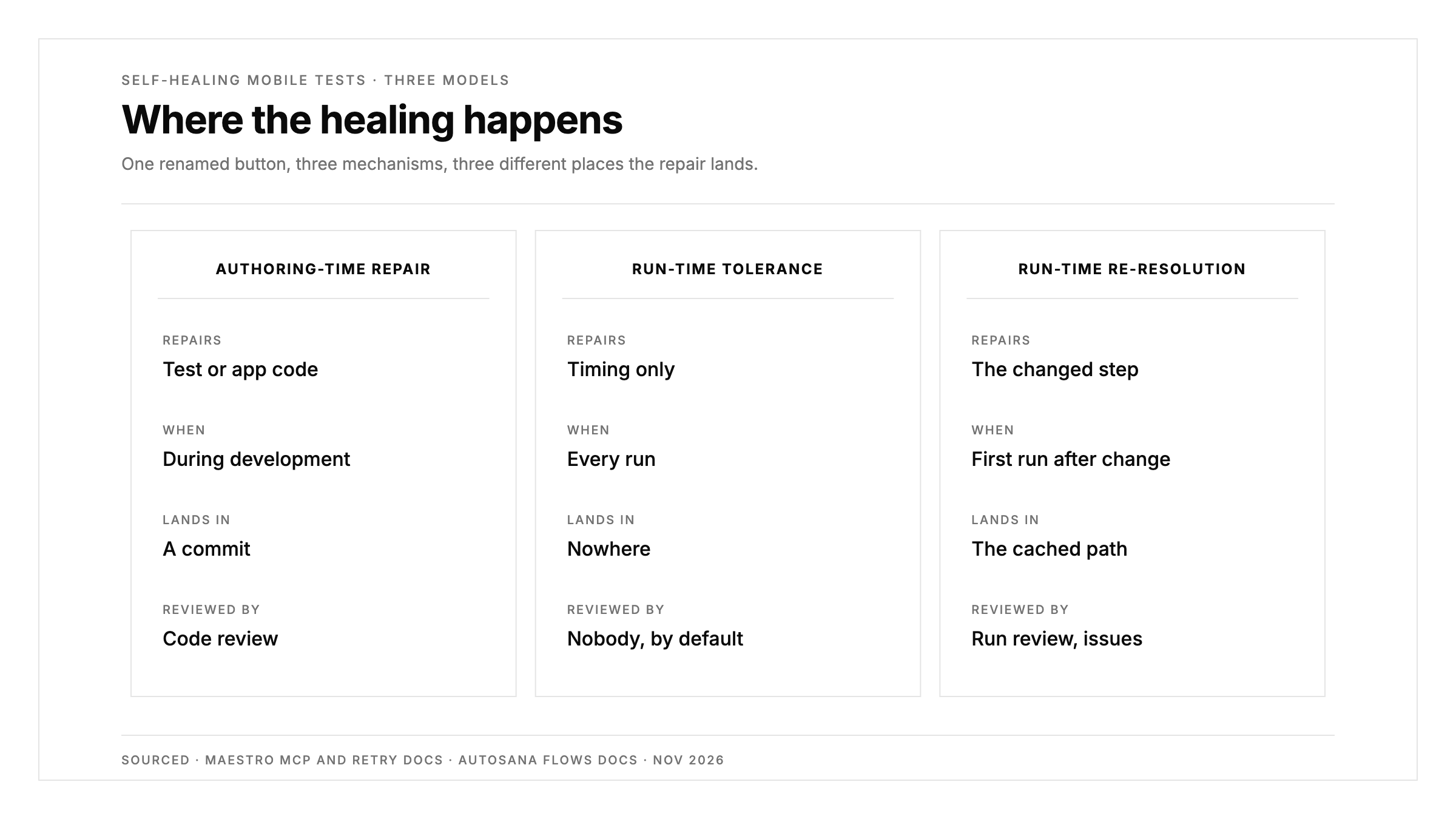
The mitigation is to be explicit about which UI details are the contract. Autosana's guidance on writing flow instructions treats quoted UI labels as exact ground truth: Tap the "Sign In" button couples the test to that label, and renaming it fails the test. That is the right lever. Leave labels unquoted in journey tests, where the behavior matters and the wording doesn't. Quote them in the tests whose subject is the UI: form validation, error copy, legal text, a pricing screen.
Two more guardrails apply to any tool:
Separate "the test is wrong" from "the app is wrong". Autosana reports instruction issues, steps the agent found ambiguous, contradictory or impossible on the current build, separately from app bugs. A spike in instruction issues after a release means your tests drifted; a spike in critical app issues means your app did.
Watch retries. Autosana retries a failed run once by default and skips retries for flows that fail consistently. A flow that passes only on retry should be investigated as flakiness in the app, exactly as Maestro's docs advise for retry blocks.
Choosing where your mobile tests heal
None of these is free, so the choice comes down to which cost you would rather carry.
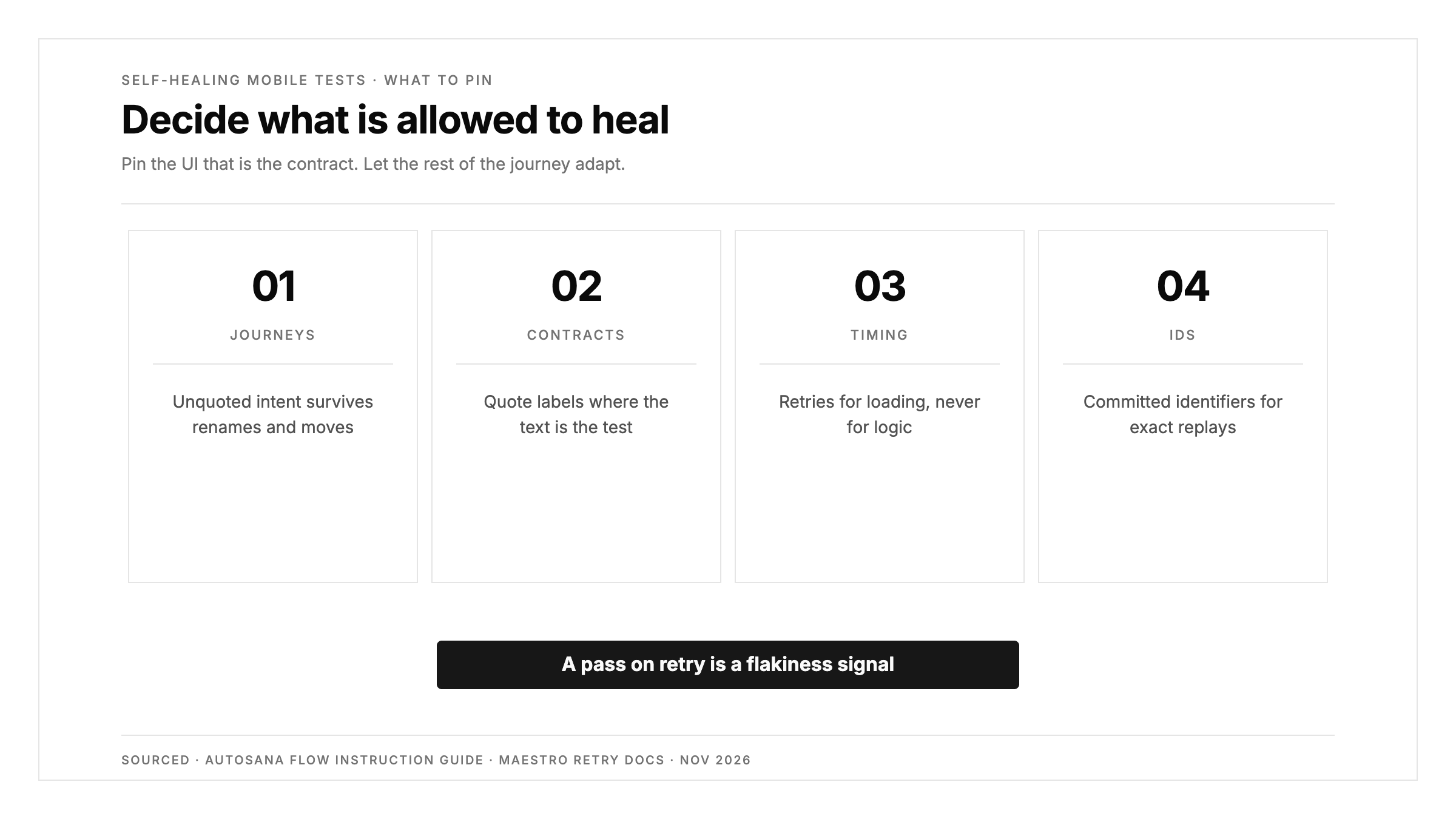
| Model | Where the repair happens | Who reviews it | Main cost | Main risk |
|---|---|---|---|---|
| Authoring-time repair (agent plus YAML) | In a commit, during development | Code review | Agent sessions, review time | Repairs missed in files nobody re-ran |
| Run-time tolerance (waits, retries) | Nowhere; the same step runs again | Nobody, unless you track retries | Slower failing runs | Real flakiness reported as a pass |
| Run-time re-resolution (agent plus cache) | In the run, scoped to changed steps | Run review and issue reports | Live steps cost more than cached ones | Adapting past a change you meant to pin |
A team with stable UI, strong code review and a culture of keeping selectors in the app code will do well with authoring-time repair. A team shipping UI changes weekly, where a dozen journey tests break on every redesign, usually spends less with run-time re-resolution and a cache, as long as the tests that guard exact UI quote their labels. For the long-run maintenance math, see this breakdown of regression suite maintenance.
Conclusion
"Self-healing" is three mechanisms with one marketing name. Authoring-time repair puts the fix in a commit and depends on an agent being run and a reviewer reading the diff. Run-time tolerance fixes timing and can hide flakiness. Run-time re-resolution survives refactors and needs you to say which UI details are the contract.
When you evaluate a tool, rename one button and watch what happens: where the repair lands, who sees it, and whether the run tells you a step was handled differently.
FAQs
What are self-healing mobile tests?
Tests that keep passing after UI changes because a step is repaired or re-targeted.
Does Maestro have self-healing tests?
Maestro handles timing at run time; agents repair flows through its MCP server during development.
Can retries fix a renamed button?
No. Retries fix timing problems; a missing label stays missing on every attempt.
Should agents add accessibility identifiers to app code?
They make selectors stable, but treat them as app changes and review them that way.
Can self-healing tests hide real bugs?
Yes, if they adapt past a change you meant to pin. Quote labels that are contracts.
How does Autosana handle UI changes in flows?
Changed steps run live with the agent; unchanged steps replay from the cache.
Sources