
Playwright Best Practices: 12 Rules for Reliable Test Suites
Playwright best practices for reliable suites: user-facing locators, web-first assertions, isolation, mocking, fixtures, sharding, flake triage and CI hygiene.
- Read time
- 7 min read
- Published
Playwright best practices are the conventions that keep a Playwright suite fast, stable and cheap to maintain: test what users see, isolate every test, let assertions wait, and give every failure evidence. Most of them come straight from the Playwright team's own guidance.
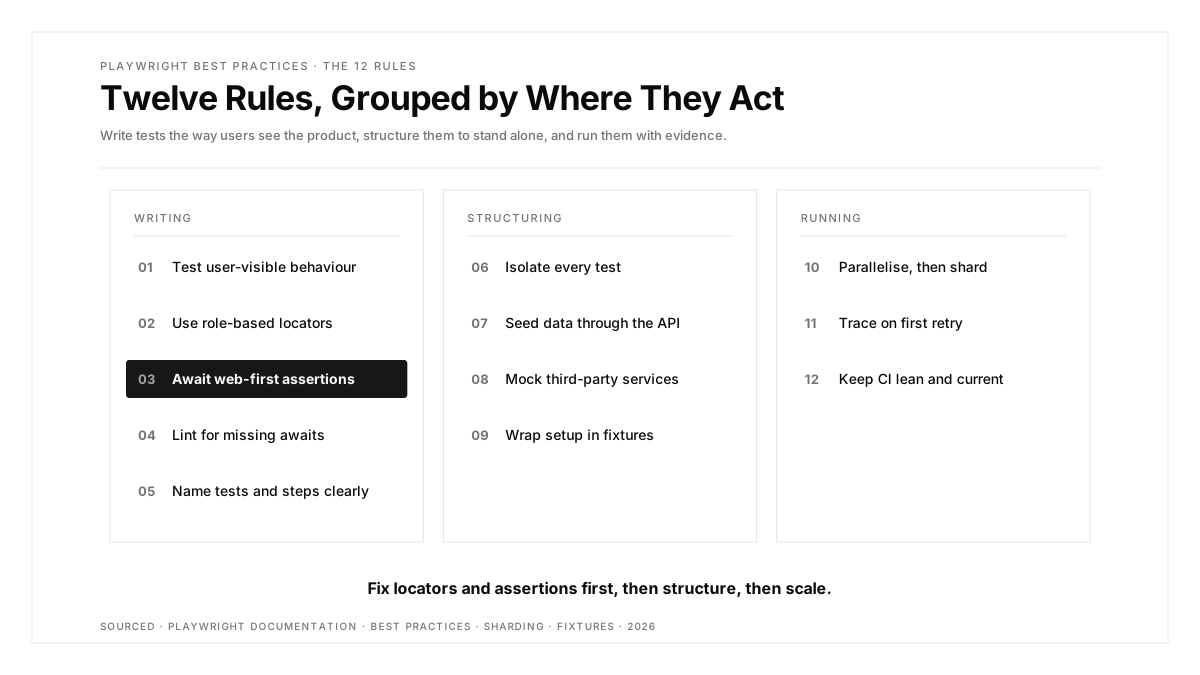
A suite of twenty tests forgives almost any habit. A suite of two thousand punishes every one of them, through flaky runs, slow pipelines and selectors that break on each redesign. The twelve rules below are grouped by where they act: how you write tests, how you structure them, and how you run them.
Key Takeaways
- Playwright recommends user-facing locators such as
getByRoleover CSS classes or XPath tied to DOM structure. - Web-first assertions such as
toBeVisible()retry until the condition holds; manualisVisible()checks return immediately. - The
@typescript-eslint/no-floating-promiseslint rule catches missingawaitcalls before they cause flaky failures. npx playwright test --shard=1/3splits a suite across machines, on top of the default per-file parallelism.- The Playwright docs recommend traces on the first retry in CI rather than on every test, because tracing every run is performance heavy.
Writing Tests
1. Test user-visible behaviour
The asks tests to verify what end users see and do, rather than implementation details such as function names or CSS classes. A test that asserts on a rendered confirmation survives a refactor; a test that asserts on an internal array breaks with it.
2. Use role-based locators
Prefer getByRole, getByLabel and getByText, and narrow results with chaining and filtering:
await page
  .getByRole('listitem')
  .filter({ hasText: 'Blue mug' })
  .getByRole('button', { name: 'Add to cart' })
  .click();
A class selector such as button.btn-primary.icon-cart breaks the day a designer renames a class. If you are curious how far this idea goes, our article on browser testing with zero selectors explores the extreme end.
3. Await web-first assertions
// Waits and retries until the text appears
await expect(page.getByText('Order placed')).toBeVisible();

// Checks once and returns immediately, a common source of flakes
expect(await page.getByText('Order placed').isVisible()).toBe(true);
The first form waits for the condition. The second checks a single moment in time, so it passes or fails depending on how fast the page renders.
4. Lint for missing awaits
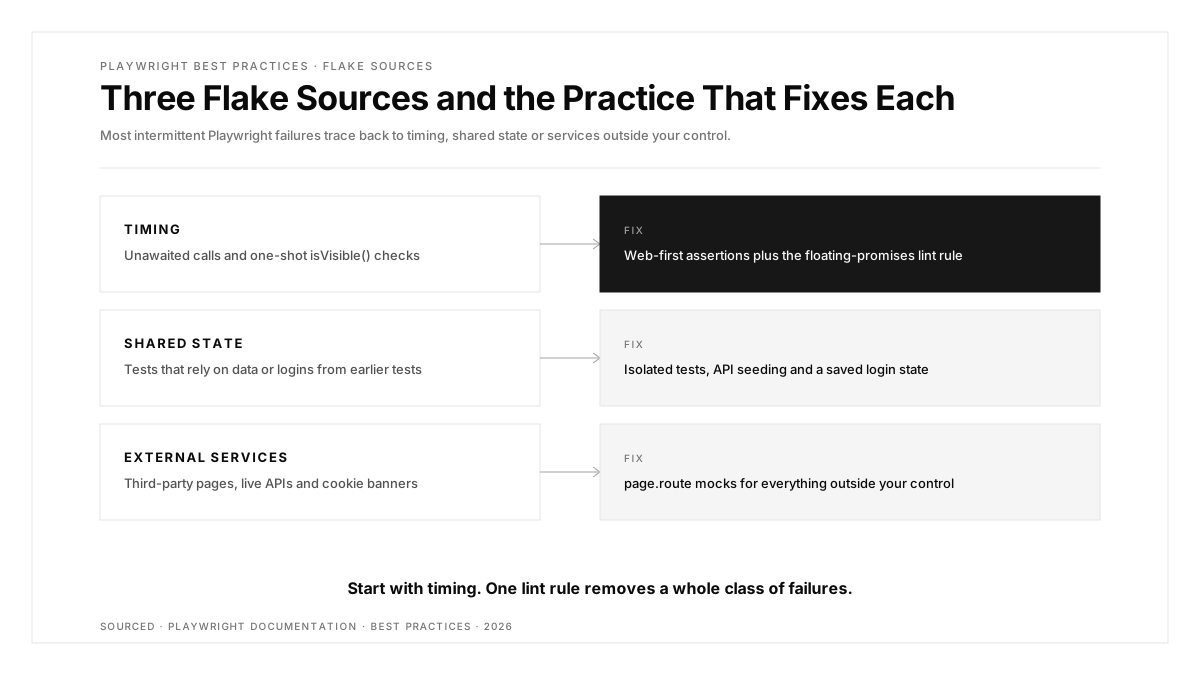
A forgotten await lets the test race ahead of the browser. Playwright recommends TypeScript plus the @typescript-eslint/no-floating-promises ESLint rule, and tsc --noEmit in CI to catch wrong call signatures. This single rule removes a whole class of intermittent failures.
5. Name tests and steps for the person debugging
Write titles that describe the expected behaviour, such as guest checkout shows shipping options for EU addresses, and wrap long flows in test.step() so the report shows exactly which step failed:
test('guest checkout shows EU shipping options', async ({ page }) => {
  await test.step('add item to cart', async () => {
    await page.goto('/products/blue-mug');
    await page.getByRole('button', { name: 'Add to cart' }).click();
  });
  await test.step('enter an EU address', async () => {
    await page.goto('/checkout');
    await page.getByLabel('Country').selectOption('Germany');
  });
  await expect(page.getByText('DHL Express')).toBeVisible();
});
Structuring Tests
6. Isolate every test
Each test should run with its own storage, cookies and data, so any test can run alone, in any order and in parallel. Use beforeEach hooks for shared setup, and reuse a saved login state from a setup project instead of signing in through the UI every time.
7. Seed data through the API
Create the user, cart or order a test needs with a direct request, then start the UI test from that state. One request replaces a dozen clicks and removes the dependency on earlier tests.
8. Mock what sits outside your control
Playwright advises testing only what you control and using the network API for third-party dependencies:
await page.route('**/api/payments/provider', route =>
  route.fulfill({ status: 200, json: { status: 'approved' } }),
);
Third-party pages bring cookie banners, rate limits and content changes that fail tests for reasons outside your product.
9. Wrap pages and setup in fixtures
Move page objects and shared setup into custom fixtures, so a test declares what it needs in its signature and Playwright builds it. Playwright's own docs describe fixtures as isolated between tests, giving each test exactly what it needs:
// fixtures.ts
import { test as base } from '@playwright/test';
import { CartPage } from './pages/cart-page';

export const test = base.extend<{ cartPage: CartPage }>({
  cartPage: async ({ page }, use) => {
    await use(new CartPage(page));
  },
});
Tests then import this test and receive a ready cartPage, which keeps setup out of the test body. Our guide to regression suite maintenance shows why that structure decides long-term cost.
Running Tests
10. Parallelise, then shard
Playwright runs files in parallel by default. Enable test.describe.configure({ mode: 'parallel' }) for large files of self-contained tests, and split the suite across CI machines with sharding:
npx playwright test --shard=1/3
npx playwright test --shard=2/3
npx playwright test --shard=3/3
The Playwright sharding guide covers merging the reports from each shard into one.
11. Trace on first retry, and triage every retry
Keep trace: 'on-first-retry' in CI. Playwright advises against tracing every test because it is performance heavy, while traces on retry capture exactly the runs you need. Then treat a pass-on-retry as a bug report rather than a success. A simple triage policy works well:
| Signal | Action | Owner |
|---|---|---|
| Passes on retry once | Log it with the trace link | Test author |
| Passes on retry twice in a week | Quarantine to a separate job | Team lead |
| Quarantined for 10 days | Fix, rewrite or delete | Feature team |
Quarantine keeps the main pipeline trustworthy while the fix happens. Our guide to fixing flaky tests in GitHub Actions lists the usual causes.
12. Keep CI lean and current
- Install only the browsers you test, for example
npx playwright install chromium --with-deps. - Run CI on Linux, which the Playwright docs call the cheaper option.
- Keep Playwright up to date so tests run on the latest browser versions before your users get them.
- Store test credentials as CI secrets and keep saved login state files out of version control.
Publishing results where reviewers already look closes the loop, as our guide to E2E results as PR comments explains.
A note on visual checks
If you use toHaveScreenshot(), generate baselines in the same environment CI uses. Playwright's visual comparison docs warn that rendering varies with operating system, browser version, hardware and settings, so a baseline captured on a laptop drifts on a Linux runner. Run screenshot tests inside a fixed container image, scope them to stable components such as headers and pricing tables, and mask regions that change every run, such as timestamps or live counts. Review and commit updated baselines in the same pull request as the UI change, so reviewers see the visual diff next to the code.
Quick Reference
| Practice | Command or pattern |
|---|---|
| Role-based locator | page.getByRole('button', { name: 'Save' }) |
| Web-first assertion | await expect(locator).toBeVisible() |
| Catch missing awaits | @typescript-eslint/no-floating-promises |
| Parallel within a file | test.describe.configure({ mode: 'parallel' }) |
| Shard across machines | npx playwright test --shard=1/3 |
| Trace on retry | use: { trace: 'on-first-retry' } |
| Soft assertions | await expect.soft(locator).toHaveText('Success') |
| Lean browser install | npx playwright install chromium --with-deps |
Conclusion
Playwright best practices come down to three habits: write tests the way users experience the product, keep every test self-contained, and make every failure explain itself. Role-based locators, awaited web-first assertions, and a lint rule for missing awaits cover the writing. Isolation, API seeding, mocking and fixtures cover the structure. Parallelism, sharding, traces on retry and lean CI cover the running.
Adopt them in that order. Fix locators and assertions first, since they touch every test, then restructure, then scale.
FAQs
What are the most important Playwright best practices?
Use role-based locators, await web-first assertions, isolate every test and record traces on the first retry.
How do I reduce flaky tests in Playwright?
Await web-first assertions, lint for missing awaits, isolate tests and mock third-party dependencies with page.route.
Should I use the Page Object Model with Playwright?
Yes, page objects wrapped in fixtures keep selectors in one place and make tests easier to maintain.
What is sharding in Playwright?
Sharding splits a test suite into parts that run on separate machines, using the --shard flag.
Should Playwright traces be on for every test?
Playwright recommends traces on the first retry in CI, because tracing every test is performance heavy.
Which locator should I use in Playwright?
Start with getByRole, then getByLabel or getByText, and use getByTestId for elements lacking accessible names.