
Native Mobile App Testing in 2026: 10 Tools for E2E Testing
Native mobile app testing explained by what actually breaks: OEM fragmentation, permission dialogs, biometric flows, and OS upgrades. Frameworks, strategies, and real tradeoffs.
Yuvan Sundrani · 20 min read
autosana.ai
Native mobile app testing verifies that apps built with platform SDKs (Swift/Kotlin) work correctly across the device and OS combinations real users actually own. Native apps held 52.10% of the mobile application testing services market in 2025, and the testing surface keeps expanding: Android has over 24,000 device variants across 1,300+ manufacturers, iOS ships a new major version every September that changes permission flows and system dialogs, and both platforms now enforce stricter runtime permission models that break tests written against last year's OS. The challenge is not whether to test on real devices. The challenge is how to keep the test suite stable when the OS, the OEM skin, and the app all change on different schedules.
Key Takeaways
- Native apps interact with device hardware (camera, biometrics, GPS, sensors) and OS services (push notifications, permission dialogs, background execution) that web and hybrid apps never touch. Testing must cover these integration points, not just the UI.
- Android fragmentation is the dominant cost driver: Samsung's One UI, Xiaomi's HyperOS, and stock Pixel Android all render the same app differently. A test that passes on a Pixel 9 can fail on a Galaxy S24 because of OEM dialog changes.
- Most teams use three environments: emulators for fast CI feedback, real devices for release verification, and cloud device labs for coverage they cannot maintain in-house.
- The testing pyramid still applies, but the middle layer (integration tests touching device APIs) is where native apps produce the most escapes. Unit tests miss permission flows. E2E tests are too slow to run on every commit.
- Autosana generates intent-based E2E flows that run natively on real iOS and Android devices, self-heal when OEM skins or OS updates change dialog layouts, and post session replay to every PR.
What makes native mobile app testing different from web or hybrid testing?
| Dimension | Native App | Hybrid App | Web App |
|---|---|---|---|
| Platform | Android or iOS specific | Cross-platform shell | Browser-based |
| Tech stack | Kotlin/Java, Swift/ObjC | Web code inside native shell | HTML, CSS, JS |
| Hardware access | Full (camera, biometrics, sensors, NFC) | Partial (via plugins) | Minimal (browser APIs only) |
| OS permission model | Deep (runtime permissions, background limits, notification channels) | Partial | Browser-managed |
| Offline support | Strong (local DB, sync) | Limited | Weak |
| Test frameworks | Espresso, XCUITest, Appium | Appium, Detox | Selenium, Playwright, Cypress |
| Primary failure mode | Device/OS fragmentation | Plugin compatibility | Browser rendering differences |
Native apps interact directly with the operating system. A hybrid app wraps web content in a native shell and delegates hardware access to plugins. A web app runs entirely in the browser. The testing gap between these three widens at the hardware and OS integration layer: push notification behavior, biometric authentication prompts, background execution limits, and runtime permission dialogs are all native-only concerns that web tests never exercise.
A practitioner on r/QualityAssurance described the shift from web to mobile: "Mobile testing seems to take longer. Every sprint, same feature scope." The debugging surface compounds: app state, OS version, build type, device permission, and cloud device slowness all contribute to longer cycle times.
Where do native mobile app tests actually break?
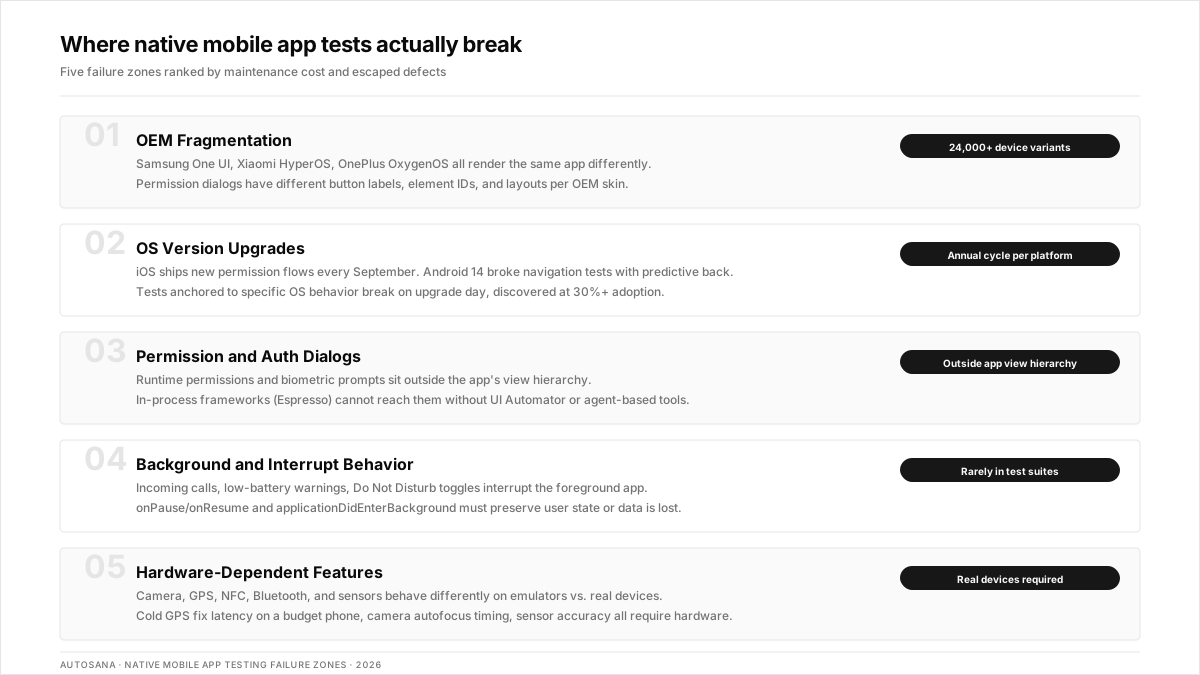
Most guides organize testing by type (functional, performance, regression, and security). That taxonomy is correct but unhelpful. The useful question is, where do tests break in practice? These are the five failure zones that produce the most escaped defects and the most maintenance costs.
1. OEM fragmentation on Android
Samsung's One UI changes how system dialogs render. Xiaomi's HyperOS modifies notification handling. OnePlus's OxygenOS applies aggressive battery optimization that kills background processes. A test written against stock Android (Pixel) breaks on any of these because the permission dialog has different button labels, different element IDs, or a different layout entirely.
A developer on r/androiddev described the scope: testing across OEM variants is "not just screen sizes. It is an entirely different system of behaviors." The fix is not more device coverage. The fix is tests that do not depend on element IDs that change between OEM skins.
2. OS version upgrades
Every September, Apple ships a new iOS version that changes the permission consent flow, notification grouping behavior, or background execution model. Android 14 introduced predictive back gestures that broke navigation tests. Android 15 changed how foreground service types are enforced. Tests anchored to specific OS behavior break on upgrade day, and the team does not discover it until the new OS reaches 30%+ adoption.
3. Permission and authentication dialogs
Runtime permissions (camera, location, contacts, notifications) produce system dialogs that sit outside the app's view hierarchy. Biometric prompts (Face ID, fingerprint) are OS-controlled. These dialogs cannot be tested with in-process frameworks like Espresso unless you use UI Automator alongside it. Most teams skip them in CI and discover failures in manual testing or production.
4. Background and interrupt behavior
Incoming calls, low-battery warnings, Do Not Disturb toggles, and app-to-app handoffs all interrupt the foreground app. Native apps must handle onPause/onResume (Android) and applicationDidEnterBackground/applicationWillEnterForeground (iOS) correctly, or users lose state. A QA lead on r/softwaretesting noted the gap: "AI is a nightmare for QA" partly because test suites never cover the interrupt matrix that real users experience daily.
5. Hardware-dependent features
Camera capture, GPS accuracy, NFC tap, Bluetooth pairing, and sensor data (accelerometer, gyroscope) all behave differently on emulators vs. real devices. Emulators can simulate GPS coordinates, but they cannot reproduce the latency of a cold GPS fix on a budget Android phone. Camera image injection works on some cloud labs but not others. If the feature depends on physical hardware, it must be tested on physical hardware.
Which frameworks handle native mobile app testing?
| Framework | Platform | Language | Best For | Pricing |
|---|---|---|---|---|
| Autosana | iOS + Android + Web | Intent-based (no code) | Cross-platform E2E with self-healing across OEM skins | Contact for pricing |
| Espresso | Android only | Kotlin/Java | Fast in-process Android UI tests | Free (Android SDK) |
| XCUITest | iOS only | Swift/ObjC | Native iOS UI automation aligned with Apple SDK updates | Free (Xcode) |
| Appium | iOS + Android | Any (WebDriver) | Cross-platform with existing Selenium skills | Free, open source |
| Detox | iOS + Android (RN) | JavaScript | React Native apps with gray-box synchronization | Free, open source |
| Maestro | iOS + Android | YAML | Simple flows without coding | Free; paid cloud |
| UI Automator | Android only | Kotlin/Java | System-level Android flows, cross-app scenarios | Free (Android SDK) |
| Flutter Integration Test | iOS + Android (Flutter) | Dart | Flutter apps with custom widget trees | Free (Flutter SDK) |
How to choose: use this decision framework.
- Single-platform Android team with SDETs who write Kotlin: Espresso for unit-level UI tests, UI Automator for system dialog and cross-app flows, and Firebase Test Lab for real-device CI execution.
- Single-platform iOS team: XCUITest for UI automation, Fastlane for build distribution, and Xcode Cloud or BrowserStack for device coverage.
- Cross-platform team shipping iOS, Android, and web: Appium if the team already has WebDriver expertise. Maestro, if the team wants YAML simplicity without coding. Autosana if the team wants AI-generated flows that self-heal across platforms and post session replay to every PR.
- React Native team: Detox for gray-box E2E with internal state synchronization. Layer Autosana for cross-platform regression that does not break when RN version upgrades shift the component tree.
- Flutter team: Flutter Integration Test for widget-level testing in Dart. Layer a cross-platform tool for E2E flows that span native screens outside the Flutter view.
A practitioner on r/ExperiencedDevs described how Airbnb handles test scale: the framework choice matters less than the strategy. "600 Selenium tests where only 10 pass is a strategy problem, not a tooling problem." The same principle applies to native: switching from Espresso to Appium without fixing the flaky test architecture produces the same failure rate on a different framework.
How should you structure your native mobile app testing strategy?
1. Apply the testing pyramid to native
- Unit tests (base): Fast, in-process, run on every commit. Espresso (Android), XCTest (iOS). Cover business logic, data transformations, and view model state. These run in seconds and catch logic errors.
- Integration tests (middle): Test the app's interaction with device APIs, network layers, local databases, and OS services. This is where native apps produce the most escapes because the integration points are platform-specific. Run these on emulators in CI.
- E2E tests (top): Full user journeys across the entire app on real devices. Slow but essential for release validation. Run these nightly or on every PR merge to the release branch. This is where Autosana's intent-based flows eliminate selector maintenance.
2. Build a device and OS matrix.
Do not test on every device. Test on the devices your users actually own. Pull device distribution from your analytics (Firebase Analytics, Mixpanel, or App Store Connect) and build a matrix of the top 10-15 device/OS combinations that cover 80%+ of your user base. Include at least one device from each major OEM (Samsung, Pixel, Xiaomi, and OnePlus for Android; iPhone and iPad for iOS).
3. Use emulators and real devices for different jobs.
Most teams use all three: emulators for the fast feedback loop during development and on every pull request, and real devices for release verification and anything touching hardware, battery, or network. A practitioner on r/QualityAssurance described the split: "purely automation" works for regression, but manual exploratory testing on real devices catches what automation misses.
4. Automate the interrupt matrix.
Build a checklist of interrupt scenarios and automate the critical ones: incoming call during checkout, app backgrounded during payment processing, low-battery warning during form submission, and airplane mode toggled mid-sync. These are the scenarios that produce support tickets and one-star reviews but rarely appear in test suites.
5. Run security checks against OWASP Mobile Top 10.
The OWASP Mobile Top 10 covers insecure data storage, weak authentication, insufficient cryptography, and insecure communication. Native apps store data locally (Keychain on iOS, EncryptedSharedPreferences on Android) and communicate with backend APIs. Automated security scans should run on every release candidate. Manual penetration testing should happen at least quarterly.
Where Autosana fits in the native testing stack
Autosana sits at the E2E layer of the testing pyramid. It does not replace Espresso for unit-level Android UI tests or XCUITest for iOS-specific integration tests. It replaces the manual work of writing, maintaining, and debugging cross-platform E2E flows that break every time the UI changes.
- One flow, three platforms. A single intent-based test definition runs on real Android devices (across Samsung, Pixel, Xiaomi, OnePlus hardware), real iPhones, and web browsers. No separate frameworks per platform.
- Self-healing across OEM skins and OS updates. When Samsung's One UI moves a permission dialog or iOS 19 changes the notification consent flow, the AI agent re-anchors visually instead of failing on a stale element ID.
- Session replay on every PR. Every test execution records a video with step-by-step annotations, posted directly to the pull request via GitHub integration.
- MCP-native. The MCP server connects to coding agents (Cursor, Claude Code, Copilot) so tests update when the code changes.
The Gobi Maps case study shows the pattern: a team shipping iOS + Android + web replaced three separate test suites with one Autosana flow definition and cut regression cycle time from days to hours.
Where native mobile app testing tools do not help
No testing tool replaces these:
- Performance profiling. Instruments (iOS) and Android Profiler measure CPU, memory, GPU rendering, and battery drain at the frame level. E2E tools measure pass/fail, not performance.
- Accessibility audits. Accessibility Scanner (Android) and Xcode Accessibility Inspector check VoiceOver/TalkBack behavior, touch target sizes, and contrast ratios. These require human judgment.
- Game engine internals. Unity, Unreal, and custom OpenGL/Vulkan rendering bypass the standard view hierarchy. E2E tools that rely on accessibility trees or element selectors cannot interact with game UIs.
- Hardware-in-the-loop testing. Bluetooth pairing, NFC tap sequences, and real-sensor data cannot be fully simulated. Physical device access is required.
- Sub-frame performance regression. Detecting a 3ms jank spike on a specific OEM requires profiling instrumentation, not E2E assertions.
How much does native mobile app testing cost?
| Approach | Setup Cost | Monthly Cost | Coverage |
|---|---|---|---|
| In-house device lab (20 devices) | $8,000–15,000 hardware | $500–1,000 maintenance | Limited to owned devices |
| Cloud device lab (BrowserStack, Firebase) | $0 | $225–2,000+/mo | Thousands of device/OS combos |
| Emulators only | $0 | $0 | No real-device failures caught |
| AI-native agent (Autosana) | $0 setup | Contact for pricing | iOS + Android + Web, self-healing |
The hidden cost is maintenance, not infrastructure. A senior engineer on r/devops shared their experience with AI testing tools: the initial setup was fast, but "flaky tests consumed 40% of QA time." The real ROI question is not how much the tool costs. It is how many hours per sprint the team spends rewriting tests that broke because the UI changed, not because the app has a bug.
Bottom line
Native mobile app testing is harder than web testing because the failure surface includes device hardware, OEM skins, OS-controlled dialogs, and background behavior that no emulator fully replicates. The teams that ship stable native apps test at every layer of the pyramid, maintain a real-device matrix based on user analytics, and automate the interrupt scenarios that produce the worst production escapes.
.png)
Frequently asked questions
What is the difference between native app testing and mobile app testing?
Mobile app testing covers native, hybrid, and web apps. Native app testing specifically verifies apps built with platform SDKs (Swift/Kotlin) that interact directly with device hardware and OS services. The distinction matters because native apps access camera, biometrics, and push notifications through platform APIs that hybrid and web apps cannot reach.
How do you test native apps on real devices without a physical lab?
Cloud device labs (Firebase Test Lab, BrowserStack, AWS Device Farm) provide remote access to real phones. Tests execute on actual hardware with real OEM skins and OS versions. Autosana runs E2E flows on real devices across multiple OEMs and posts session replay directly to pull requests.
Should you use emulators or real devices for native app testing?
Both for different purposes. Emulators for fast CI feedback on every commit (logic, layout, navigation). Real devices for release validation (biometrics, camera, GPS, OEM-specific behavior, battery impact). Never ship a release tested only on emulators.
What are the most common causes of flaky native mobile tests?
Element IDs that change between OEM skins. Timing issues from network latency or animation completion. Permission dialogs that appear differently on different OS versions. Background process throttling by OEM battery optimization. Tests that depend on device state (WiFi connected, GPS enabled) without resetting between runs.
How often should you run native app regression tests?
Unit and integration tests on every commit. E2E smoke suite on every PR. Full regression suite nightly and before every release candidate. Performance benchmarks weekly. Security scans on every release candidate and quarterly penetration tests.
Does Autosana replace Espresso or XCUITest?
No. Autosana sits at the E2E layer and complements platform-native frameworks. Teams keep Espresso for fast Android UI tests and XCUITest for iOS integration tests. Autosana handles cross-platform E2E flows that would otherwise require maintaining separate test suites for each platform.
What is the OWASP Mobile Top 10, and why does it matter for native testing?
The OWASP Mobile Top 10 is a standardized list of the most critical security risks in mobile applications, covering insecure data storage, weak authentication, insufficient cryptography, and insecure communication. Native apps store sensitive data locally and communicate with backend APIs, making these risks directly relevant to test coverage.
How do you handle testing across Android OEM skins?
Build a device matrix based on your user analytics. Include at least one device from Samsung (One UI), Xiaomi (HyperOS), OnePlus (OxygenOS), and stock Android (Pixel). Test permission dialogs, notification handling, and background behavior on each, since OEM modifications change these system-level interactions.