
Best Test Case Management Tools in 2026: 10 Compared by Key Features
Ten test case management tools reviewed by what they manage: standalone platforms, Jira-native apps, enterprise ALM, and AI-native generators. Honest pricing and tradeoffs.
Yuvan Sundrani · 17 min read
autosana.ai
Test case management tools organize the artifacts around testing: who writes the test, what steps it contains, which requirements it traces to, and whether it passed or failed on the last run. The meaningful split in 2026 is not "which tool has the most features." It is whether the tool treats test execution as something a human does manually (write steps, run them, mark pass/fail) or something an agent does automatically (generate the test, run it in CI, report the result to the PR). Most comparison guides rank 15-20 tools in a flat list without acknowledging that TestRail and Autosana solve fundamentally different problems. TestRail manages test cases a human wrote. Autosana generates and executes the tests itself. This guide separates the tools by what they actually manage, so you pick from the right category first.
Key Takeaways
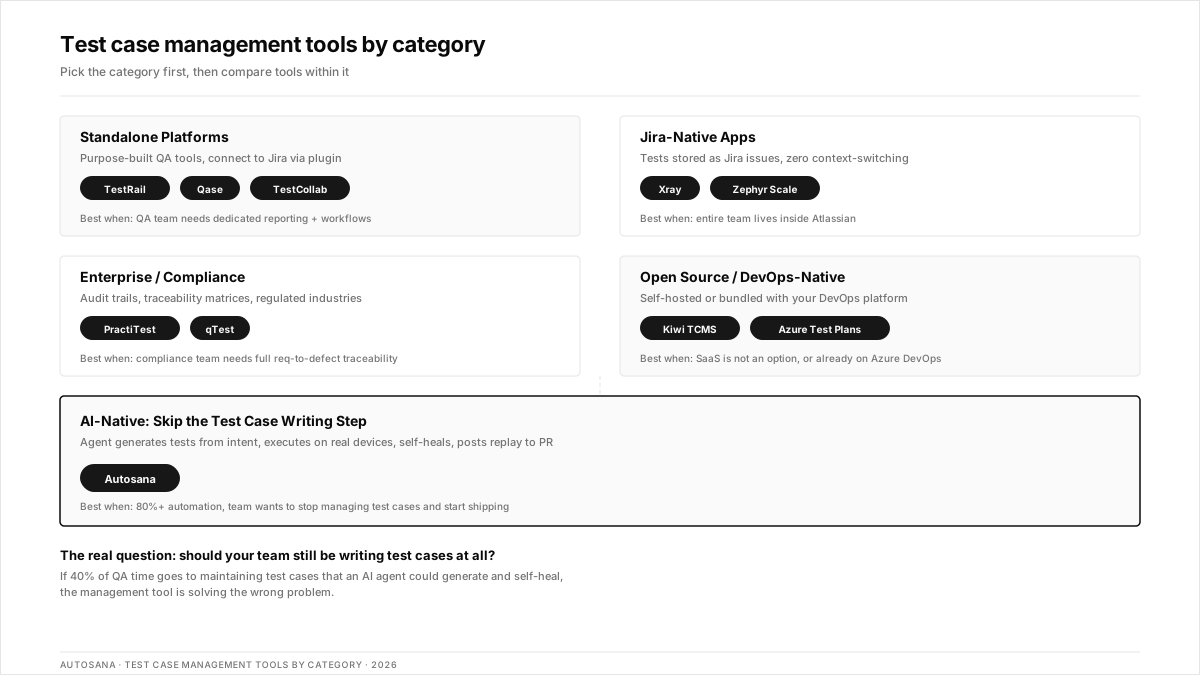
- Test case management tools fall into four categories: standalone platforms (TestRail, Qase), Jira-native apps (Xray, Zephyr Scale), enterprise ALM suites (PractiTest, qTest), and AI-native platforms that generate and execute tests without human-written cases.
- The Jira-native vs. standalone decision matters more than the individual tool. Jira-native apps (Xray, Zephyr Scale) keep tests as Jira issues. Standalone tools (TestRail, Qase) offer deeper QA workflows but require a plugin bridge to Jira.
- Pricing models vary dramatically: per-user/month (Qase at $17.50, Zephyr Scale from $10), flat-rate unlimited users (TestLodge from $34/mo), or enterprise quote (TestRail, PractiTest, qTest).
- Teams with 50%+ automated test coverage increasingly outgrow traditional test case management tools because the tests live in code, not in a web UI. The management layer shifts from "test case repository" to "CI dashboard + session replay."
- Autosana eliminates the test case writing step entirely. An AI agent generates intent-based E2E flows, runs them on real devices across iOS, Android, and web, self-heals when the UI changes, and posts session replay to every PR.
Which test case management tools are teams using in 2026?
| Tool | Category | Best For | Jira | Pricing |
|---|---|---|---|---|
| Autosana | AI-native (generates + executes) | Teams that want tests generated and run automatically, not managed manually | Via CI/CD | Contact for pricing |
| TestRail | Standalone platform | Enterprise QA teams needing milestone tracking, audit trails, and detailed reporting | Plugin | From $36/user/mo |
| Qase | Standalone platform | Small-to-mid teams wanting a modern UI with AI test case generation and a free tier | Plugin | Free; from $17.50/user/mo |
| Xray | Jira-native app | BDD teams wanting Gherkin-based test cases stored as Jira issues | Native | From $10/mo |
| Zephyr Scale | Jira-native app | Agile teams needing a global test repository shared across Jira projects | Native | From $10/mo |
| TestCollab | Standalone platform | Teams wanting AI Copilot-assisted test writing with requirement traceability | Plugin | Free; from $9/user/mo |
| PractiTest | Enterprise platform | Regulated industries (finance, healthcare, government) needing compliance audit trails | Plugin | Contact for pricing |
| Tricentis qTest | Enterprise ALM | Large QA orgs needing heat map reporting and deep Jenkins/CI integration | Plugin | Contact for pricing |
| Kiwi TCMS | Open source | Teams wanting self-hosted, free test management with Playwright/Cypress reporters | Plugin | Free (self-hosted) |
| Azure Test Plans | DevOps-native | Microsoft-stack teams already using Azure DevOps for boards and pipelines | Native (Azure) | Included in Azure DevOps |
Standalone test case management platforms
These are purpose-built tools for organizing test cases, planning test runs, tracking execution, and reporting results. They live outside your issue tracker and connect via plugins.
TestRail: best for enterprise QA reporting
What you get:
- Hierarchical test case organization with sections, sub-sections, and custom fields
- Milestone-based test planning with configurable test runs and configurations
- Detailed reporting with comparison charts, defect summaries, and traceability matrices
- API for importing automated test results from any CI pipeline
- Audit trails and access controls for regulated environments
Why teams pick it: TestRail has been the default enterprise test management tool for over a decade. QA leads pick it because the reporting satisfies stakeholders who want release-readiness dashboards with drill-down to individual test results. A practitioner on r/QualityAssurance described the split between automation and manual: "Purely automation" works for regression, but someone still needs to track the manual exploratory sessions. TestRail handles that tracking layer.
The tradeoff: Per-user pricing adds up quickly for large teams. The UI feels dated compared to newer tools like Qase. TestRail manages test cases but does not generate or execute them. For teams with 80%+ automation, the tool becomes a reporting layer on top of CI results rather than the center of the testing workflow.
Qase: the best modern UI with a free tier
What you get:
- Clean, modern interface with drag-and-drop test case organization
- AI test case generation from requirements or user stories
- Shared steps and parameterized test cases to reduce duplication
- Defect tracking with Jira, GitHub, and GitLab integrations
- Free tier: 3 users, 500 test cases, unlimited test runs
Why teams pick it: Qase is what teams switch to when TestRail feels too heavy. The interface is faster, the free tier is generous enough for small teams, and the AI generation feature saves time on writing repetitive test cases. Rated 4.7/5 across 300+ G2 reviews.
The tradeoff: Deeper reporting and advanced role-based access require paid tiers. The Jira integration is a plugin, not native. Teams already inside the Atlassian ecosystem may prefer Xray or Zephyr Scale for tighter Jira coupling.
TestCollab: the best budget option with AI Copilot
What you get:
- AI Copilot that generates test cases from requirements and suggests edge-case scenarios
- Requirement traceability with bi-directional linking
- Test execution with screenshots, attachments, and defect logging
- Integrations with Jira, GitHub, Slack, and CI/CD pipelines
- Free tier available; paid from $9/user/mo
Why teams pick it: Lowest entry price among tools with AI-assisted test writing. The Copilot feature reduces the time QA engineers spend writing repetitive test steps, especially for forms, CRUD operations, and multi-step workflows.
The tradeoff: Smaller ecosystem and community compared to TestRail and Qase. Enterprise features like SSO and advanced audit trails require higher tiers. Less mature than tools that have been in the market for a decade.
Jira-native test management apps
These install directly into Jira and store test cases as Jira issue types. The advantage: zero context-switching between issues and tests. The tradeoff: your test data lives inside Jira's data model, which can get complex at scale.
Xray: best for BDD teams inside Jira
What you get:
- Test cases stored as native Jira issue types with full JQL search
- Gherkin (Cucumber) support for BDD scenarios written directly in Jira
- Manual and automated test execution with CI/CD result import
- Requirement traceability from Jira stories to test cases to defects
- Test environments and test plans with reusable configurations
Why teams pick it: Xray is the strongest Jira-native option for teams practicing BDD. Writing Gherkin scenarios inside Jira and linking test outcomes back to requirements and defects keeps everything in one system. A QA engineer on r/softwaretesting described the problem with developer-owned testing: tests come from "that same mental model. " BDD with Xray forces the conversation about expected behavior before the code is written.
The tradeoff: Locked to the Jira ecosystem. If you migrate away from Jira, your test data goes with it (or requires export). The Gherkin-to-automation pipeline works well for web but adds complexity for mobile-native tests that require device-specific interactions.
Zephyr Scale: best for cross-project test sharing
What you get:
- Global test case repository shared across multiple Jira projects
- Folders, labels, and custom fields for organizing large test suites
- Test cycles with version and environment tracking
- Parameterized test cases with data-driven execution
- From $10/mo on Atlassian Marketplace
Why teams pick it: Zephyr Scale is the go-to for teams that have multiple Jira projects but want a single test repository. The global library avoids duplicate test cases across projects. A senior engineer on r/ExperiencedDevs described test scale at Airbnb-level organizations: the framework matters less than having a shared, searchable repository that every team can pull from.
The tradeoff: "Scale" is in the name, but very large repositories (10,000+ test cases) can slow down the Jira UI. Zephyr Squad (the older product) and Zephyr Scale (the newer one) cause confusion during evaluation. The automation integration imports results but does not execute tests.
Enterprise and compliance platforms
These serve regulated industries where audit trails, traceability matrices, and role-based access are requirements, not features.
PractiTest: best for regulated industries
What you get:
- Full traceability chain: requirements to test cases to test runs to defects
- Customizable dashboards with real-time status across releases
- Compliance-grade audit trails for ISO 27001, SOC 2, FDA, and HIPAA workflows
- Exploratory testing module with session-based test management
- API for importing automated test results from CI pipelines
Why teams pick it: PractiTest is the tool QA leads in banking, healthcare, and government choose when the compliance team needs to see exactly which requirement was tested, by whom, and when. The traceability matrix is not just a feature. It is the deliverable for auditors.
The tradeoff: Enterprise pricing without public transparency. The depth of configuration can overwhelm teams that just need basic test case tracking. Overkill for startups and mid-market teams without compliance requirements.
Tricentis qTest: best for large DevOps QA orgs
What you get:
- Test case management with heat map reporting for release readiness
- Deep Jenkins, Bamboo, and Azure DevOps CI/CD integration
- Session-based exploratory testing with screen recording
- Centralized test asset management across multiple teams and projects
- Part of the broader Tricentis testing platform (Tosca, NeoLoad)
Why teams pick it: qTest fits large organizations already invested in the Tricentis ecosystem. The heat map reporting gives release managers a visual indicator of test coverage gaps. Integration with Tosca (codeless automation) and NeoLoad (performance testing) creates a unified QA platform.
The tradeoff: Enterprise pricing, long procurement cycles, and implementation timelines. Teams outside the Tricentis ecosystem find limited value in a tool designed to integrate with Tricentis products. A practitioner on r/QualityAssurance described the broader challenge: "mobile testing seems to take longer." Enterprise ALM tools add process overhead that smaller teams cannot absorb.
Open source and DevOps-native options
Kiwi TCMS: best self-hosted open source
What you get:
- Self-hosted test case management with no user limits
- Official reporters for Playwright, Cypress, pytest, and JUnit
- Docker-based deployment with PostgreSQL backend
- Jira integration via plugin
- Actively maintained with regular releases
Why teams pick it: Kiwi TCMS is the most actively maintained open-source test management tool. Teams that cannot use SaaS (air-gapped environments, data sovereignty requirements) or refuse to pay per-user fees run Kiwi on their own infrastructure.
The tradeoff: Self-hosted means self-maintained; upgrades, backups, security patches, and infrastructure are your responsibility. The UI is functional but not modern. No AI-assisted test case generation. Smaller community than commercial tools.
Azure Test Plans: best for Microsoft Stack teams
What you get:
- Test case management integrated into Azure DevOps boards and pipelines
- Manual test execution with screenshots and annotations
- Automated test result tracking from Azure Pipelines
- Exploratory testing browser extension
- Included in Azure DevOps pricing (from $6/user/mo for Basic + Test Plans)
Why teams pick it: Teams already using Azure DevOps for boards, repos, and pipelines get test management without adding a third-party tool. The exploratory testing extension captures screenshots, notes, and screen recordings during manual sessions.
The tradeoff: Locked to the Azure DevOps ecosystem. Limited test case organization compared to TestRail or Qase. The exploratory testing extension is powerful, but the test case management UI is less refined than dedicated tools.
AI-native: when you outgrow test case management
Autosana: best for teams that do not want to write test cases at all
What you get:
- Intent-based E2E flows generated from plain-English descriptions, not manually written test cases
- Runs natively on real iOS devices, Android devices (across Samsung, Pixel, Xiaomi, and OnePlus), and web browsers
- Self-heals when the UI changes, OEM skins shift dialog layouts, or OS updates alter permission flows
- Session replay posted to every PR via GitHub integration
- MCP server connects to coding agents, so tests update when the code changes
Why teams pick it: Traditional test case management tools assume someone writes the test. Autosana removes that step. A QA engineer on r/softwaretesting described the frustration with maintaining test suites: "AI is a nightmare for QA" when the tool generates noise instead of signal. Autosana's agent approach generates tests from intent, executes them on real devices, and only surfaces genuine failures, not flaky selector breaks.
The tradeoff: Not a test case repository. Does not manage manually written test cases, exploratory session notes, or compliance audit trails. Teams that need a traditional test case management tool for regulatory traceability should pair Autosana with PractiTest or TestRail. Does not replace unit tests, API contract tests, or performance profiling.
Where Autosana fits in: Autosana replaces the E2E layer that teams traditionally manage inside TestRail or Qase. Instead of writing test cases in a management tool, then writing automation scripts in a framework, then importing results back, Autosana collapses all three steps into one: describe the flow, and the agent runs it. The Gobi Maps case study shows the pattern.
How to choose the right test case management tool
- Small team, budget-conscious, modern UI: Qase (free tier) or TestCollab ($9/user/mo)
- Jira-first team, agile sprints: Xray (BDD) or Zephyr Scale (global repository)
- Enterprise with compliance requirements: PractiTest or Tricentis qTest
- Microsoft-stack team: Azure Test Plans
- Self-hosted/air-gapped: Kiwi TCMS
- Team with 80%+ automation that wants to stop writing test cases: Autosana
The real question is not which tool manages test cases best. It is whether your team should still be managing test cases at all. A DevOps engineer on r/devops shared the maintenance reality: "flaky tests consumed 40% of QA time." If most of that 40% is spent maintaining test cases that an AI agent could generate and self-heal, the management tool is solving the wrong problem.
Where test case management tools do not help
- Performance testing. No test case management tool measures response time, CPU usage, or memory leaks. Use k6, Gatling, or Locust.
- Security scanning. OWASP ZAP, Burp Suite, and Snyk handle vulnerability detection. Test case management tracks the results, not the scans.
- Production monitoring. Sentry, Datadog, and New Relic catch issues after deployment. Test management is pre-release.
- Code coverage analysis. Istanbul (JS), JaCoCo (Java), and coverage.py (Python) measure which lines the tests exercise. Test management tools do not.
Conclusion
The best test case management tool depends on whether your team writes test cases manually (TestRail, Qase, Xray), needs compliance audit trails (PractiTest, qTest), or wants to skip the test-writing step entirely and let an AI agent handle generation, execution, and self-healing (Autosana). Pick the category first, then compare tools within it.
.png)
Frequently asked questions
What is the difference between test case management and test management?
Test case management handles individual test cases: creating, organizing, and maintaining the steps. Test management covers the broader lifecycle: planning, execution scheduling, defect tracking, reporting, and CI/CD integration. In practice, most tools on this list do both. The distinction is mostly marketing.
Is TestRail still the best test case management tool in 2026?
TestRail remains the strongest option for enterprise QA teams needing detailed reporting, milestone tracking, and audit trails. For small teams, Qase offers a better UX and a free tier. For Jira-native teams, Xray or Zephyr Scale avoid the plugin bridge. For teams with high automation, Autosana eliminates the need for manual test case writing entirely.
Can Jira be used as a test case management tool?
Not natively. Jira is a project tracker. Test case management requires a Jira app like Xray, Zephyr Scale, or AIO Tests. These add test case issue types, test plans, test runs, and execution tracking as native Jira capabilities.
What is the best free test case management tool?
Qase offers a free tier (3 users, 500 test cases). TestCollab has a free plan. Kiwi TCMS is fully free and open source (self-hosted). Tuskr offers 5 users and 1,000 test cases on its free plan. The best choice depends on whether you want SaaS convenience or self-hosted control.
Should you use a test case management tool if most tests are automated?
Teams with 80%+ automation coverage increasingly find that the test "management" happens in the CI pipeline and the version control system, not in a separate tool. The test cases live in code. The results show in the pipeline dashboard. A traditional test case management tool adds value primarily for the manual and exploratory testing that automation does not cover.
How does Autosana compare to TestRail?
They solve different problems. TestRail manages test cases a human wrote: organizing, planning runs, tracking results, and reporting. Autosana generates and executes tests automatically: an AI agent creates intent-based flows, runs them on real devices, self-heals when the UI changes, and posts results to the PR. Teams often pair both: Autosana for automated E2E, TestRail for manual and exploratory test tracking.
What test case management tools work with Jira?
Jira-native: Xray, Zephyr Scale, AIO Tests, RTM (install from Atlassian Marketplace). Plugin-based: TestRail, Qase, PractiTest, qTest, TestCollab (connect via API or plugin). The native apps offer tighter integration but lock your test data into Jira's data model.
How much do test case management tools cost?
Free: Qase (3 users), TestCollab, Kiwi TCMS (self-hosted), Tuskr (5 users). Budget: TestCollab from $9/user/mo, Zephyr Scale from $10/mo, and Qase from $17.50/user/mo. Mid-range: TestRail from $36/user/mo. Enterprise: PractiTest and qTest require custom quotes. Flat-rate: TestLodge from $34/mo for unlimited users.