
Automating iOS Apple Pay Sheet Testing in Cloud CI
The Apple Pay sheet is system UI owned by the operating system, and Apple documents manual testing on physical devices only. Where the automation boundary falls, and what to assert instead.
Yuvan Sundrani · 20 min read
autosana.ai
TL;DR
- The Apple Pay sheet is a payment sheet system UI presented through PassKit, so it sits outside your application's process and beyond what in-process assertions can reach.
- Apple's sandbox documentation covers manual testing on physical devices and makes no mention of simulator testing or of automating the sheet programmatically.
- Sandbox transactions decline pre-fulfillment by design, because the test key fails to match the production key, so a declined result is the expected outcome rather than a defect.
- The productive strategy tests everything up to the sheet and everything after it, treating the sheet itself as a boundary rather than as a target.
- Autosana runs flows on hosted real devices, which matters here because Apple documents physical hardware as the sandbox environment.
Why does the Apple Pay sheet defeat ordinary automation?
Because of where it lives.
Your application requests payment authorization through PassKit, and the operating system presents the sheet. That sheet is not a view in your view hierarchy, not a composable in your layout, and not an element your application owns. It belongs to the system, rendered above your application by a separate process.
Every consequence follows from that ownership.
In-process frameworks cannot reach it. A framework compiling into your application's instrumentation build has visibility into your application, and the sheet is elsewhere by construction.
Biometric confirmation adds a second boundary. Face ID and Touch ID confirmation is a hardware-backed interaction mediated by the secure enclave. No test process authorises a biometric prompt on a user's behalf, which is precisely the property that makes the mechanism worth anything.
The sheet's contents vary by device state. Cards provisioned in Wallet, the region the device is set to, and the account signed in all change what the sheet displays, so the sheet is a function of device configuration rather than of your application build.
XCUITest payment testing runs into all three. The framework can interact with some system interface through the springboard, while Apple Pay specifically sits behind the authorization boundary described above. An engineer on r/devops made the general observation that pipelines break where they cross an ownership boundary nobody controls, and this is that boundary expressed in a payment flow.
What does Apple actually document?
Worth reading carefully, because the documentation defines the supported path and the absences are as informative as the content.
Sandbox tester accounts. Testing requires an App Store Connect sandbox tester account, created under Users and Access, then Sandbox, then Testers. The device must be signed out of a personal Apple Account and signed in with the tester account instead.
Supported devices. The documentation lists iPhone 6 or later, iPad mini 3 or later, iPad Air 2, iPad Pro and Apple Watch.
Test cards. Apple supplies test card details for American Express, Discover, JCB, Mastercard, Visa and China UnionPay, each with an FPAN, expiration date, and CVV or CID. American Express covers the UK and US regions only, and China UnionPay covers mainland China only.
Two stated limitations that shape everything. Test cards fail in production, since real cards are required there. And sandbox transactions decline pre-fulfillment because the test key fails to match the production key.
That second limitation deserves emphasis. A sandbox payment is expected to decline. A suite asserting that a sandbox purchase completes successfully is asserting against behavior Apple documents as impossible, and teams occasionally spend days debugging a decline that was working as designed.
Two absences. The documentation makes no mention of Simulator testing, since every provisioning instruction references physical hardware. And it makes no mention of automating the sheet programmatically. PassKit sandbox testing is documented as a manual activity on a real device.
A contributor on r/opensource noted that tooling built against undocumented behavior carries a maintenance burden proportional to how much the vendor changes, which is the risk any team takes on when automating around a boundary the vendor declines to describe.
Where exactly does the automation boundary fall?
Mapping it precisely converts a frustration into a design decision.
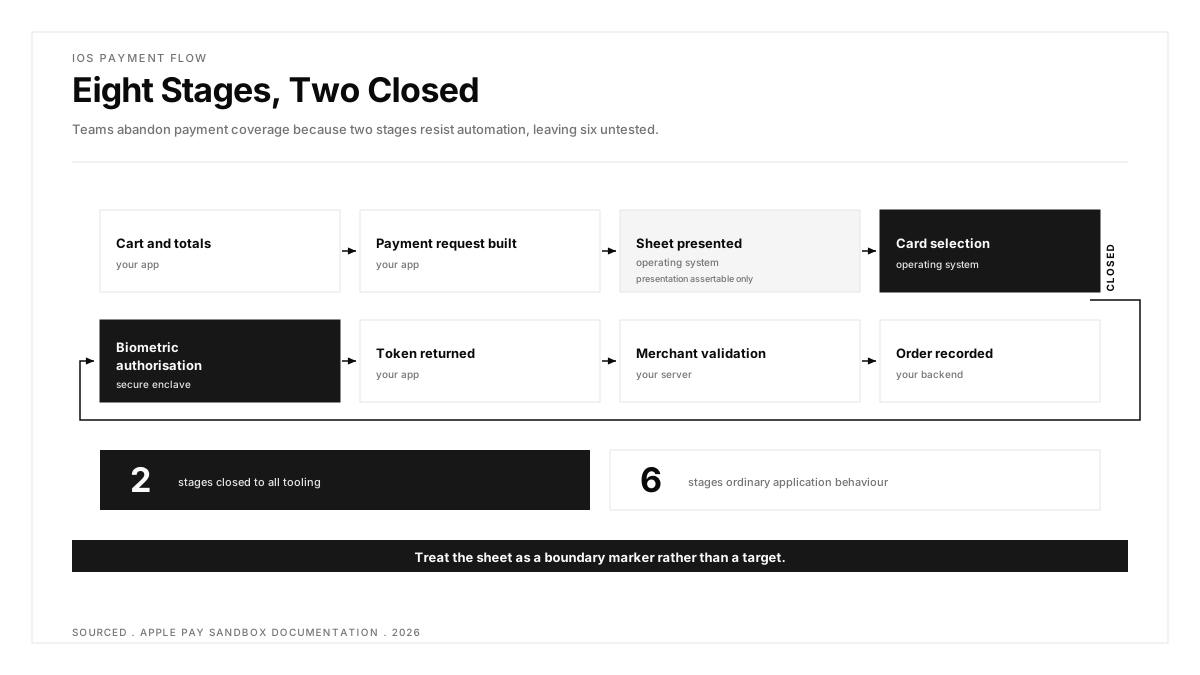
| Stage | Owned By | Automatable | What to Assert |
|---|---|---|---|
| Cart and totals assembled | Your application | Yes | Line items, tax, shipping, final amount |
| Payment request constructed | Your application | Yes | Merchant identifier, supported networks, required fields |
| Sheet presented | Operating system | Presentation only | That the sheet appeared at all |
| Card selection and confirmation | Operating system | No | Nothing |
| Biometric authorisation | Secure enclave | No | Nothing |
| Token returned to the application | Your application | Yes | Token received, shape as expected |
| Merchant validation round trip | Your server | Yes | Request sent, response handled |
| Order recorded and confirmed | Your backend | Yes | Record exists, correct total, confirmation rendered |
Eight stages, and two of them are genuinely closed. The other six are ordinary application behaviors that automation handles normally.
That ratio is the useful finding. Teams frequently abandon iOS payment flow CI coverage entirely because two stages resist automation, leaving six stages untested for no reason.
What should you test instead of the sheet?
Three things, each catching a different class of defect.
Everything up to presentation. The payment request your application constructs is where most real defects live. A wrong merchant identifier, a missing supported network, an incorrect total after a promo code, a required shipping field omitted. These are application bugs, they are fully automatable, and they produce user-visible failures.
That the sheet appears at all. Confirming presentation catches an entire category: a malformed request causes PassKit to refuse presentation, so the user taps the pay button and nothing happens. Asserting that the sheet appeared establishes that the request was at least well formed.
Everything after the token returns. Token handling, the merchant validation round trip, backend recording, confirmation rendering, and failure paths. This half of the flow carries the money-losing defects, including the double-charge and the order recorded against a failed payment.
A practitioner on r/softwaretesting made the point that suites tend to grow where authoring is convenient rather than where risk concentrates, and payment flows demonstrate it clearly, since the hard-to-reach middle attracts attention while the automatable tail goes uncovered.
The decline path deserves equal coverage.
Given that sandbox transactions decline by design, the decline path is the one you can exercise most readily, and it is genuinely worth exercising.
Correct behavior on a decline involves preserving the cart, explaining the outcome, permitting a retry with another method, and recording no order. Each of those is assertable, and each fails in production often enough to matter. A suite treating every non-success as a failure state never verifies that the cart survived.
How do Simulator and real devices differ here?
Apple's documentation describes provisioning against physical devices, which sets the direction.
The Simulator supports exercising the application side of the flow, meaning request construction and token handling against stubbed responses, which covers the first two stages and the last three usefully. What it does not provide is the documented sandbox path, since card provisioning in Wallet, sandbox tester account sign-in and the device region behavior all describe hardware.
The practical split that works:
| Environment | Covers | Use For |
|---|---|---|
| Simulator | Application logic with stubbed payment responses | Fast feedback on every pull request |
| Real device, sandbox | The documented path including the real sheet | Scheduled runs and pre-release |
| Real device, production card | The complete live path | Manual smoke before a release |
Keep the last row. Sandbox and production differ in key material and in decline behavior by definition, so a live-mode manual check before release catches configuration problems that no sandbox run can surface.
An engineer on r/Everything_QA observed that teams add conditional complexity to production faster than to the test matrix, and payment configuration is a clear instance, since merchant identifiers, certificates, and capability entitlements all vary by environment while the test suite usually knows about one.
Which Apple Pay defects actually reach production?
Five recur often enough to deserve named coverage, and four of the five sit in automatable territory.
Merchant identifier and certificate mismatch. The identifier in the entitlement, the certificate registered against it, and the value the application passes all have to agree. Where they diverge, PassKit declines to present the sheet, so the user taps and nothing happens. This is configuration rather than logic, and it is checkable without running a flow at all.
Total recalculated after the sheet opens. A promo applied, a shipping option chosen inside the sheet, or an address change can alter the amount. Where the application fails to update the payment request correctly in response, the authorized amount diverges from the displayed one, which is the most expensive defect in the category.
Missing supported network. A card network omitted from the request means users holding only that card see no usable payment method. The flow appears broken to them and works for everyone testing it, which delays discovery considerably.
Token handling after return. The token arrives and the application must forward it for merchant validation. Timeouts, retries and malformed responses all land here, and this stage is fully automatable.
Completion handler never called. PassKit expects the application to signal completion. Failing to call it leaves the sheet spinning indefinitely, which users experience as a frozen payment and abandon.
Only the second of those five touches the closed stages, and even then the defect lives in the application's response rather than inside the sheet. The remaining four are ordinary application behaviour.
What does the pipeline actually look like?
Shaping it concretely helps more than principles alone.
| Trigger | Environment | Covers | Budget |
|---|---|---|---|
| Pull request | Simulator, stubbed responses | Request construction, token handling, decline path | Under 5 min |
| Merge to main | Simulator plus configuration checks | The above plus merchant identifier and entitlement validation | Under 10 min |
| Nightly | Real device, sandbox | Full documented path including the real sheet presentation | Unbounded |
| Pre-release | Real device, production card | Live smoke, performed manually | Manual |
Two notes on this shape.
Configuration validation belongs on merge rather than on every pull request, since entitlements and certificates change rarely while the check costs real time. Running it on merge catches a change before it reaches a release branch, which is early enough.
The nightly real-device run asserts presentation rather than completion, because the sandbox declines by design. Its purpose is confirming that the request was well formed enough for the operating system to accept it, which is the one assertion the simulator cannot make authoritatively.
A useful habit: record the sandbox tester account state alongside the run. Wallet provisioning, the signed-in account, and the device region all affect what the sheet presents, so a failure that looks like a code regression is frequently a device whose tester account was signed out by an update.
What to do when the sheet fails to present
Four checks, in order, and they resolve most cases within minutes.
Confirm the merchant identifier matches between entitlement, certificate and request. Confirm at least one supported network overlaps with a card provisioned in Wallet. Confirm the device region permits the card type, since American Express and China UnionPay carry regional restrictions. Then confirm the total is a positive value, because a zero or negative amount produces a refusal that reads as a generic failure.
Running those four before opening a debugging session saves more time than any amount of instrumentation, since the cause is usually configuration rather than code.
How should a payment CI strategy be shaped?
Four principles, applied in order.
Stub aggressively on the pull request gate. Payment flows involve external systems and real devices, both of which are slow. The gate should assert that the request is constructed correctly and that token handling behaves, which stubs cover in seconds.
Reserve real-device sandbox runs for a schedule. The provisioning overhead, including tester account sign-in and Wallet state, makes this unsuitable for every commit and appropriate nightly.
Treat the sheet as a boundary marker rather than a target. Assert presentation and move on. Effort spent attempting to automate past it produces fragile tooling against undocumented behaviour.
Separate configuration verification from flow verification. Merchant identifier, certificate validity and entitlement correctness are configuration facts checkable independently of any user flow, and checking them separately produces clearer failures than discovering them through a stalled sheet.
A practitioner on r/servicenow described the enterprise version of this, where controls introduced as advisory and earning promotion survive while mandated ones get routed around, which applies to a payment gate too, since a slow gate on a revenue flow attracts pressure to bypass it.
How does Autosana fit an iOS payment flow?
Autosana is an AI-native E2E testing agent for iOS, Android and web, and its relevance here concerns the environment more than the sheet.
Runs execute on hosted real devices, which matters directly, since Apple documents physical hardware as the sandbox environment and a Simulator run covers a different path. Flows reaching a payment step therefore execute where the documented behaviour actually occurs.
Because flows state intent rather than encoding interface structure, the application-side stages tolerate the interface churn that payment screens experience routinely, as checkout layouts change for conversion reasons more often than most surfaces.
Results arrive through the GitHub integration with session replay attached, which is worth more on this flow than on most, since a payment failure raises the question of what the screen showed at the moment it stalled, and watching answers it. Flows are invocable over MCP.
The boundary stated plainly. Autosana does not automate card selection, biometric confirmation or anything else the operating system owns, because no testing tool does and claiming otherwise would be worth distrusting. The sheet remains a boundary, and the value sits in covering the six stages around it reliably.
Where to start
Open your payment suite and count how many of the eight stages above it actually asserts. Most teams find coverage concentrated before the sheet and almost nothing after the token returns, which is the half where money gets lost.
Then write one decline-path test. Sandbox declines pre-fulfillment by design, so the path is readily reachable, and verifying that the cart survives with a clear explanation and a working retry usually catches something within the first run.
FAQ
Can you automate the Apple Pay sheet?
Card selection and biometric confirmation sit outside your application's process and beyond any testing tool. Apple's sandbox documentation describes manual testing on physical devices and makes no mention of automating the sheet programmatically.
Why do sandbox Apple Pay transactions decline?
By design. Apple documents that sandbox transactions decline pre-fulfillment because the test key fails to match the production key, so a decline is the expected outcome rather than a defect in your integration.
What do you need for Apple Pay sandbox testing?
An App Store Connect sandbox tester account created under Users and Access, then Sandbox, then Testers. The device signs out of the personal Apple Account and signs in with the tester account, then provisions a supplied test card.
Which test cards does Apple provide?
American Express, Discover, JCB, Mastercard, Visa and China UnionPay, each with an FPAN, expiration date and CVV or CID. American Express covers UK and US regions only, and China UnionPay covers mainland China only.
Can you test Apple Pay in the Simulator?
The documented sandbox path references physical devices throughout. A Simulator covers application-side logic against stubbed responses usefully, which suits a pull-request gate, while the documented path needs hardware.
What should an iOS payment suite assert?
Request construction before the sheet, that the sheet appeared at all, then token handling, merchant validation, backend recording and confirmation afterwards. Six of the eight stages are ordinary application behaviour that automation handles normally.
Why does the decline path matter so much?
Because sandbox reaches it readily and production reaches it regularly. Correct behaviour preserves the cart, explains the outcome and permits retry, and suites treating every non-success as failure never verify the cart survived.
Does Autosana automate Apple Pay confirmation?
No tool does, since card selection and biometric authorisation belong to the operating system. Autosana runs on hosted real devices where the documented sandbox path lives, and covers the six automatable stages either side of the sheet.